Assignment of benefit for a bulk bill: Tyro's text to the patient, or signed on paper
Queue a bulk bill so the patient's agreement is captured the right way: by the text Tyro sends them, or on a form they signed at the counter.
Note: This applies once your practice's Tyro connection is switched on. Until then, Send to Medicare… shows what would be sent and files nothing.
Before you start
- Any signed-in member of staff can queue a claim.
- This is about bulk bills only. A DVA claim assigns nothing and is queued without the question (KB-159 — Claim for a DVA patient, and lodge a private patient's Medicare claim for them).
- For Tyro's text, the patient needs a mobile number on their record.
Why a bulk bill needs it
A bulk bill assigns the patient's Medicare benefit to the practice. Medicare needs the patient's agreement to that. There are two ways the agreement reaches Medicare, and you choose between them each time you queue a bulk bill.
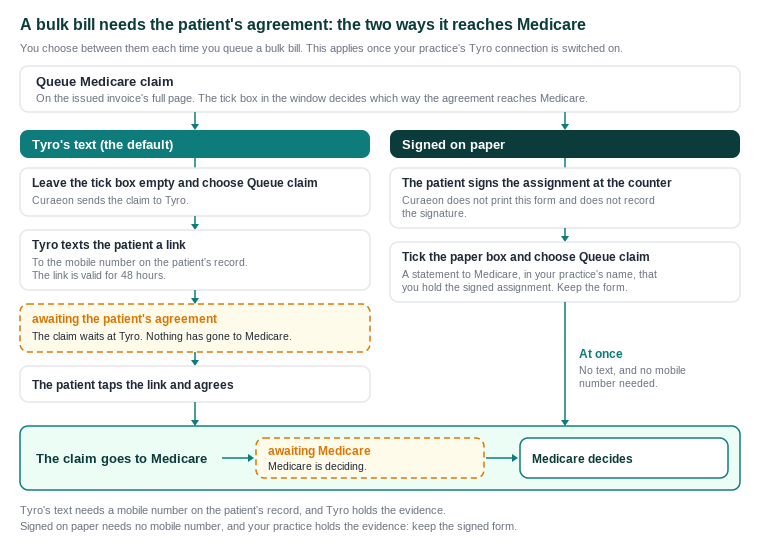
| Tyro's text (the default) | Signed on paper | |
|---|---|---|
| What the patient does | Taps a link in a text from Tyro. The link is valid for 48 hours. | Signs the assignment at the counter. |
| When the claim goes to Medicare | After the patient agrees. | At once. |
| Needs a mobile number | Yes | No |
| Who holds the evidence | Tyro | Your practice |
Queue a bulk bill with Tyro's text
- Open the issued invoice from Billing. The quick view and the full page both work.
- Choose Queue Medicare claim. The window says Tyro will text the patient a link, and that this needs a mobile number on the record.
- Leave the tick box empty.
- Choose Queue claim.
Curaeon sends the claim to Tyro. Tyro texts the mobile number on the patient's record. The claim then waits at Tyro until the patient agrees.
Queue a bulk bill signed on paper
Use this for a patient who cannot receive a text: a patient with no mobile phone, or one who will not use it for this.
- Have the patient sign the assignment of benefit. Curaeon does not print this form and does not record the signature.
- Open the issued invoice, in the quick view or on its full page, and choose Queue Medicare claim.
- Tick The patient signed the assignment of benefit on paper, and the practice holds it.
- Choose Queue claim.
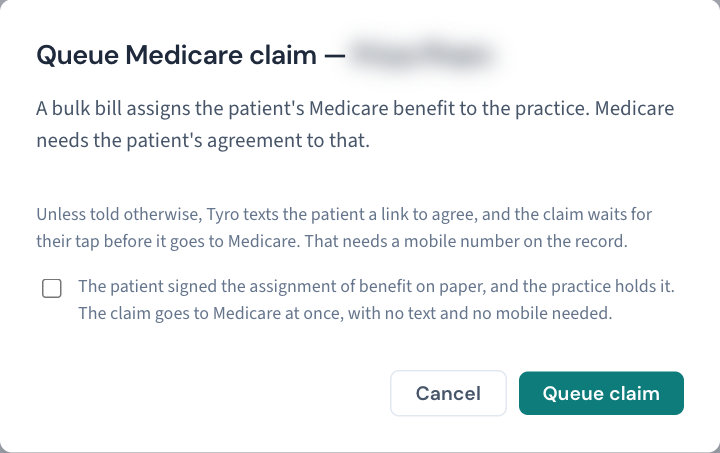
The claim goes to Medicare at once, with no text and no mobile number needed. The invoice shows Queued — ready to send · assignment signed on paper until it is sent.
Important: Ticking the box is a statement to Medicare, in your practice's name, that you hold the signed assignment. Tick it only when the signed form is in your hands, and keep the form. The tick is recorded with the name of the person who queued the claim.
You can file a scan of the signed form on the patient's record (KB-047 — Scan and file paper letters, including the appliance's pre-filled suggestions).
From the New Medicare claim screen
Issue & queue claim issues the invoice and queues its claim in one step. While Claim type is Bulk Bill, at a practice that uses Tyro's text, the same tick box sits above the buttons: The patient signed the assignment of benefit on paper, and the practice holds it. Tick it before you choose Issue & queue claim. Leave it empty for Tyro's text. The box clears when you change the patient.
When the window says an item is under the schedule's benefit
Medicare pays no more than the amount claimed. If an item on a bulk bill is priced under the schedule's benefit, Medicare pays what was claimed, and the rest is never claimed.
Nobody has to type a low fee for this to happen. An item keeps the fee it was given when it was added to the invoice. The schedule can rise after that, when fees change or when your schedule is next loaded.
Curaeon checks each item on a bulk bill against the schedule's benefit as it stands today, and says so in two places:
- On the invoice, while its items can still be changed, the item reads Under the schedule's benefit, which is now $….
- In the Queue Medicare claim window, a notice names each item, the fee it is on the invoice at, the benefit, and how much would go unclaimed.
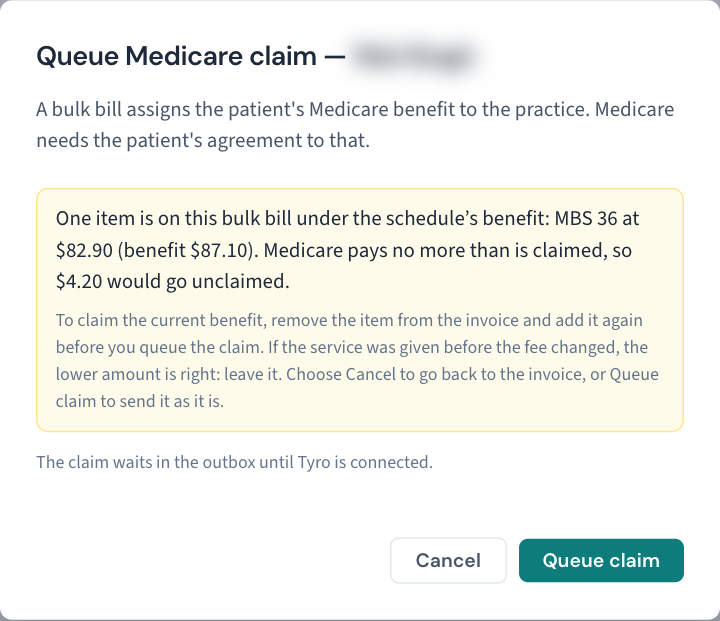
What to do:
- Choose Cancel to go back to the invoice.
- Remove the item, then add it again. It takes today's benefit.
- Choose Queue Medicare claim again. The notice is gone.
Curaeon does not stop the claim. If the service was given before the fee changed, the lower amount is the right one: choose Queue claim and send it as it is.
Once the claim is queued, the items can no longer be changed and the note is not shown. What Medicare then pays is on the claim's line (KB-156 — Follow a Medicare or DVA claim: its status, Check now and the claims list).
Note: This is for bulk bills only. A private fee is your practice's own (KB-118 — Set what your practice charges for private and DVA billing in Settings → Fees), and Curaeon does not hold DVA's fee schedule. Curaeon compares with the schedule loaded on your server. When that schedule itself is very likely out of date, a notice at the top of Billing says so (KB-138 — Read Utilities → Storage and Clinical datasets: how big the database is, and which reference data is loaded).
On New Medicare claim, a fee typed under the benefit is said as the item is added: MBS … is on this bulk bill at $…, and the schedule's benefit is $…. Medicare pays no more than the amount claimed.
Which wait the claim is in
| The invoice says | What it means |
|---|---|
| Sent to Tyro … awaiting the patient's agreement to assign the benefit — Tyro has texted them a link, valid 48 hours | The patient has not agreed yet. Nothing has gone to Medicare. |
| Sent to Medicare … patient agreed to assign the benefit (recorded …) … awaiting Medicare | The patient agreed. Medicare is deciding. |
| Sent to Medicare … awaiting Medicare, with no mention of the patient | A paper-signed claim. It went straight to Medicare. |
Curaeon records the agreement on its own, the next time it asks Tyro about the claim, or sooner if Tyro reports it first. The time shown is when Curaeon learned of it, which can be some minutes after the patient tapped the link. To find out at once, choose Check now. It answers Waiting on the patient…, or The patient has agreed to assign the benefit, and the claim has gone to Medicare…, or Medicare has not decided yet… (KB-156 — Follow a Medicare or DVA claim: its status, Check now and the claims list).
On the claims list, bulk bills waiting for the patient are in the With Medicare group, and the row says they are waiting for the patient's agreement.
Where Curaeon asks for the mobile number
Curaeon prompts for a mobile number before a claim can stumble on it. On the new patient form and on the Contact card of the patient's record, this line appears under Mobile:
Needed to bulk bill: Tyro texts the patient a link to agree to assign the benefit, and a bulk-billed claim stops at the desk without one.
It shows when the record has a whole Medicare number and no mobile. It is a prompt, not a block. You can save without a mobile number and use the paper tick when you bill.
What each message means
| Message | What it means | What to do |
|---|---|---|
| The claim is rejected with This patient has no mobile number, and a bulk bill is agreed from a link Tyro texts to the patient. … | The claim was queued for Tyro's text and the record has no mobile. Nothing was sent. | Add the mobile number and choose Send again… on the claim. Or have the patient sign on paper, choose Send again… and tick the paper box in the window (KB-156 — Follow a Medicare or DVA claim: its status, Check now and the claims list). |
| The window says This practice holds the signed assignment itself; the claim goes to Medicare at once. | Your practice is set up to hold every agreement itself. There is no tick box, and Tyro texts nobody. | Make sure the patient has signed before you queue. |
| The window says The claim waits in the outbox until Tyro is connected. | Your practice's Tyro connection is not switched on. | The claim is queued and nothing is sent. |
| Queue claim is refused with a message that an item is payable only beside another, on the same invoice for the same day, and none is there | The invoice holds a bulk billing incentive, or another item paid only beside a service, with no such service on it. Nothing was queued. | Add the service the item rides on, or remove the item, then queue the claim (KB-177 — Why an item is warned about or refused on an invoice: MBS co-claiming rules and the bulk billing incentive). |
Things to know
- The tick box is asked wherever a bulk bill is queued: on the invoice's full page, in the quick view on the Billing list, and beside Issue & queue claim on the New Medicare claim screen.
- The tick can be changed until the claim is sent. A queued claim has Change… on its row on the invoice. The window opens on the answer the claim holds. Tick or clear the box and choose Save. The change is recorded with your name.
- Where Curaeon files claims itself, that is a short window. A queued claim is sent within moments, and Change… goes with it. If Curaeon is in the middle of sending, it answers Curaeon is sending this claim right now, so it cannot be changed. A practice whose claims are held has as long as they are held.
- Once a claim is sent, the tick is what Medicare was told. It cannot be changed. It is asked again only if the claim is rejected and you send it again: the Send again window shows the box as the claim was queued, and you can tick or clear it there.
- Sending a rejected bulk bill again starts the agreement again. Unless the paper box is ticked, the new claim waits for the patient's agreement, even if they agreed to the one that was rejected.
- The text goes to the mobile on the patient's own record. For a child, that is the number on the child's record.
- Whether every bulk bill is sent as signed at the practice is a set-up choice made with Curaeon, not a setting on any screen.
- The claim's summary says how the patient agreed. Once a bulk bill has been sent, Summary on its row on the invoice prints a page that says whether the benefit was assigned by Tyro's link, with the date that was recorded, or on a form signed at the practice (KB-169 — Print the form for a patient, or a summary, for a Medicare or DVA claim).
If that didn't work
If a claim has said it is waiting for the patient for more than 48 hours, choose Check now. If Tyro still answers Waiting on the patient, the link has run out. Curaeon does not show what Tyro does with the claim after that, and has no button to send the text again while the claim is still waiting. Raise a ticket with the invoice number. If the claim later shows as rejected, Send again… queues it afresh (KB-156 — Follow a Medicare or DVA claim: its status, Check now and the claims list).
Still stuck? Raise a ticket at support.curaeon.com.au or call 1300 XXX XXX. If your clinic can't see patients right now, call and choose option 1. Support is staffed Monday to Friday, 8:00–18:00 Sydney time; outside those hours a call or text to the same number is answered on a best-effort basis.
Related articles
- KB-156 — Follow a Medicare or DVA claim: its status, Check now and the claims list — Follow a Medicare or DVA claim: its status, Check now and the claims list
- KB-157 — Verify a patient's Medicare card with Medicare — Verify a patient's Medicare card with Medicare
- KB-169 — Print the form for a patient, or a summary, for a Medicare or DVA claim — Print the form for a patient, or a summary, for a Medicare or DVA claim
- KB-052 — Raise, correct and claim an invoice, including when "Send to Medicare…" is blocked — Raise, correct and claim an invoice, including when "Send to Medicare…" is blocked
- KB-142 — Register a new patient — Register a new patient
- KB-047 — Scan and file paper letters, including the appliance's pre-filled suggestions — Scan and file paper letters, including the appliance's pre-filled suggestions
- KB-177 — Why an item is warned about or refused on an invoice: MBS co-claiming rules and the bulk billing incentive — Why an item is warned about or refused on an invoice: MBS co-claiming rules and the bulk billing incentive