Claim for a DVA patient, and lodge a private patient's Medicare claim for them
Bill a veteran's visit to the Department of Veterans' Affairs, know how a DVA claim differs from a bulk bill on screen, and lodge a Medicare claim for a private patient who has paid, including a child's claim made by a parent.
Note: This applies once your practice's Tyro connection is switched on. Until then, Send to DVA… on a queued DVA claim shows what would be sent and files nothing.
Before you start
- Any signed-in member of staff can raise the invoice and queue the claim.
- The patient's record needs their DVA number.
- The doctor's Medicare provider number must be on their account and registered with Tyro (KB-162 — Register each provider with Tyro before the first claim). Without it, Queue DVA claim and Queue patient claim keep Queue claim greyed out and say why (KB-052 — Raise, correct and claim an invoice, including when "Send to Medicare…" is blocked). Curaeon sends the Medicare provider number on a DVA claim. There is no separate DVA provider number to record.
- DVA lines are priced from DVA's published fee schedule, where it is loaded on your server. See "What a DVA line bills" below.
Record the DVA number
On the patient's record:
- Open the Overview tab and choose the pencil (Edit) on Identifiers & Funding.
- Type the file number in DVA number and choose the DVA card colour: Gold, White or Orange.
- Choose Save. The card shows the number and colour on its DVA row.
On the new patient form, choose DVA Gold Card or DVA White Card under Concession / entitlement and type the file number in Card number (KB-142 — Register a new patient).
Queue a DVA claim
- Raise the invoice with the claim type DVA. On the New Medicare claim screen, choose DVA under Claim type.
- Issue the invoice.
- On the issued invoice, choose Queue DVA claim. The quick view and the full page both work.
- Under Where was the service given?, choose the place. See the next section.
- If the doctor travelled to the veteran and travel is claimed, type the distance in Kilometres travelled, if travel is claimed. See "Claim travel to a visit" below.
- For a White Card holder, type the condition in Accepted disability treated. See "Say which accepted disability was treated" below.
- For a service claimed against a referral, open Referral and say what it is. A general practitioner's attendance has none: leave it closed. See "A referral on the claim" in KB-052 — Raise, correct and claim an invoice, including when "Send to Medicare…" is blocked. DVA takes two answers Medicare does not: Allied health as what the referral is for, and Remote area as a reason there is none. An allied health provider's DVA claim is made with the MBS item: in Tyro Health's test system DVA took item 10960 from a physiotherapist (KB-052 — Raise, correct and claim an invoice, including when "Send to Medicare…" is blocked).
- Choose Queue claim.
A DVA claim assigns no benefit, so there is no text to the patient and nothing to sign (KB-158 — Assignment of benefit for a bulk bill: Tyro's text to the patient, or signed on paper). On New Medicare claim, the same questions appear above the buttons while Claim type is DVA, and Issue & queue claim does steps 2 to 6 and 8 together. It does not ask about a referral: to say one, use Save draft, issue the invoice and queue the claim from it.
What a DVA line bills
Leave an item's fee alone and Curaeon prices a DVA line at the first of these that exists:
- A DVA fee the practice set for the item, in Settings → Fees with For set to DVA claims only (KB-118 — Set what your practice charges for private and DVA billing in Settings → Fees), while the practice's fee list is in use. Someone chose it, so it wins.
- DVA's published rate for the item: its GP rate, or else its out-of-hospital procedure, pathology or imaging rate. The in-hospital rate never prices a line, because the line is priced before the claim says where the service was given.
- The practice's own fee for the item.
- The MBS schedule fee.
On New Medicare claim, with Claim type on DVA, each line shows its price and says where it came from, for example DVA's rate · MBS fee and the MBS fee (KB-052 — Raise, correct and claim an invoice, including when "Send to Medicare…" is blocked). Settings → Fees says which of DVA's schedules is loaded and from what date (KB-118 — Set what your practice charges for private and DVA billing in Settings → Fees). DVA's schedule is loaded on your server; Curaeon cannot see DVA's website, so if DVA has published a newer one, raise a ticket.
For a service dated before the loaded schedule took effect, Curaeon says, as the item is added, that it is priced from DVA's schedule from that date, after this service, and that DVA pays by the date of the service, so the amount paid may differ from this line. Queue the claim as it is. When DVA pays a different amount, Curaeon brings the invoice to what DVA paid (KB-156 — Follow a Medicare or DVA claim: its status, Check now and the claims list).
Say where the service was given
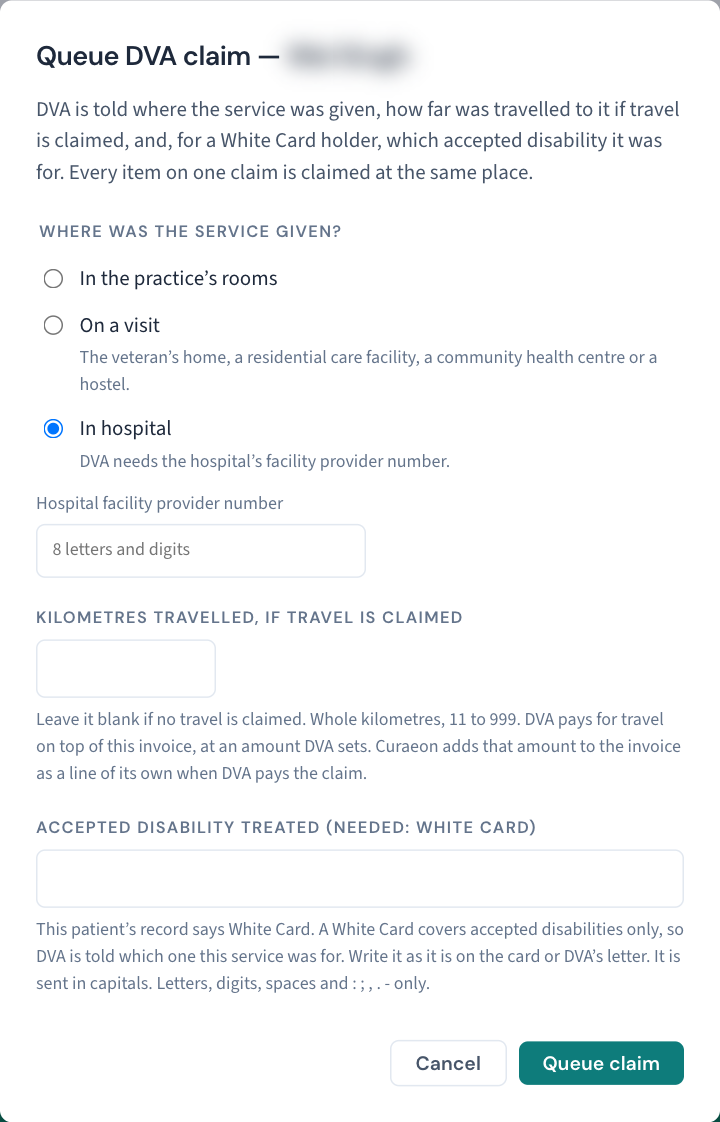
DVA is told where each service was given. Curaeon asks every time you queue a DVA claim, and starts on the practice's rooms.
| Choose | When |
|---|---|
| In the practice's rooms | The veteran came to the practice. |
| On a visit | The doctor went to the veteran: their home, a residential care facility, a community health centre or a hostel. |
| In hospital | The veteran was attended in hospital. Type the hospital's facility provider number, eight letters and digits. Ask the hospital for it. |
Every item on one claim is claimed at the same place. If one visit to the practice and one home visit are on the same invoice, bill them on two invoices.
The place does not choose the item. A home visit is claimed with a home-visit item number and a consultation in the rooms with a rooms item. Curaeon does not suggest items (KB-056 — Why the scribe never writes the Assessment or suggests item numbers), and DVA may reject a claim whose item does not fit the place.
The claim's line says where when it was not the rooms: given on a visit, or given in hospital and the facility number. The answer is recorded with the name of the person who queued the claim.
Important: The place, the kilometres travelled and the accepted disability can be changed until the claim is sent. A queued DVA claim has Change… on its row on the invoice: put it right and choose Save. Where Curaeon files claims itself a queued claim is sent within moments, so act at once. Once the claim is sent, the place is what DVA was told. If it was wrong, wait for DVA's answer, and if the claim is rejected use Void & correct on the invoice and answer the question again when you queue the new claim (KB-156 — Follow a Medicare or DVA claim: its status, Check now and the claims list).
Claim travel to a visit
When the doctor travels to the veteran, DVA may pay for the travel as well as the attendance. Curaeon sends the distance with the claim.
- In the Queue DVA claim window, choose On a visit or In hospital. The box is not shown for In the practice's rooms.
- Type the distance in Kilometres travelled, if travel is claimed. Use whole kilometres, in digits, from 11 to 999.
- Leave the box blank if no travel is claimed.
Curaeon does not work out how far counts or what DVA pays for it. Both are set by DVA's fee schedule. Type the distance that schedule lets you claim.
Where the money shows. DVA pays for travel on top of the invoice, at an amount DVA sets. The invoice does not show it at first.
| When | What you see |
|---|---|
| The claim is queued | The claim's line ends with the distance, for example 45 km travelled. |
| DVA has the claim | The line adds what Tyro Health expects DVA to pay for the travel, on top of this invoice, and says It is added to the invoice when DVA pays the claim. This is an expectation, not money received. |
| The claim reads Paid by DVA | Curaeon adds a line to the invoice, Distance travelled, … km (paid by DVA with this claim), for what DVA paid for the travel. Under it the invoice says Added by Curaeon when DVA paid the claim. The claim's line says the amount is on this invoice as a line of its own. |
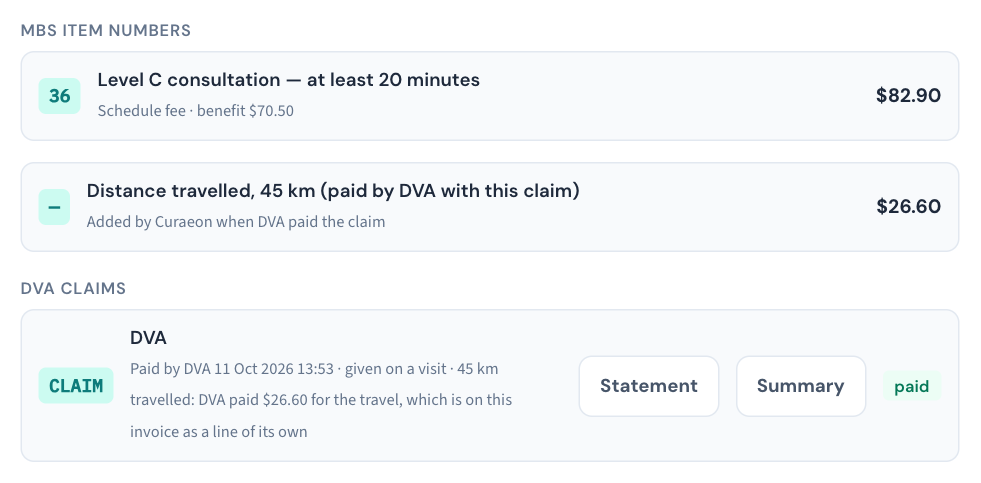
The invoice's total is then what DVA paid, and one Record payment settles it. See "Payment" below.
Nobody types the travel line and nobody can edit or remove it. It is added once, when the claim is paid, from what Tyro Health reports DVA paid.
- If DVA paid nothing for the travel, no line is added. The claim's line says DVA paid $0.00 for the travel.
- If the claim's line says Tyro reported no amount for the travel, no line was added. Check DVA's payment advice, and raise a ticket if DVA did pay for the travel.
- If the claim is rejected, nothing is added. Send again… shows the kilometres as they were said, so you can correct them or clear the box.
Note: A DVA claim that claims travel is filed by Curaeon itself. Where Send to DVA… is offered on that claim, its window does not open Tyro's form. It says nothing is wrong with the claim and that Curaeon files it.
Say which accepted disability was treated
A White Card covers a veteran's accepted disabilities only. So a claim for a White Card holder tells DVA which accepted disability the service was for.
Type it in Accepted disability treated, as it is written on the veteran's card or DVA's letter. Curaeon does not keep a list of a veteran's accepted disabilities. A veteran can have several, and each claim names the one that was treated.
| The patient's record says | The box |
|---|---|
| White | Reads Accepted disability treated (needed: White Card). The claim cannot be queued until you fill it in. |
| Gold or Orange | Leave it blank. |
| No card colour | Fill it in if the veteran holds a White Card. Then record the colour on their record, so Curaeon asks next time. |
The box says which of these applies on the invoice's full page. The quick view, the claims list and New Medicare claim cannot see the card, so the box there explains when it is needed and Curaeon checks the record when you queue the claim.
What you type is sent in capitals, with single spaces. You can type it in any case. It can be up to 100 characters and can use letters, digits, spaces and : ; , . - only.
| Curaeon says | What to do |
|---|---|
| This patient's record says White Card, which covers their accepted disabilities only. Say which accepted disability was treated, as it is written on the card or DVA's letter. | Fill in the box. If the patient does not hold a White Card, correct the card colour on their record first. |
| The accepted disability can use letters, digits, spaces and : ; , . - only, and names the character | Take that character out. Write "left knee", not "knee (left)". |
| The accepted disability must start with a letter or a digit. | Remove the punctuation at the start. |
| The accepted disability can be at most 100 characters | Shorten it. |
| Invoice issued, but the claim was not queued: and one of the sentences above, then Queue it from the invoice. | This is New Medicare claim for a White Card holder with the box left blank. The invoice is there. Open it, choose Queue DVA claim and fill in the box. |
The claim's line shows what was stated: accepted disability: and the condition. Curaeon's summary of the claim prints Accepted disability stated to DVA: and the condition (KB-169 — Print the form for a patient, or a summary, for a Medicare or DVA claim). The form Tyro Health produces for the claim shows it beside Condition treated.
A queued claim's Change… window shows the condition and lets you correct it. If DVA rejects a claim, Send again… asks for the condition again and starts from what was said, so you can correct it before the claim goes back (KB-156 — Follow a Medicare or DVA claim: its status, Check now and the claims list).
Note: A DVA claim that names an accepted disability is filed by Curaeon itself. Where Send to DVA… is offered on that claim, its window does not open Tyro's form. It says nothing is wrong with the claim and that Curaeon files it.
How a DVA claim differs on screen
| Bulk bill | DVA | |
|---|---|---|
| Patient detail the claim needs | Medicare number and IRN | DVA number |
| Card checked with Medicare before filing | Yes (KB-157 — Verify a patient's Medicare card with Medicare) | No |
| Patient's agreement | Tyro's text, or signed on paper | None needed |
| Asked when you queue the claim | How the patient agreed | Where the service was given, the kilometres travelled if travel is claimed, and for a White Card holder the accepted disability treated |
| The invoice's claims block is headed | Medicare claims | DVA claims |
| Claim row reads | bulk bill | DVA |
| The status line names | Medicare | DVA |
| Who decides | Medicare | DVA |
| Medicare details not verified on the claims list | Shown when the card was never confirmed | Never shown |
| The patient's sex | Not sent | Sent from the record: male, female or other. Left out when the record does not say |
| You can ask the funder about the patient | Verify with Medicare (KB-157 — Verify a patient's Medicare card with Medicare) | Verify with DVA, which also says the card DVA holds (KB-157 — Verify a patient's Medicare card with Medicare) |
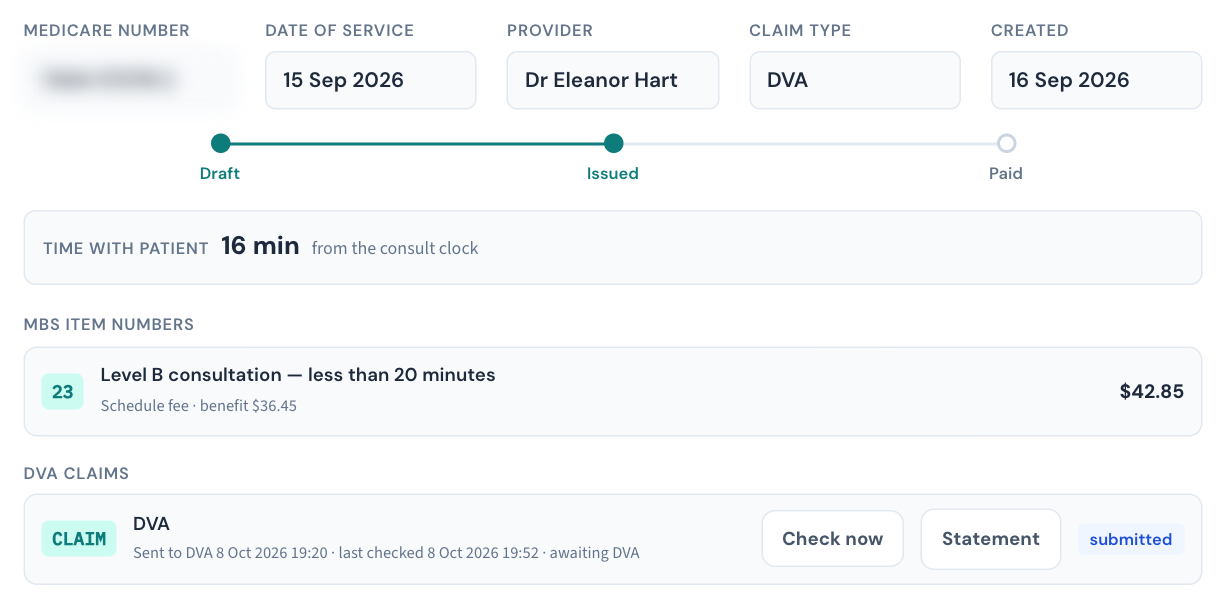
The status line says who is deciding. A DVA claim reads Sent to DVA … awaiting DVA, then Approved by DVA and Paid by DVA. On the claims list it is in the With Medicare group, and its row says awaiting DVA. Check now works the same way and answers about DVA: while DVA is deciding it says DVA has not decided yet. Tyro has the claim and is waiting on DVA, which can take up to two business days. (KB-156 — Follow a Medicare or DVA claim: its status, Check now and the claims list)
DVA sometimes answers within moments of the claim being sent, so a DVA claim can show as rejected almost at once. Otherwise allow up to two business days.
Once a DVA claim has been sent, Statement on its row on the invoice's full page opens the DVA treatment service voucher Tyro Health produces, to print for the veteran. Summary beside it prints Curaeon's DVA Claim Summary for the file. That page names DVA throughout, shows the DVA file number by its last four characters, and says where the service was given when that was not the rooms (KB-169 — Print the form for a patient, or a summary, for a Medicare or DVA claim). For a claim that claimed travel it says Distance travelled stated to DVA and the kilometres, and once DVA has paid, what DVA paid for the travel.
Payment
DVA pays the practice, not the veteran. When the claim reads Paid by DVA and the money has reached your account, choose Record payment on the invoice. The method starts on Direct deposit.
For a claim that claimed travel, wait until the claim reads Paid by DVA before you record the payment. The travel line is on the invoice by then, so the amount to record is the attendance and the travel together. If the attendance was recorded as paid before DVA's payment was read, the invoice goes back to Issued with the travel outstanding. Choose Record payment again for the travel.
Important: Do not use Take payment on the terminal on a DVA or bulk-bill invoice. That button charges the person at the counter.
What each message means
| The claim is rejected with | What to do |
|---|---|
| a DVA claim needs the patient's DVA file number | Add the DVA number to the patient's record. |
| When you queue: A service given in hospital needs the hospital's facility provider number: eight letters and digits. … | You chose In hospital and the number is empty, the wrong length, or has a space or symbol in it. Nothing was queued. Type the number as the hospital gave it, or choose the right place. |
| Additional information required. If Treatment Location Code is set to H (In Hospital) then Facility Id must be supplied | DVA's own sentence for a hospital claim with no facility number. Curaeon stops this before it is sent, so you should not see it on a claim queued now. |
| When you queue: A distance travelled is 11 to 999 whole kilometres … Leave it blank if no travel is claimed. | The number is under 11 or over 999. Nothing was queued. Correct it, or clear the box. |
| When you queue: The distance travelled is whole kilometres, in digits only: 45, not 45.5 and not 45 km. | Something other than digits is in the box. Nothing was queued. |
| A distance travelled is claimed for a visit or a hospital attendance, and this service was given in the practice's rooms. … | A claim that names a distance was changed to the practice's rooms. Clear the kilometres, or choose the right place. |
| Distance Kilometres must not be set when Treatment Location Code is R for Rooms | DVA's own sentence for a distance claimed on a service in the rooms. Curaeon stops this before it is sent, so you should not see it on a claim queued now. |
| provider number is required … | The doctor had no provider number when the claim was queued. Record it (KB-162 — Register each provider with Tyro before the first claim), then use Void & correct on the invoice and queue the claim on the corrected one (KB-156 — Follow a Medicare or DVA claim: its status, Check now and the claims list). |
| Any other reason | It is Tyro's or DVA's own sentence. Read it, fix the cause, then choose Send again… on the claim (KB-156 — Follow a Medicare or DVA claim: its status, Check now and the claims list). |
Patient claims
A patient claim is the other kind of Medicare claim: the patient pays the practice, and Medicare pays the benefit to the patient. Curaeon can lodge that claim for the patient once they have paid.
Note: This applies once your practice's Tyro connection is switched on.
When Queue patient claim is offered
Queue patient claim appears on a Private invoice's full page when all of these are true:
- The patient has paid the whole invoice. A claim tells Medicare the account is paid in full.
- The invoice has at least one MBS item on it.
- No credit note has lowered the invoice.
- The invoice has no claim already.
The button is not shown on a bulk-bill or DVA invoice, while any of the fee is unpaid, or after a refund has taken the invoice back below its total. It is on the invoice's full page, not the quick view.
Lodge the claim
- Raise the invoice as Private, issue it, take the payment and give the patient their receipt (KB-148 — Take a payment, give a receipt, void or correct an invoice).
- On the invoice's full page, choose Queue patient claim.
- Read the window. It says This claim tells Medicare that the account of the total is paid in full, and lists each MBS item being claimed under Claimed:.
- Under Who is claiming?, choose who the benefit is paid to. See the next section.
- Choose Queue claim.
A line with no MBS item, such as a dressing or a form, was paid for and is not claimed. The window says so: One line has no MBS item, so Medicare pays nothing for it and it is not claimed.
Medicare pays the benefit into the bank account it holds for whoever claims. Once the claim is sent, it cannot be taken back from Curaeon.
Curaeon also tells Tyro Health that the patient has paid, so Tyro's own record of the claim in Tyro Health Online shows nothing outstanding from the patient. It does this on every patient claim, and never on a bulk bill or a DVA claim.
Who is claiming
Medicare pays the benefit to the claimant.
| The patient | What the window does |
|---|---|
| Was 15 or over on the day of the service | Starts on The patient. You can choose someone else from the list. |
| Was under 15 on the day of the service | Says This patient was under 15 on the day of the service, so Medicare needs an adult claimant. Nobody is chosen for you. The claim does not go until you choose an adult. |
The people listed are the patients linked to this patient under Relationships & Contacts on the patient's record, each with what they are to the patient, such as parent or guardian. Nothing about the claimant is typed into the claim. Their name and Medicare card are read from their own record when the claim is sent.
A person can be the claimant when they are a patient of your practice, were 18 or over on the day of the service, and have a Medicare card number and reference number on their own record. Anyone linked who cannot claim is still listed, greyed out, with the reason:
| The list says Cannot claim: | What to do |
|---|---|
| Their record has no Medicare card number. | Add the card to that person's record. |
| The Medicare card number on their record is not ten digits. | Correct the card number on their record. |
| Their record has no Medicare reference number, the digit beside their name on the card. | Add the reference number to their record. |
| Their record has no date of birth, and a claimant must be 18 or over. | Add their date of birth to their record. |
| They were under 18 on the day of the service. | Choose an adult. |
To add someone to the list:
- Open the patient's record. On the Overview tab, find Relationships & Contacts.
- Choose + Link patient and pick the parent or guardian. They must be a patient of the practice. If they are not, register them first (KB-142 — Register a new patient).
- Make sure their own record has their Medicare card number and reference number.
- Go back to the invoice and choose Queue patient claim again.
If nobody linked can claim, the window says Nobody linked to this patient can claim yet. and gives these steps.
What Curaeon says
| Curaeon says | What it means | What to do |
|---|---|---|
| Checking who can claim for this patient… | The window is reading the patient's linked people. | Wait a moment. |
| Who can claim for this patient could not be loaded … so the claim cannot be queued from here yet. | The list could not be read. | Choose Try again in the window (KB-170 — When part of a screen says it could not be loaded: Try again, and what Loading… means). |
| This patient was under 15 on the day of the service, so Medicare needs an adult claimant. Choose who is claiming. | You chose Queue claim with nobody chosen. | Choose an adult from the list. |
| A patient claim tells Medicare the account is paid in full. This invoice is … and … has been paid on it | A payment was refunded or changed after the page loaded. | Take the rest of the payment, then queue the claim. |
| A credit note has lowered this invoice, so the patient has not paid the fee a claim would state. | The patient paid less than the fee on the invoice. | Use Void & correct to bill the fee that was charged, then claim on the new invoice (KB-148 — Take a payment, give a receipt, void or correct an invoice). |
| This invoice has no MBS item on it, so there is nothing Medicare pays a benefit for. | Nothing on the invoice can be claimed. | Nothing. There is no claim to make. |
| This invoice already has a claim on it. | A claim was queued from another screen. | Follow that claim on the invoice (KB-156 — Follow a Medicare or DVA claim: its status, Check now and the claims list). |
| A name, then cannot be the claimant. and a reason | The person's record changed after the window opened. | Fix their record, or choose someone else. |
| The claimant must be linked to this patient under Relationships & Contacts on the patient's record. | The link to that person was ended. | Link them again, or choose someone else. |
After the claim is sent
The claim's row reads patient claim. Its line follows the same steps as any claim (KB-156 — Follow a Medicare or DVA claim: its status, Check now and the claims list) until Medicare answers.
When Medicare has assessed it, the line reads Assessed by Medicare and the benefit is paid to the patient. That is the end of it for the practice:
- Nothing more is paid to the practice. Do not record a payment for it.
- The claim leaves the claims list.
- Check now is no longer offered on it.
Statement on the claim's row opens the lodgement advice Tyro Health produces, to print for the patient. Summary prints Curaeon's own page for the file, which names the claimant when it was not the patient (KB-169 — Print the form for a patient, or a summary, for a Medicare or DVA claim).
If Medicare rejects the claim, read the reason, fix what it names and choose Send again…. For a patient claim, Send again… asks Who is claiming? again, starting from who was named, so a wrong claimant can be corrected.
Important: A patient claim cannot be cancelled in Curaeon. If one was lodged by mistake, it can be cancelled in Tyro Health Online on the day it was lodged only. Raise a ticket if you need help with that.
What Curaeon does not do
- It does not lodge a claim for an account that is unpaid or part-paid.
- It does not let you type a claimant's name or card into the claim. The claimant is a linked patient.
- It does not queue a patient claim from New Medicare claim or from the quick view.
If that didn't work
If Queue DVA claim is missing on a DVA invoice, check the invoice is issued and has no claim on it already. The button is offered only on an issued invoice with no claim yet. A rejected DVA claim is sent again with Send again…, not queued a second time.
Still stuck? Raise a ticket at support.curaeon.com.au or call 1300 XXX XXX. If your clinic can't see patients right now, call and choose option 1. Support is staffed Monday to Friday, 8:00–18:00 Sydney time; outside those hours a call or text to the same number is answered on a best-effort basis.
Related articles
- KB-156 — Follow a Medicare or DVA claim: its status, Check now and the claims list — Follow a Medicare or DVA claim: its status, Check now and the claims list
- KB-158 — Assignment of benefit for a bulk bill: Tyro's text to the patient, or signed on paper — Assignment of benefit for a bulk bill: Tyro's text to the patient, or signed on paper
- KB-169 — Print the form for a patient, or a summary, for a Medicare or DVA claim — Print the form for a patient, or a summary, for a Medicare or DVA claim
- KB-162 — Register each provider with Tyro before the first claim — Register each provider with Tyro before the first claim
- KB-118 — Set what your practice charges for private and DVA billing in Settings → Fees — Set what your practice charges for private and DVA billing in Settings → Fees
- KB-148 — Take a payment, give a receipt, void or correct an invoice — Take a payment, give a receipt, void or correct an invoice
- KB-052 — Raise, correct and claim an invoice, including when "Send to Medicare…" is blocked — Raise, correct and claim an invoice, including when "Send to Medicare…" is blocked