Why an item is warned about or refused on an invoice: MBS co-claiming rules and the bulk billing incentive
Know why Curaeon spoke up about an item you added, what it can and cannot see, and what to do next.
Important: Curaeon never suggests or adds an MBS item. Every check in this article runs on an item someone has already chosen. It says what the Medicare Benefits Schedule says about that item, in the schedule's own words, and names the note it comes from. It never names an item to claim instead. A Medicare claim is the billing practitioner's legal assertion, so the billing practitioner chooses (KB-056 — Why the scribe never writes the Assessment or suggests item numbers).
Before you start
- The checks run on every invoice, whether or not your practice's Tyro connection is switched on.
- The bulk billing incentive checks run only once an administrator has recorded the practice's Modified Monash area. See "The bulk billing incentive by your practice's area" below.
- Three checks read the patient's MyMedicare registration, as your practice has recorded it on their record (KB-176 — Record a patient's MyMedicare registration, and what reads it).
Where you see a check
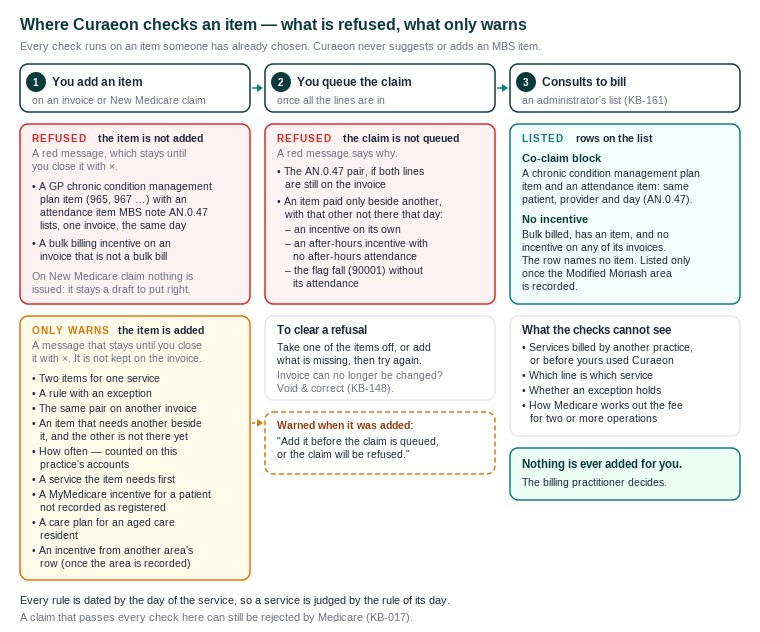
| When | What happens |
|---|---|
| You add an item on an invoice, or save New Medicare claim | A refusal is a red message that stays until you close it with ×. The item is not added. A warning is a message that stays until you close it with ×. The item is added. |
| You queue the claim | A combination the schedule says will not be paid is refused, including the AN.0.47 pair if both lines are still on the invoice. The claim is not queued, and a red message says why. |
| Consults to bill | An administrator sees Co-claim block and No incentive rows (KB-161 — Find consults that were never billed: the Consults to bill list). |
Things to know:
- A warning stays until you close it, but is not kept on the invoice. Close it once you have read it. Reloading the page loses it; to see it again while the invoice's items can still be changed, remove the item and add it again. On New Medicare claim, the warnings are shown as the screen moves on to the invoice.
- On New Medicare claim, a refused item stops the claim. If any item could not be added, nothing is issued and no claim is queued. The screen says "Not issued, and no claim queued: … could not be added, so the invoice is saved as a draft without …. Put it right on the invoice, then issue it." and takes you to the draft. With Save draft, the draft is saved and the message says what it was saved without.
- Every rule is dated by the day of the service, so a service given before a note changed is judged by the rule of its day.
What is refused
Curaeon refuses only what it can see for certain on the invoice itself: two lines for one day that the schedule says cannot be claimed together, with no exception; an item the invoice's type rules out; and, once all the lines are in and the claim is queued, an item whose required partner is missing, or a pair that cannot be claimed together.
| What | When it is refused | The message includes |
|---|---|---|
| A GP chronic condition management plan item (965, 967, or their telehealth and prescribed-practitioner pairs) and one of the attendance items MBS note AN.0.47 lists, on one invoice for the same day | When the second item is added, and again when the claim is queued if both lines are still there | cannot be claimed with item … by the same practitioner on the same day (MBS note AN.0.47) |
| A bulk billing incentive on an invoice that is not a bulk bill | When the incentive is added | is payable only when the service is bulk billed, and this invoice is not a bulk bill |
| An item that is paid only beside another, with that other item not on the invoice for the day: an incentive on its own, an after-hours incentive with no after-hours attendance, the residential aged care flag fall (90001) without its attendance | When the claim is queued | is payable only beside … on the same invoice for the same day, and none is there |
To clear a refusal, take one of the items off, or add what is missing, then try again. If the invoice can no longer be changed, use Void & correct (KB-148 — Take a payment, give a receipt, void or correct an invoice).
What is only warned about
Most of what the schedule says turns on something the invoice does not record: which line belongs to which service, whether an exception the clinician can assert applies, or what another practice has billed. So Curaeon says what the schedule says and lets the line through. The billing practitioner decides.
| The warning is about | What it means | It ends with |
|---|---|---|
| Two items for one service. The schedule says "in conjunction with", "associated with" or "once per visit". For example: an incentive beside an item that already includes one; a practice nurse item beside a health assessment; a consultation beside a procedure whose descriptor includes the consultation (MBS note GN.14.36, such as dressing of burns or sclerotherapy). | Curaeon sees the day, not the service. Two separate services on one day are often legitimate. | The schedule says this of one service; this server sees only the day, so it is said rather than refused — check each item is claimed against its own service. |
| A rule with an exception. For example, a separate consultation beside a health assessment "unless clinically necessary". | Whether the exception holds is the clinician's call. | The note's exception: and the note's words |
| The same pair on another invoice, for the same patient on the same day | The other invoice may be the one that is wrong. | The other invoice's number |
| An item that needs another beside it, and the other is not on the invoice yet | Items are added one at a time. | Add it before the claim is queued, or the claim will be refused. |
| How often. For example, a health assessment more than once in its period, or a care plan review within three months of the last. | The count is what this practice has claimed. Medicare may hold more. | on this practice's accounts. |
| A service the item needs first. A telehealth attendance needs a face-to-face service at this practice in the last 12 months (MBS note AN.1.1). The follow-up items 10987, 93200 and 93202 need an earlier health assessment (MN.12.3). Focussed psychological strategies need a mental health treatment plan. | The earlier service may have been billed by another practice, or before your practice used Curaeon. | One billed by another practice, or before this practice used Curaeon, is not seen here — check the patient's history. |
| A MyMedicare incentive (75880 to 75885) for a patient not recorded as registered in MyMedicare on the day | The registration may simply not be recorded. | If they are registered, record it on their record (MyMedicare). |
| A GP chronic condition management plan (965, 967, or their telehealth and prescribed-practitioner pairs) for a patient not recorded as registered in MyMedicare with your practice on the day (MBS note AN.0.47) | A patient registered in MyMedicare has these services from the practice they are registered with. Curaeon records registration with your practice only, so the patient may be registered nowhere, and can then have the service from their usual medical practitioner, or registered with another practice. The warning quotes both sentences of the note. | If they are registered with this practice, record it on their record (MyMedicare); if they are registered with another, item … is that practice's to provide. |
| A GP chronic condition management plan for an aged care resident | The record says the patient lives in an aged care facility (MBS note AN.0.47). | The facility's name |
Good to know:
- The telehealth warning is not given for a patient recorded as registered in MyMedicare with your practice on the day of the service (KB-176 — Record a patient's MyMedicare registration, and what reads it). Record the registration and the warning stops. The same is true of the MyMedicare incentive and GP chronic condition management plan warnings.
- In a practice that moved to Curaeon in the last year, the telehealth warning will often be wrong for established patients. Their face-to-face visits before the move are not on Curaeon's accounts.
- A warning is not a refusal. Read the quoted note, check the patient's history if the warning asks you to, and leave the item if it is right.
The bulk billing incentive by your practice's area
MBS note MN.1.1 pays a different bulk billing incentive in each Modified Monash area, and the area that counts is where the practice is. Curaeon cannot look the area up, so your practice states it once.
Record the area
You must be an administrator.
- Open More in the menu bar, then Settings, then Practice.
- In Practice identity, choose the area in Modified Monash area, as the Health Workforce Locator gives it: MM 1 — metropolitan, MM 2 — regional centre, MM 3–4 — large or medium rural town, MM 5 — small rural town, MM 6 — remote or MM 7 — very remote.
- Choose Save changes.
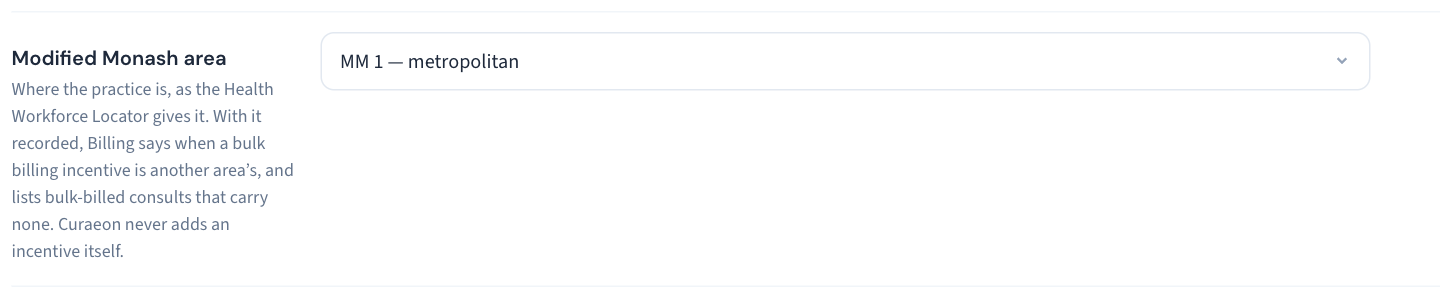
Leave it at Not recorded and neither check below runs.
Changing the area later, even to correct it, starts the No incentive list on Consults to bill again from that day. The message after the save says so and stays until you close it (KB-116 — Set up your practice's details, opening hours and closures in Settings → Practice).
What Curaeon then does
- An incentive from another area's row warns. The warning reads, for example, Item 75873 is the bulk billing incentive for MM3–4 practices in MN.1.1's table, and this practice's area is recorded as MM1, and quotes the note. It never names the incentive to use instead.
- A bulk-billed consult with no incentive is listed on Consults to bill as No incentive (KB-161 — Find consults that were never billed: the Consults to bill list), for consults from the day the area was recorded or last changed. Earlier consults are not listed for it. The row names no item. Whether the service is eligible, and which incentive applies, is the clinician's to decide.
- Where the clinician decides no incentive applies, the row can be set aside with a reason, by someone who may adjust billing, and put back later (KB-161 — Find consults that were never billed: the Consults to bill list). Setting it aside changes nothing on the invoice.
- Nothing is ever added for you.
Curaeon reads MN.1.1's table as follows. Which of an area's items applies also turns on the category of service and on MyMedicare registration, and that is the billing practitioner's call.
| Area | The incentives Curaeon treats as that area's |
|---|---|
| MM 1 | 75870, 75880, 10990, and the after-hours incentives 10992 and 75872 |
| MM 2 | 75871, 75881, 10991 |
| MM 3–4 | 75873, 75882, 75855 |
| MM 5 | 75874, 75883, 75856 |
| MM 6 | 75875, 75884, 75857 |
| MM 7 | 75876, 75885, 75858 |
What the checks cannot see
- Services billed by another practice, or before your practice used Curaeon.
- Which line belongs to which service on a day with two.
- Whether an exception holds: a separate and unrelated condition, clinical necessity, exceptional circumstances.
- How Medicare works out the fee for two or more operations. Curaeon prices each line at its schedule fee, and Medicare assesses the rest.
A claim that passes every check here can still be rejected by Medicare (KB-017 — Medicare claim rejections — common causes and fixes).
If that didn't work
If a refusal names a rule you believe does not apply to this service, do not work around it. Raise a ticket with the invoice number, the item numbers and the note the message names. Do not include the patient's name.
Still stuck? Raise a ticket at support.curaeon.com.au or call 1300 XXX XXX. If your clinic can't see patients right now, call and choose option 1. Support is staffed Monday to Friday, 8:00–18:00 Sydney time; outside those hours a call or text to the same number is answered on a best-effort basis.
Related articles
- KB-052 — Raise, correct and claim an invoice, including when "Send to Medicare…" is blocked — Raise, correct and claim an invoice, including when "Send to Medicare…" is blocked
- KB-161 — Find consults that were never billed: the Consults to bill list — Find consults that were never billed: the Consults to bill list
- KB-056 — Why the scribe never writes the Assessment or suggests item numbers — Why the scribe never writes the Assessment or suggests item numbers
- KB-176 — Record a patient's MyMedicare registration, and what reads it — Record a patient's MyMedicare registration, and what reads it
- KB-017 — Medicare claim rejections — common causes and fixes — Medicare claim rejections — common causes and fixes
- KB-148 — Take a payment, give a receipt, void or correct an invoice — Take a payment, give a receipt, void or correct an invoice
- KB-116 — Set up your practice's details, opening hours and closures in Settings → Practice — Set up your practice's details, opening hours and closures in Settings → Practice