Read Utilities → Storage and Clinical datasets: how big the database is, and which reference data is loaded
Two read-only sections in the System group of Utilities. Storage measures the practice database and the backups. Clinical datasets shows which reference catalogues are loaded, how fresh they are, and the command that updates each one. Nothing on either screen can be changed from the browser.
Before you start
- You need to be a practice administrator. Open More in the menu bar, choose Utilities, then Storage or Clinical datasets.
- Neither screen shows patient information, so a screenshot of either is safe to attach to a support ticket.
- Updating a dataset is done at the practice server, by whoever runs it. This article tells you how to read the screen and what to hand that person.
Storage
Every figure is measured when you open the section. The screen reads Measuring… for a moment first.
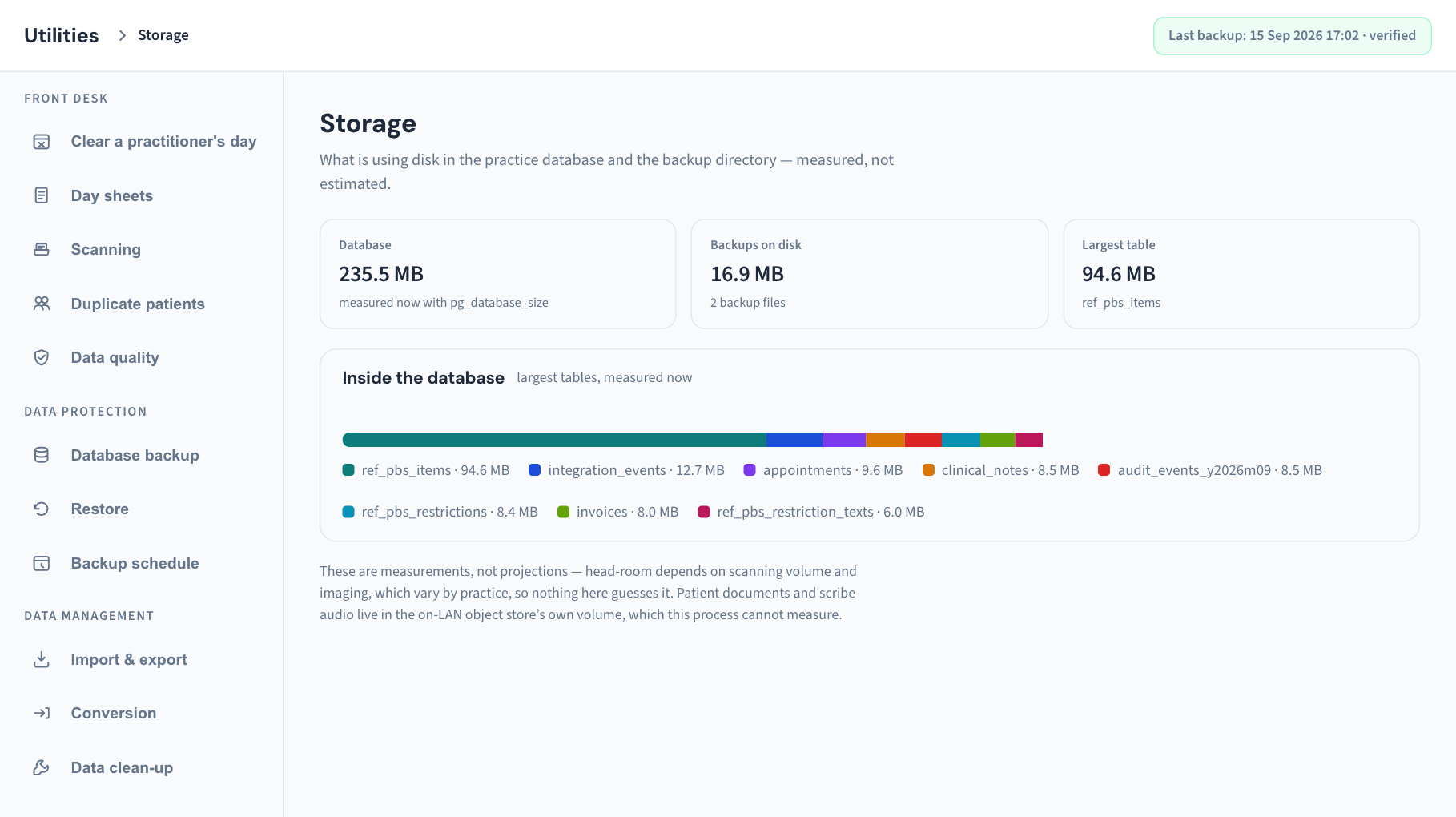
The three tiles
| Tile | What it shows |
|---|---|
| Database | The size of the practice database, "measured now" |
| Backups on disk | The total size of the server's backup folder, and the number of backup files in it |
| Largest table | The size and name of the biggest table in the database |
Inside the database
A coloured bar shows the eight largest tables in proportion to the whole database, with a legend beneath giving each table's name and size. The names are the database's own technical names. You do not need to know what each holds; what matters is whether one of them is growing much faster than the rest between one look and the next.
What Storage does not measure
The note at the bottom says two things plainly:
- These are measurements, not projections. How much room is left depends on how much the practice scans and stores, so the screen does not guess a number of years.
- Patient documents and scribe audio are not included. They live in the document store's own volume on the practice network, which this screen cannot measure. Ask whoever runs your server for that figure.
The screen also does not show the server's free disk space.
Encryption at rest
Below the storage figures, a card headed Encryption at rest reports whether the server's disks under the database, the backups and the server program are encrypted, as the operating system reports it. Any row reading NOT encrypted needs action the same day. See KB-166 — Check that the server's disks are encrypted.
Check storage as a routine
- Open Utilities → Storage once a month.
- Note Database and Backups on disk in your own log.
- Compare with last month. Steady growth is normal.
- If Backups on disk is the large number, look at how long backups are kept in Utilities → Backup schedule (KB-139 — A tour of Utilities → Database backup, Restore and Backup schedule: every control and status).
- If Database has jumped after a big import, Utilities → Data clean-up → Reclaim space may recover some (KB-137 — Tidy the database from Utilities → Data clean-up: reclaim space, rebuild search, and find dormant records and forgotten scans).
Clinical datasets
Curaeon's billing, prescribing and coding screens read from reference catalogues that are loaded onto your server and refreshed from time to time. This section shows "what is actually loaded — row counts are measured, not asserted".
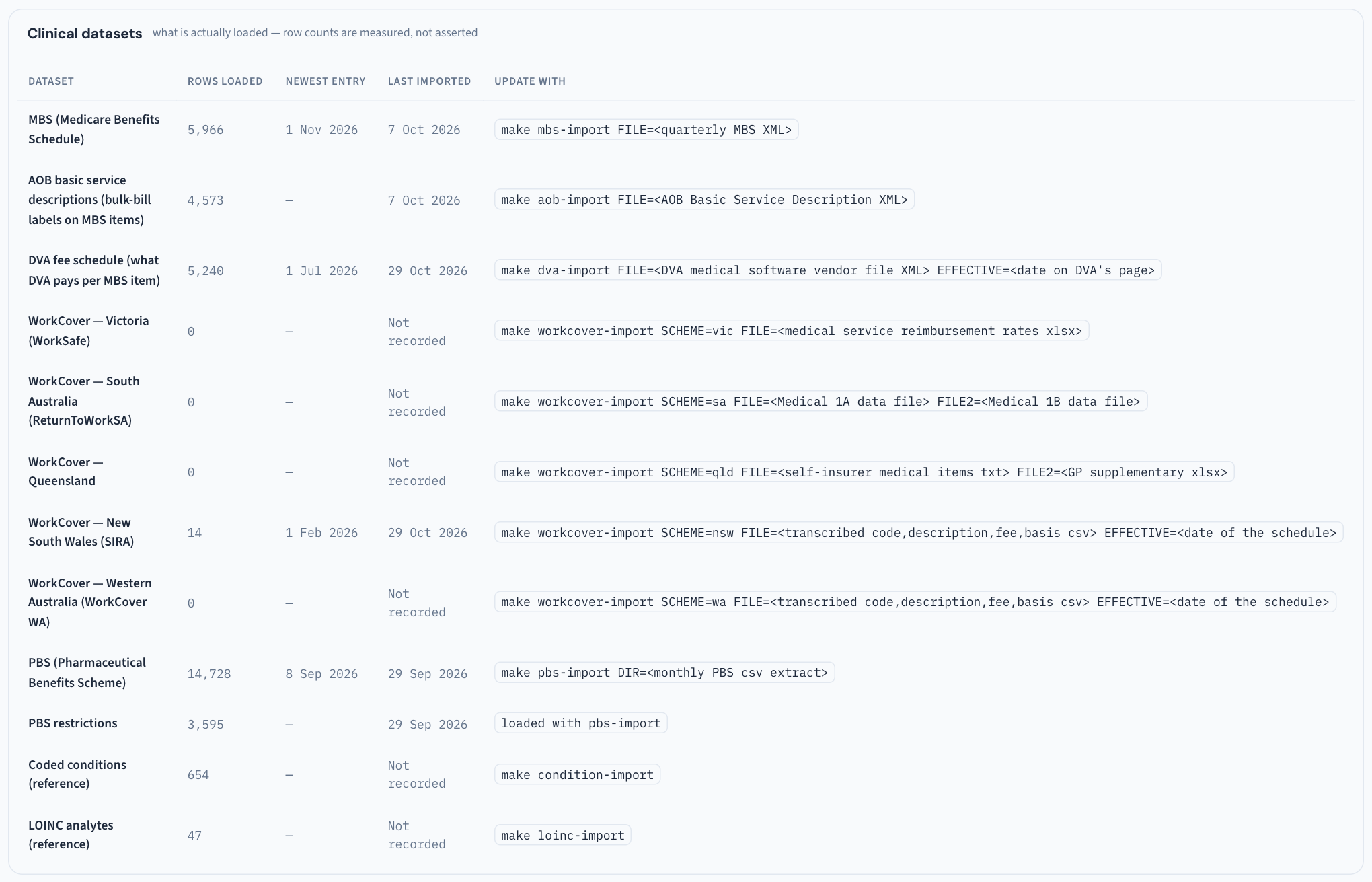
The datasets listed
| Dataset | What reads it | Update with shows |
|---|---|---|
| MBS (Medicare Benefits Schedule) | The item search when billing | make mbs-import FILE=<quarterly MBS XML> |
| AOB basic service descriptions (bulk-bill labels on MBS items) | The short description a bulk-billed item is shown and billed under | make aob-import FILE=<AOB Basic Service Description XML> |
| DVA fee schedule (what DVA pays per MBS item) | The price of a DVA line the practice has set no DVA fee for (KB-159 — Claim for a DVA patient, and lodge a private patient's Medicare claim for them) | make dva-import FILE=<DVA medical software vendor file XML> EFFECTIVE=<date on DVA's page> |
| WorkCover — Victoria (WorkSafe), WorkCover — South Australia (ReturnToWorkSA), WorkCover — Queensland, WorkCover — New South Wales (SIRA), WorkCover — Western Australia (WorkCover WA) | The price of a WorkCover line, and the state's own codes, for a practice in that state (KB-179 — Bill a WorkCover consultation: the state's rates and its own codes). Each state is a row of its own. NSW and WA publish their codes only as PDFs, so theirs are loaded from Curaeon's transcription of the state's document | make workcover-import SCHEME=vic (or sa, qld, nsw, wa) with the state's files |
| PBS (Pharmaceutical Benefits Scheme) | The drug search when prescribing | make pbs-import DIR=<monthly PBS csv extract> |
| PBS restrictions | The restriction detail on PBS items | "loaded with pbs-import". It has no command of its own |
| Coded conditions (reference) | Diagnosis coding | make condition-import |
| LOINC analytes (reference) | Pathology result names | make loinc-import |
How to read a row
| Column | What it tells you |
|---|---|
| Dataset | Which catalogue |
| Rows loaded | How many entries are in the database now. For PBS it counts current listings only. For the AOB descriptions it counts the MBS items that carry one, so it is never more than the MBS row |
| Newest entry | The latest "effective from" date among the entries. Shown for MBS, PBS, DVA and the WorkCover rows; a dash for the others, which carry no such date |
| Last imported | The day the most recent recorded import ran. Not recorded means the data was loaded before Curaeon began keeping that record, or came with the installation |
| Update with | The command that refreshes it |
Two signs that a dataset needs attention:
- Rows loaded is very small. A new installation carries only sample MBS and PBS entries until the real schedules are imported.
- Newest entry or Last imported is older than the publisher's cycle. The screen's own wording gives the cycle: MBS is published quarterly and PBS monthly.
The AOB descriptions have their own date
The bulk-bill descriptions come from a separate file, which MBS Online publishes only with the July release of the schedule. Loading a new MBS schedule does not refresh them, and the MBS row's Last imported says nothing about them. That is why they have a row of their own: its Last imported is the day the descriptions themselves were last loaded, and it reads Not recorded until an AOB import has been recorded.
A row whose date is some months behind the MBS row's is expected between July releases. If Rows loaded is zero or very small on a practice that bulk bills, ask whoever runs your server to load the file.
When Billing says the Medicare schedule is out of date
A bulk bill is priced from the Medicare schedule loaded on your server, and Medicare pays no more than the amount claimed. If the schedule is old, bulk bills are claimed under the current benefit.
Curaeon cannot see Medicare's website, so it cannot tell you a newer schedule exists. It does know when the fees on your server took effect, and Medicare usually changes its fees on 1 July. Once a 1 July has passed and no fee on your server is newer than it, a notice appears at the top of Billing and of New Medicare claim, for everyone who bills:

| The notice says | What it means |
|---|---|
| Most Medicare fees on this server took effect on …, and none is newer. … the schedule here is very likely out of date. | The schedule was published before the most recent 1 July. |
| Most Medicare fees on this server took effect on …, and the newest on …. | The same, for a schedule published for another month: its newest fee is still from before the most recent 1 July. |
| The newest item in the Medicare schedule on this server started on …. | The schedule was loaded before Curaeon kept fee dates, so it is judged by its newest item. Loading any current schedule replaces this with the wording above. |
| The Medicare schedule has not been loaded on this server. It holds … sample items, and their fees are not Medicare's. | A new installation. Load the schedule before claims are raised. |
| How current the Medicare schedule on this server is could not be checked | The check itself failed. Choose Try again (KB-170 — When part of a screen says it could not be loaded: Try again, and what Loading… means). |
The notice goes when a current schedule is loaded. See "Update a dataset" below.
Important: No notice does not prove the schedule is current. Curaeon judges only by 1 July. Schedules are also published for other months, changing fewer items, and Curaeon does not detect those. Check MBS Online when a new schedule is due.
Update a dataset
The commands are run at the server console, not in the browser. In the screen's words: "Dataset updates run at the server console with the commands above — each import is idempotent and never changes patient records".
- Open Utilities → Clinical datasets and find the row.
- Give whoever runs your server the dataset's name and the text in Update with.
- They obtain the current file from its publisher and run the command at the practice server, putting the real file or folder in place of the part in angle brackets.
- Reload Utilities → Clinical datasets. Rows loaded and Last imported should have changed.
What to know about an import:
- It is safe to repeat. Running the same file twice changes nothing the second time.
- It never touches a patient's record. It refreshes the catalogue only.
- It is recorded: the file, its fingerprint, who ran it and what it changed. That lets the practice show which release was in force on a given day.
The screen prints a short form of each command. The coded conditions and LOINC commands also need to be told which file to load; whoever runs the server will know, and Support can supply the full form.
What is not on this screen
- A medicines dataset for interaction checking. There is none to load. Drug-safety screening asks MIMS's online service each time, once an administrator has set it up in Settings, so there is no dataset to load and this screen has no row for it. See KB-173 — Set up MIMS drug-safety screening in Settings: the three credentials, the switch, the test and each doctor's MIMS user and KB-045 — "Not checked": what the drug-safety line says when screening is not set up, is held, or did not complete.
- Other prescribing reference lists that Curaeon also loads, such as the brand-prescribing lists. They are loaded the same way, at the server, but are not listed here.
- A calendar version or release name. The screen shows only what the data can prove: counts and dates.
What the messages mean
| What you see | Meaning | What to do |
|---|---|---|
| Measuring… or Loading… | The figures are being read | Wait a moment |
| "could not measure storage" or Storage could not be measured. | The server could not read the sizes | Reload. If it repeats, raise a ticket |
| "could not read dataset state" or Dataset state could not be read. | The server could not read the catalogues | Reload. If it repeats, raise a ticket |
| "the operations manager is not configured on this server" | The server was started without its operations component | Tell whoever runs the server |
| Not recorded under Last imported | No import has been recorded for that dataset | Normal for data loaded at installation. An update will fill it in |
| A dash under Newest entry | That dataset carries no effective date | Nothing |
If that didn't work
- A command fails at the server. Send Support the command, its output and a screenshot of Clinical datasets. There is no patient information in any of them.
- The numbers did not change after an update. Reload the page. If they are still the same, the import did not run against the practice database; whoever ran it should check which database it was pointed at.
- The main app will not load. The same two sections are in the standalone console the server itself serves (KB-068 — Use the standalone admin console when the main app won't load).
Still stuck? Raise a ticket at support.curaeon.com.au or call 1300 XXX XXX. If your clinic can't see patients right now, call and choose option 1. Support is staffed Monday to Friday, 8:00–18:00 Sydney time; outside those hours a call or text to the same number is answered on a best-effort basis.
Related articles
- KB-133 — Find your way around Utilities: every section, what it is for and who can open it — Find your way around Utilities: every section, what it is for and who can open it
- KB-045 — "Not checked": what the drug-safety line says when screening is not set up, is held, or did not complete — "Not checked": what the drug-safety line says when screening is not set up, is held, or did not complete
- KB-126 — Code a backlog of free-text diagnoses in Settings → Diagnosis coding — Code a backlog of free-text diagnoses in Settings → Diagnosis coding
- KB-137 — Tidy the database from Utilities → Data clean-up: reclaim space, rebuild search, and find dormant records and forgotten scans — Tidy the database from Utilities → Data clean-up: reclaim space, rebuild search, and find dormant records and forgotten scans
- KB-139 — A tour of Utilities → Database backup, Restore and Backup schedule: every control and status — A tour of Utilities → Database backup, Restore and Backup schedule: every control and status
- KB-068 — Use the standalone admin console when the main app won't load — Use the standalone admin console when the main app won't load
- KB-166 — Check that the server's disks are encrypted — Check that the server's disks are encrypted