Verify a patient's Medicare card with Medicare
Ask Medicare whether the card number, IRN, name and date of birth on a patient's record belong together, and correct the record while the patient is still at the counter. The same card on the record asks Medicare about a concession, and asks DVA about a veteran.
Note: This applies once your practice's Tyro connection is switched on. Until then, Send to Medicare… shows what would be sent and files nothing.
Before you start
- Any signed-in member of staff who can open the patient's record can verify the card.
- The record needs a Medicare number, the IRN (the digit beside the patient's name on the card) and a date of birth.
- The check goes to Medicare through Tyro Health Online. If your practice is not connected, the button answers Tyro Health is not connected for this practice yet, so the Medicare card cannot be verified.
Verify from the patient's record
- Open the patient's record. Stay on the Overview tab.
- Find the Identifiers & Funding card.
- Under Medicare number, choose Verify with Medicare. The button reads Checking… while Medicare answers.
The button is there only when the record has a Medicare number.
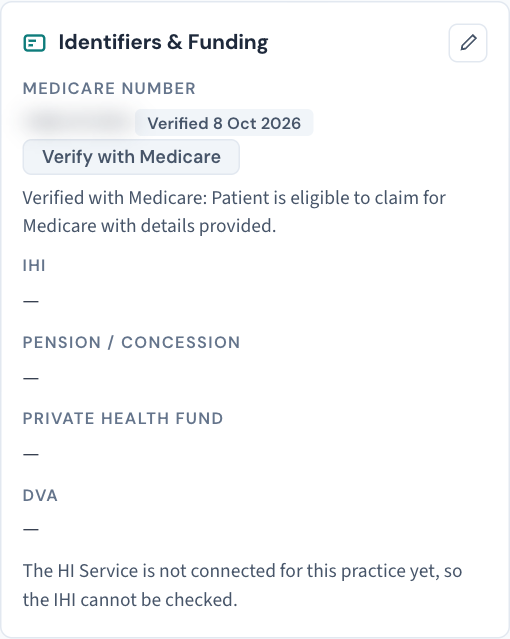
| What you see | What it means |
|---|---|
| Verified with Medicare: and Medicare's sentence. A Verified mark with today's date appears beside the number. | The details match Medicare's records. |
| Medicare did not match this card (code …): and Medicare's sentence | The details sent do not belong together. See below. |
| The same, ending Medicare holds: and a card number, IRN, given name or family name, with Update the record beside it | Medicare offered a correction. Curaeon shows it and does not change the record until you choose Update the record. See "Take a correction into the record" below. |
When Medicare did not match
"Did not match" is Medicare's answer, not a fault. Curaeon sent the given name, family name, date of birth, card number and IRN from the record, and Medicare says they do not fit one person on one card.
- Ask for the card and compare each detail with the record.
- Check the name is spelled as it is on the card, and that the IRN is the digit beside this patient's name, not another family member's.
- Choose the pencil (Edit) on Identifiers & Funding to correct the number or IRN, or on Demographics to correct the name or date of birth. Choose Save.
- Choose Verify with Medicare again.
Note: Correcting the card removes an earlier Verified mark, because Medicare has not seen the new details. Verify again to put the mark back. See When a mark is removed.
Take a correction into the record
When Medicare or DVA holds a detail differently, the answer says what it holds and Update the record appears beside it. Medicare's corrections are a newer card number, a different IRN, or a different spelling of a name. DVA's are a file number the record lacks, a different spelling, or a different card.
- Check the detail with the patient, or against the card in their hand. A name is the one to ask about: the funder's spelling may be an old registration.
- Choose Update the record.
Curaeon writes those details to the record and asks the funder again straight away. The answer starts Record updated. and then says what the funder now says. If it matches, the Verified mark appears.
- Nothing changes until you choose Update the record.
- The funder sends names in capitals. Curaeon writes them as a record does: PLACIDO becomes Placido.
- The change is in the Audit log as an edit to the patient's details, by you, like any other (KB-101 — Find who did what in the Audit log: kinds, Sign-ins, Exactly, Who and a bookmarkable view).
Check a concession with Medicare
Use this when a patient says they hold a concession card.
- On the Identifiers & Funding card, find Pension / Concession.
- Choose Check with Medicare.
Medicare checks the card as well and answers about the concession. You do not need the concession card's number: Medicare answers from the Medicare details. The button is there only when the record has a Medicare number. This check takes a little longer than the card check.
| What you see | What it means |
|---|---|
| Medicare: Patient Eligible for Concession. A Confirmed by Medicare mark with today's date appears on the row. | Medicare holds a concession entitlement for this patient. |
| Medicare (code 9685): A concessional entitlement has not been found for this patient. | Medicare holds none. Any earlier Confirmed by Medicare mark is removed. |
| Medicare did not match this card (code …), so it gave no answer about a concession | The card details did not match, so Medicare said nothing about a concession. This is not "no concession". Fix the card first, then check again. |
Check a veteran with DVA
- On the Identifiers & Funding card, find DVA.
- Choose Verify with DVA. Where the record has no DVA number, the button reads Look up with DVA.
Curaeon sends the given name, family name, date of birth and sex from the record, with the DVA number if there is one.
| What you see | What it means |
|---|---|
| Verified with DVA: Patient is known to DVA with details provided. DVA says Gold Card. A Verified mark with today's date and the card appears on the row. | DVA knows this veteran. The card named is the one DVA holds. |
| The same, with DVA holds: file number and a number | The record had no DVA number, and DVA found the veteran from their name and date of birth. Choose Update the record to keep the number. |
| The same, ending The record says Gold Card; DVA says White Card. A White Card claim must name the accepted disability treated. | The card on the record is not the one DVA holds. Choose Update the record to correct it. This matters: Curaeon asks for the accepted disability on a claim by the card on the record (KB-159 — Claim for a DVA patient, and lodge a private patient's Medicare claim for them). |
| DVA did not confirm these details (code 8005): and DVA's sentence, with DVA holds: and a name | DVA knows the veteran under a slightly different spelling. Check with the patient, then choose Update the record. |
| DVA did not confirm these details (code 9650): … did not match Veteran checks | DVA knows nobody with these details. Check the name, date of birth and DVA number against the card. |
Note: DVA's check is more forgiving than Medicare's. A veteran DVA confirms can still have a claim declined.
A record needs a given name, a family name and a date of birth before DVA can be asked.
What each refusal means
These appear when Curaeon cannot ask Medicare at all.
| Message | What to do |
|---|---|
| This patient has no Medicare card number to verify. Record the card first. | Add the Medicare number. |
| Medicare verifies the card with the IRN, the digit beside the patient's name on the card, and this record has none. Record it first. | Add the IRN. Medicare will not check a card without it. |
| Medicare verifies a card against the date of birth, and this record has none. Record it first. | Add the date of birth. |
| The Medicare number on this record is not a valid card number (its check digit is wrong). Correct it before verifying. | The number was mistyped. Curaeon tests it before sending anything. Retype it from the card. |
| Tyro Health would not run the check: and a reason | Tyro refused the request. Read the reason. If it is not something on the record, raise a ticket. |
| Tyro Health could not be reached to verify the card. Try again shortly. | Tyro or your internet connection is down. Try again later. |
At registration
The Medicare & entitlements section of the new patient form is marked Checked with Medicare on save. When you save a new patient with both a Medicare number and an IRN typed in, Curaeon checks the card straight away and tells you before the record opens:
- Medicare confirmed the card: and Medicare's sentence. The record opens with the Verified mark.
- Medicare did not match the card (code …): and Medicare's sentence, with any correction Medicare offered.
- Medicare card not checked: and the reason, such as a wrong check digit.
The patient is registered either way. If you left the IRN blank, or your practice is not connected to Tyro, nothing is checked and nothing is said. See KB-142 — Register a new patient.
Automatically, before a claim
Curaeon checks the card itself before it files a bulk bill or other Medicare claim, unless the record was verified in the last 24 hours. DVA claims are not checked this way.
- A match: the record gets the Verified mark and the claim is filed.
- No match: the claim is not filed. It shows as rejected with Medicare could not verify the patient before the claim was filed: and Medicare's sentence, and any Verified mark is removed. Correct the record, verify it here, then follow KB-156 — Follow a Medicare or DVA claim: its status, Check now and the claims list to send the claim again.
- Medicare could not be asked: the claim is filed anyway. Medicare's answer to the claim will say the same thing.
Curaeon does not ask DVA before it files a DVA claim.
The claims list flags a queued or rejected Medicare claim whose patient has never been confirmed: Medicare details not verified, with a link to the chart.
Note: A verified card is not a promise that a claim will be paid. Medicare checks a claim more strictly than it checks a card.
When a mark is removed
A mark is the funder's word about the details it was shown. Change one of those details and the mark comes off, because the funder has not seen the new one.
| You change | Marks removed |
|---|---|
| The Medicare number or the IRN | Verified beside the Medicare number, and Confirmed by Medicare beside the concession. Medicare was asked about the concession with those card details. |
| The DVA number, or the patient's sex | Verified beside the DVA number. |
| The given name, family name or date of birth | All three. Both funders were shown them. |
| Anything else, including the card's expiry, the DVA card colour and the concession card | None. |
When you save, Curaeon says which marks were taken off, for example Medicare's "Verified" and Medicare's concession confirmation were taken off this record, because the details they were given for have changed. Check again to put them back.
-
Choose the check on each row that lost its mark: Verify with Medicare, Check with Medicare or Verify with DVA.
-
Retyping the same card number with different spacing, or a name in different capitals, removes nothing.
- Update the record can remove the other funder's mark. Taking DVA's spelling of a name changes a detail Medicare was shown, so Medicare's marks come off and the answer says so. Check with Medicare again.
- The mark is removed however the detail changes, including when two records are merged.
Note: A mark that was on a record before this behaviour was added stays, even if the card had been changed since it was given. If you are not sure a mark is current, verify again. Curaeon also checks the card before it files a Medicare claim unless the mark is less than 24 hours old.
What is recorded
- On the patient: the date of the last match, shown as the Verified mark. A "did not match" answer removes it, and so does changing a detail the funder was shown. The same for DVA, with the card DVA named, and for a concession, shown as Confirmed by Medicare.
- When an edit removes a mark: the audit trail's entry for that edit records which marks were removed, beside the detail that changed (KB-101 — Find who did what in the Audit log: kinds, Sign-ins, Exactly, Who and a bookmarkable view).
- On the audit trail: Medicare card verified or Medicare card not matched, with who asked, Medicare's code, its sentence, the time Medicare answered and the details that were sent. A check made before a claim is recorded with nobody signed in, because Curaeon made it (KB-101 — Find who did what in the Audit log: kinds, Sign-ins, Exactly, Who and a bookmarkable view). A DVA check is DVA details verified or DVA details not confirmed. A concession check is Concession confirmed by Medicare or No concession found by Medicare.
A provider number is sent with the card check when the patient's usual doctor has one. If Tyro Health does not know that number, Curaeon asks again without it, so the answer is still about the patient.
If that didn't work
If Medicare keeps answering "did not match" and every detail agrees with the card in the patient's hand, the card may have been replaced. Ask the patient to check their current card details with Medicare. Claims for that patient will be rejected for the same reason until the record matches.
Still stuck? Raise a ticket at support.curaeon.com.au or call 1300 XXX XXX. If your clinic can't see patients right now, call and choose option 1. Support is staffed Monday to Friday, 8:00–18:00 Sydney time; outside those hours a call or text to the same number is answered on a best-effort basis.
Related articles
- KB-142 — Register a new patient — Register a new patient
- KB-156 — Follow a Medicare or DVA claim: its status, Check now and the claims list — Follow a Medicare or DVA claim: its status, Check now and the claims list
- KB-158 — Assignment of benefit for a bulk bill: Tyro's text to the patient, or signed on paper — Assignment of benefit for a bulk bill: Tyro's text to the patient, or signed on paper
- KB-017 — Medicare claim rejections — common causes and fixes — Medicare claim rejections — common causes and fixes
- KB-081 — Fix data-quality gaps before they become rejected claims or lost letters — Fix data-quality gaps before they become rejected claims or lost letters
- KB-101 — Find who did what in the Audit log: kinds, Sign-ins, Exactly, Who and a bookmarkable view — Find who did what in the Audit log: kinds, Sign-ins, Exactly, Who and a bookmarkable view