Bill a WorkCover consultation: the state's rates and its own codes
Raise a WorkCover invoice on New claim, add MBS items and your state's own WorkCover codes, and know where each line's price comes from.
Before you start
- Any signed-in member of staff can raise the invoice.
- The practice's state must be recorded. Curaeon prices WorkCover lines, and offers WorkCover codes, by the state the practice is in, not where the patient lives or works. An administrator records it in Settings → Practice, in the State box of the Address row (KB-116 — Set up your practice's details, opening hours and closures in Settings → Practice).
- Curaeon does not lodge a WorkCover claim. No claim is queued for a WorkCover invoice, and nothing is sent to the insurer. Curaeon raises and prices the invoice, and you send it to the insurer as your practice does now. See "After the invoice is issued" below.
- Curaeon never suggests an item or a code. You choose every line (KB-056 — Why the scribe never writes the Assessment or suggests item numbers).
What your state has on the server
The rates and codes come from what each state publishes. Curaeon loads the state's own schedule onto your server. Curaeon cannot see the state's website, so it cannot tell you whether a newer schedule has come out since. Settings → Fees says which schedule is loaded and from what date (KB-118 — Set what your practice charges for private and DVA billing in Settings → Fees).
| The practice is in | MBS items on a WorkCover line | The state's own codes |
|---|---|---|
| VIC (WorkSafe Victoria) | WorkSafe Victoria's rate for the item | Case conferences, reports, worksite visits, phone calls (RTWCC1, AGT001 and the like) |
| SA (ReturnToWorkSA) | ReturnToWorkSA's rate for the item | ReturnToWorkSA's own codes (such as WMG24) |
| QLD (WorkCover Queensland) | WorkCover Queensland's rate for the item | Its GP supplementary codes (such as 100158) |
| NSW (SIRA) | No state rate: see "How a line is priced" | SIRA's GP codes, including the consultations themselves (AA010 to AA045, WCO001, WCO002 and others) |
| WA (WorkCover WA) | No state rate | WorkCover WA's twelve GP consultation codes (AA010 to AA045 and AA220 to AA280, in force from 1 November 2026) and its four WG codes (WG010 to WG040), paid per 6 minutes. The specialists' WS codes and diagnostic imaging are left out on purpose |
| TAS, ACT, NT | No state rate | None. These states publish no WorkCover list for GPs |
In NSW and WA a WorkCover consultation is billed by the state's code rather than an MBS item. A claim can be codes alone. Both states publish their codes only as PDFs, so Curaeon loads them from its own transcription of the state's document, dated by that document.
Raise the invoice
- Open Billing in the menu bar and choose New claim. The screen is headed New Medicare claim.
- Choose the patient in the Patient box (KB-052 — Raise, correct and claim an invoice, including when "Send to Medicare…" is blocked). Set the Provider. If the service was on an earlier day, change Date of service.
- Under Claim type, choose WorkCover. The list heading changes to MBS items and WorkCover codes, and an Add WorkCover code box appears in the right-hand column, under Add MBS item.
- Add MBS items from Add MBS item, as for any invoice.
- Add the state's codes from Add WorkCover code. See the next section.
- Check each line and the Amount payable.
- Choose Issue invoice. Curaeon says Invoice issued — record a payment when taken. No claim is queued. To keep working on it first, choose Save draft. A code chosen in Add WorkCover code and not added holds both buttons, and the screen says Not on the claim yet: a WorkCover code. Add it, or cancel it.
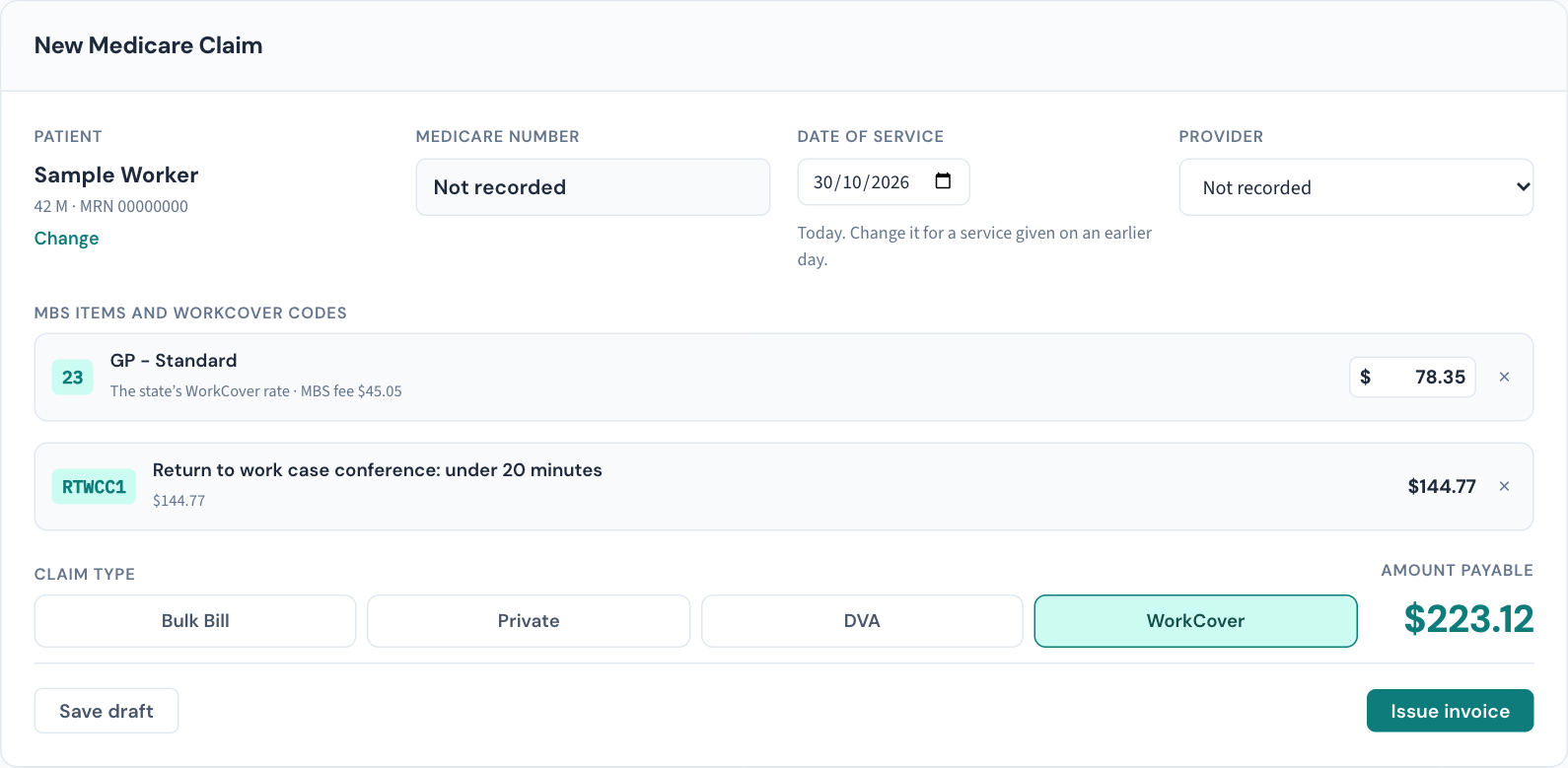
If a line cannot be added when you issue, nothing is issued. Curaeon says Not issued, and no claim queued: and names the line, and the invoice is kept as a draft without it. Open the draft, put the line right and issue it there.
Codes are kept if you change the claim type. Switch to another type and the screen says the codes are kept for a WorkCover claim, and not on this one. They are not sent unless the type is WorkCover when you save.
A consult that already has a draft
When a consult is finished, Curaeon opens a bulk bill draft for it. Change it to WorkCover on the invoice itself; there is no need to void it:
- Open the draft from Billing or from Consults to bill (KB-161 — Find consults that were never billed: the Consults to bill list).
- Under Claim type, choose WorkCover. While an invoice is a draft, Claim type is a choice.
- Curaeon says Now a WorkCover invoice and how many lines it priced again. Each MBS line still at the price bulk billing gave it takes the state's WorkCover rate, or the practice's fee where there is no state rate. A fee someone typed is kept, and Curaeon says which items kept theirs.
- The draft now offers WorkCover codes under its items. Add any you need, then issue it.
The change is refused, naming the line, while the draft holds something a WorkCover invoice cannot bill: a bulk-billing incentive such as 10990, which is payable only on a bulk bill. Remove that line first. Once an invoice is issued, its claim type is fixed: void and correct it instead (KB-148 — Take a payment, give a receipt, void or correct an invoice).
On an invoice that is already a draft
A draft WorkCover invoice has the same search under its items, headed WorkCover codes. Adding a code there saves it at once and says Added with the code and its amount.
Say which claim it bills
An insurer needs to match the invoice to a claim. Record the Insurer, Claim number, Employer and Date of injury, under WorkCover claim: on New claim as you raise it, or on the invoice afterwards with Save claim details.
- None of them is required, because a claim number often arrives after the first invoice. You can change them until the invoice is paid or voided. After that it keeps what it was sent with.
- The patient's next WorkCover invoice offers the last claim: choose Use the same claim to fill the boxes, then save. Curaeon doesn't copy it for you, because a worker may have another claim and this invoice may be for it.
- Void & correct carries the details to the new invoice.
Add one of the state's own codes
- In Add WorkCover code, type part of the code or a word from its description. The box reads Search and the insurer's name, for example Search SIRA codes….
- Choose the code from the list. Each shows what it is paid at.
- What happens next depends on how the code is paid:
| The list shows | What it means | What to do |
|---|---|---|
| An amount, such as $144.77 | A flat fee | Nothing. The code is added as soon as you choose it. |
| An amount per hour, per 5 minutes, per 6 minutes, per page, per km or per patient | Paid by the unit | Type how many in the box (Hours, 5-minute periods, Pages and so on), then choose Add and the code. Half an hour is 0.5. |
| no set fee or not paid | The state gives no amount for the code by itself | Type the fee in Fee $, then choose Add and the code. |
Until the box holds something Curaeon can use, the Add button stays off and says why: Say how many … first. or Type the fee first — this code has no set amount., and for a number it cannot use, such as half or 0, "“half” is not a number of 5-minute periods: type digits, such as 3 or 0.5." Cancel puts the code back.
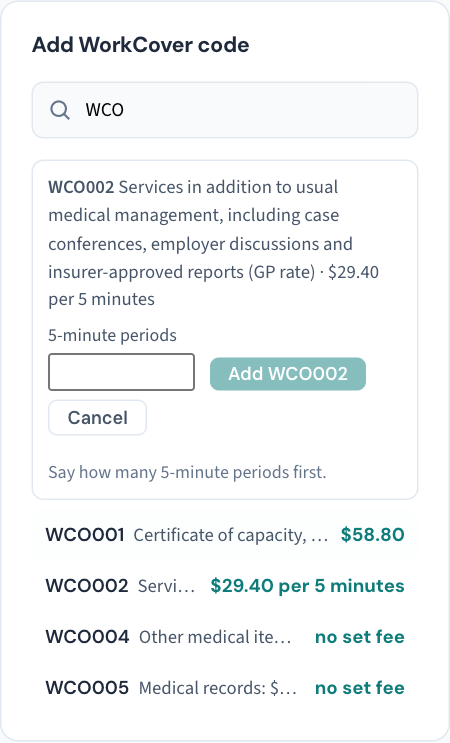
The search shows up to 30 codes. When more match it says Showing the first 30 — keep typing to narrow it.
A code paid by the unit, or one whose fee you typed, shows on New claim as priced when saved or Fee typed. Curaeon works out the amount when the invoice is saved: the rate times the units, rounded to the cent, and the line's description then ends with the units and the rate, for example — 0.5 hours at $330.90 per hour.
How a line is priced
Leave the fee box on an MBS line alone and Curaeon prices it. It takes the first of these that exists:
- A WorkCover fee the practice set for the item, in Settings → Fees with For set to WorkCover claims only. Someone chose it, so it wins. It applies only while the practice's fee list is in use (KB-118 — Set what your practice charges for private and DVA billing in Settings → Fees).
- The state's WorkCover rate for the item (VIC, SA and QLD).
- The practice's own fee for the item (KB-118 — Set what your practice charges for private and DVA billing in Settings → Fees).
- The MBS schedule fee.
New claim asks your server for each line's price before the invoice is saved, and shows it in the fee box with where it came from: The state's WorkCover rate, A fee the practice set for this funder or The practice's fee, each followed by the MBS fee for comparison. A line priced at the MBS fee reads Schedule fee.
- Pricing… while the answer is on its way.
- If the prices cannot be read, the total says The prices could not be read, that each line is priced when saved, and offers Try again (KB-170 — When part of a screen says it could not be loaded: Try again, and what Loading… means). You can still issue: the server prices each line as it is saved.
- Type a fee in the box to bill something else. The line then says fee changed. Clear the box to go back to the price Curaeon gives it.
- While any line has no price on screen, the total reads Priced when saved instead of an amount.
A state's code is priced from its own rate, as described above, unless you type a fee.
When Curaeon speaks up
- The item is not paid by itself. Some schedules list an item as not payable, paid by formula, per patient or per hour. Curaeon then prices the line by the steps above without the state's rate, and says so as the line is added: for example ReturnToWorkSA lists MBS … as not payable. Check with the insurer before billing it., or that the insurer works out the item's fee by formula, so the line is priced as before. Check the amount against its schedule.
- The service is older than the schedule. For a service dated before the loaded schedule took effect, Curaeon says the item is priced from the state's WorkCover schedule from that date, after this service, and that The insurer pays by the date of the service, so the amount paid may differ from this line.
When your state has no codes
If the practice's state is not recorded, or is one with no codes of its own, Add WorkCover code says The practice's state has no WorkCover codes of its own. Add the line by MBS item, or record the state in Settings → Practice. If the state has codes but none are loaded on your server, the box says No … codes are loaded on this server. Bill by MBS item, and raise a ticket if you expected codes for your state.
After the invoice is issued
- Send it to the insurer yourself. On the invoice, View receipt prints it on your letterhead, headed Tax Invoice / Receipt. Where the invoice has a state's code, its first column reads Item and shows the code. The insurer, claim number, employer and date of injury print on it where you have recorded them.
- Record the insurer's payment with Record payment when the money arrives. On a WorkCover invoice the method starts on Direct deposit (KB-148 — Take a payment, give a receipt, void or correct an invoice).
-
To correct it, use Void & correct or a Credit note…, as for a private invoice (KB-148 — Take a payment, give a receipt, void or correct an invoice).
-
Chase it on Aged debtors. An unpaid WorkCover invoice is aged with the other debts, and the row names the insurer under the patient's name, such as WorkCover — Allianz, or says WorkCover — the insurer's where no invoice names one (KB-053 — Month-end and end of day: aged debtors, statement runs and bank reconciliation). It is never on the patient's statement or in a statement run: the insurer owes it, not the worker.
If that didn't work
- The state's rate is not used, and the line bills the practice's fee or the MBS fee. Check, in order: the practice's state in Settings → Practice; that Settings → Fees shows a schedule loaded for your state; that the claim type is WorkCover. In NSW, WA, TAS, the ACT and the NT there is no state rate for MBS items.
- A rate looks out of date. Check the date on Settings → Fees. If your state has published a newer schedule, raise a ticket so it can be loaded.
Still stuck? Raise a ticket at support.curaeon.com.au or call 1300 XXX XXX. If your clinic can't see patients right now, call and choose option 1. Support is staffed Monday to Friday, 8:00–18:00 Sydney time; outside those hours a call or text to the same number is answered on a best-effort basis.
Related articles
- KB-052 — Raise, correct and claim an invoice, including when "Send to Medicare…" is blocked — Raise, correct and claim an invoice, including when "Send to Medicare…" is blocked
- KB-118 — Set what your practice charges for private and DVA billing in Settings → Fees — Set what your practice charges for private and DVA billing in Settings → Fees
- KB-116 — Set up your practice's details, opening hours and closures in Settings → Practice — Set up your practice's details, opening hours and closures in Settings → Practice
- KB-148 — Take a payment, give a receipt, void or correct an invoice — Take a payment, give a receipt, void or correct an invoice
- KB-161 — Find consults that were never billed: the Consults to bill list — Find consults that were never billed: the Consults to bill list
- KB-053 — Month-end and end of day: aged debtors, statement runs and bank reconciliation — Month-end and end of day: aged debtors, statement runs and bank reconciliation
- KB-154 — Write a medical certificate, and the other built-in letter templates — Write a medical certificate, and the other built-in letter templates