Write a medical certificate, and the other built-in letter templates
Write a medical certificate from the built-in template, know which parts Curaeon fills in and which you type, print it, and see what other templates come with Curaeon.
Before you start
- In a consult you need the
notes.writepermission, and the note must not be signed yet. Once it is signed, the consult says it is closed to new letters, and the server refuses a new one. A certificate you saved as a draft before signing can still be finished (KB-143 — Write and sign off a consult note). - From the patient's record you need the
chart.writepermission. - Clinicians and administrators have both. Other roles do not unless your practice has granted them (KB-121 — Change what each role may do in Settings → Permissions).
- Which templates are offered is your practice's choice in Settings → Templates (KB-049 — Build and import letter templates: Word upload, merge fields, pronoun fields, snippets). The editor itself is covered in KB-106 — Write a letter in the editor: Insert from the record, { } Field, and the formatting that survives print and email.
Start from a template
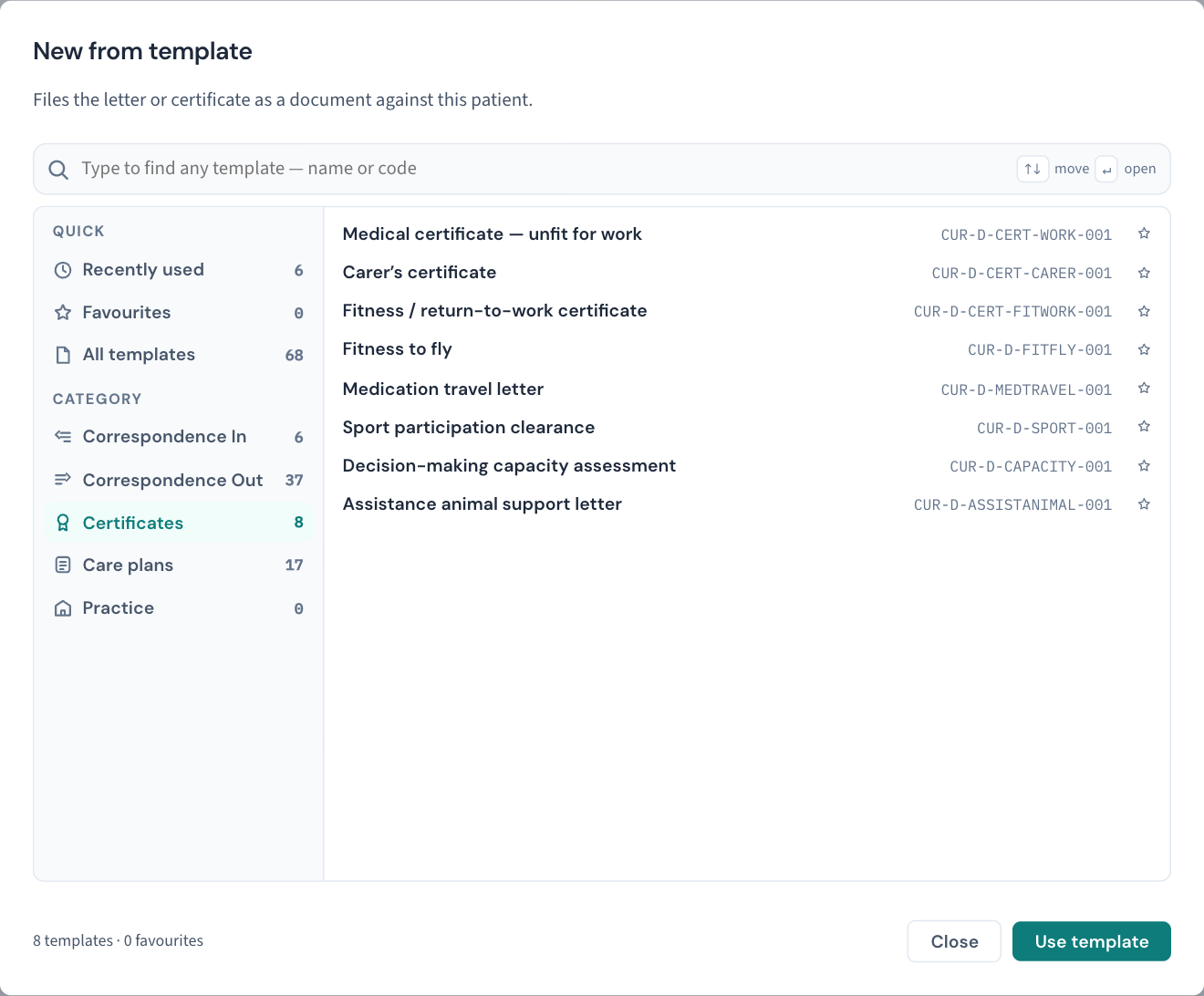
There are two ways in. Both open the same window, New from template.
| Where you are | What to choose | What happens next |
|---|---|---|
| In a consult | Under Do now, Letters & certificates | The document opens in a window over the consult, and is filed against this visit |
| On the patient's record | Reports tab, then New from template | The document opens as a page in a new browser tab, with Print on it |
In New from template, choose a list on the left: Correspondence In, Correspondence Out, Certificates, Care plans or Practice. Or type in the search box, which looks in every list. Choose the template, or move to it with the arrow keys and choose Use template. The star beside a template keeps it under Favourites.
Write a medical certificate
- Open New from template and choose Certificates, then Medical certificate — unfit for work. If your practice has added its own questions to the template, they come first: answer them and choose Continue.
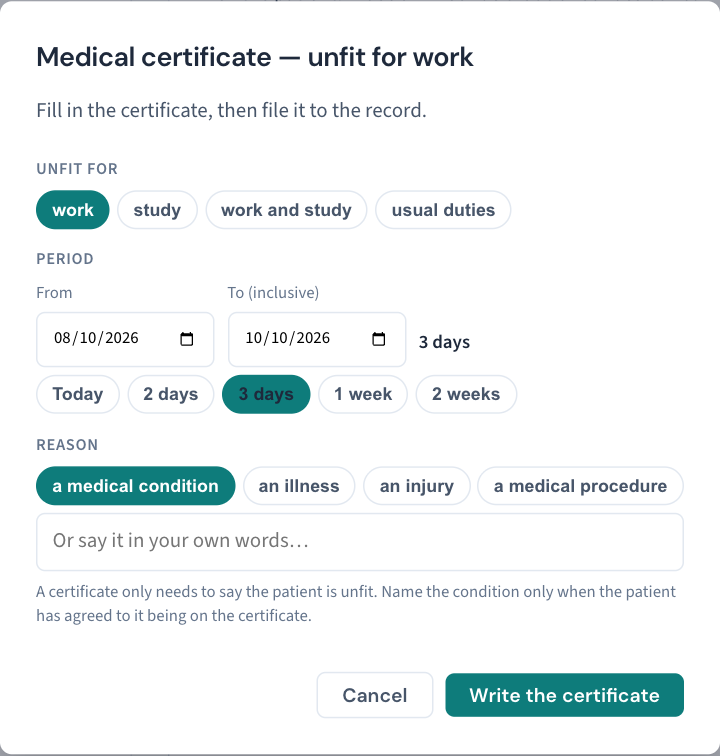
- Answer the certificate's questions. It opens on the commonest answers: unfit for work, today only, for a medical condition.
- Unfit for: work, study, work and study or usual duties.
- Period: From and To (inclusive), or one of Today, 2 days, 3 days, 1 week, 2 weeks. Moving From keeps the same number of days.
- Reason: a medical condition, an illness, an injury or a medical procedure, or your own words in the box underneath.
- Choose Write the certificate. The certificate is written once from your answers. To change the period after this, edit the text. The heading and the title it files under follow your Unfit for choice, so a certificate for study reads Medical certificate — unfit for study.
- Read the certificate and complete it (see the table below).
- File it: File to record in a consult, or File to patient on the page opened from the record.
A certificate is not addressed to anyone, so it does not ask who it is to. A letter or a referral does, as its first step (KB-048 — Refer a patient: find a provider in HealthLink/HealthShare, or record a referral without a letter).
Note: The reason choices do not name a condition, on purpose. The screen says a certificate only needs to say the patient is unfit. Name the condition only when the patient has agreed to it being on the certificate.
What the certificate fills in, and what you type
| Part of the certificate | Where it comes from |
|---|---|
| Letterhead and date | The letterhead that applies to you and today's date. Yours sincerely and your letter sign-off are left off, because the certificate is signed under Signed. The Signature line stays |
| Patient, date of birth, age and sex, Address, Medicare number, IRN and IHI | The patient's record. A blank means the record is blank. IRN or IHI with nothing held prints nothing at all |
| Examined on | Today's date |
| Unfit for, From, To (inclusive), Duration, Reason | Your answers in step 2 |
| Basis for any back-dated period | You type it. If From is before today, the questions screen reminds you |
| Clinical details | You decide. See the note below |
| Signed, qualifications, AHPRA number, provider number and HPI-I, and Date | Your practitioner details and today's date. HPI-I with nothing held prints nothing at all |
Note: Under Clinical details the built-in wording reads "No clinical details are disclosed on this certificate unless the patient has expressly consented to their inclusion." Leave it as it is, or replace it with the details the patient has agreed to. Curaeon does not check for a consent or fill this part in. If your practice has its own version of the template, its wording is whatever your administrator saved in Settings → Templates (KB-049 — Build and import letter templates: Word upload, merge fields, pronoun fields, snippets).
Other certificates ask only for what their wording prints. The Carer's certificate asks for the period and the reason. The Fitness / return-to-work certificate asks nothing first: you type the capacity, restrictions and review date into the certificate.
Print it
- Started from the record. The page has Print, Print as PDF and Download .rtf beside File to patient. Print it and file it.
- Started in a consult. The consult window files the certificate. It has no print button. Either choose Save as draft in the consult and then Continue on that draft on the record's Reports tab, which opens it on the page with Print, or write the certificate from the record in the first place.
Once filed, the certificate is on the record's Reports tab under Issued to the patient. A draft shows a Draft chip and Continue until it is filed.
Email it
On the record's Reports tab, a filed certificate under Issued to the patient has Send to patient. A draft does not: file it first.
- Choose Send to patient on the certificate's row.
- Check Send to, the Subject and the Message. The message starts as your practice's message for letters, or "Your certificate is attached. If you have any questions, please call the practice." if the practice has not written one. Change it if you need to.
- Choose Send.
A certificate goes by the same route as a letter: the channel your practice set up for letters, to a patient who has consented, as a password-protected PDF. The messages you may see, and what fixes each, are in KB-050 — Email a letter to a patient: password, refused characters, "I can't open it". Nothing else under Issued to the patient has the button: not a receipt, a script or a care plan. A care plan is sent from the plan's own page (KB-102 — Start a care plan from a template, share templates between sites, and keep Plan reviews and INR clear).
The built-in templates
These are the templates Curaeon comes with for this window. Your practice can switch any of them off, rename them, edit their wording or add its own (KB-049 — Build and import letter templates: Word upload, merge fields, pronoun fields, snippets).
| List | Built-in templates |
|---|---|
| Certificates | Medical certificate — unfit for work. Carer's certificate. Fitness / return-to-work certificate. Fitness to fly. Medication travel letter. Sport participation clearance. Decision-making capacity assessment. Assistance animal support letter |
| Correspondence Out, Referrals | Specialist referral — general. Mental health services referral. Allied health referral (non-plan). My Aged Care / ACAT referral. One referral for each of: Cardiology, Dermatology, Orthopaedics, Gastroenterology, ENT, Ophthalmology, Psychiatry, Obstetrics, Endocrinology, Respiratory, Neurology, Urology, Gynaecology, Rheumatology, General surgery, Vascular, Paediatrics, Geriatrics, Pain medicine and Sleep medicine |
| Correspondence Out, Letters | Reply to referring practitioner. Clinical handover / health summary. Post-hospital-discharge follow-up. Letter to a third party |
| Correspondence Out, To the patient | Letter to patient — results. Letter to patient — recall |
| Correspondence Out, Reports | NDIS supporting evidence. Medico-legal report. Insurance report. Coroner / police information release |
| Correspondence Out, Hospital transfer | Hospital / ED transfer |
| Correspondence Out, Pathology & imaging | Pathology request. Diagnostic imaging request. These are free text. The window points you to Order investigations for the structured request form |
| Correspondence In | Acknowledge received referral. Incoming letter — filing summary. Discharge summary received — action. Result received — action note. Decline / redirect an inbound referral. Received correspondence — task / handover |
| Care plans | The care plan and health assessment documents. See KB-102 — Start a care plan from a template, share templates between sites, and keep Plan reviews and INR clear |
| Practice | Empty until your practice uploads or writes its own |
Templates that stay hidden until an administrator confirms them. Eleven certificates and forms are not offered until an administrator opens the template in Settings → Templates and ticks Licence confirmed, which confirms the practice holds the licence or uses the authoritative form: WorkCover certificate of capacity, Centrelink medical evidence, Commercial driver medical, Private driver medical, Pre-employment medical, Insurance medical, Mobility parking scheme assessment, Firearms licence medical, Working-with-children health declaration, Medical certificate of cause of death and Cremation certificate.
State forms. A form written for one state is hidden from practices in another. Show other states' forms at the foot of the window brings them back.
If that didn't work
| What you see | What it means | What to do |
|---|---|---|
| Letters & certificates cannot be chosen | Your role cannot write notes, or the note is signed. The line under Do now says which | For a signed note, write the certificate from the record's Reports tab |
| The certificate needs a start date or an end date, or cannot end before it starts | The period is incomplete or backwards | Correct the dates |
| Say what the patient is unfit for. | No Unfit for choice is selected | Choose one |
| A template is missing from the window | It is switched off, waiting on Licence confirmed, or a form for another state | Ask an administrator, or tick Show other states' forms |
| The practice's own wording for this template could not be loaded (…), so this letter starts from the standard body. | Your practice's edited wording did not load, so the built-in wording was used | Choose Try again beside the message, which is offered while you have not typed in the document. Otherwise check the wording before you file |
| The practice's own template library could not be read, so these are the templates as supplied: the practice's wording, and anything it has switched off, are not applied. | New from template could not read your practice's library, so it lists the built-in templates as Curaeon supplies them | Choose Try again beside the message before you pick a template (KB-170 — When part of a screen says it could not be loaded: Try again, and what Loading… means) |
| the note for this consult is signed, so the consult is closed to new letters | The note was signed after you opened the window, so the certificate was not filed | Write it from the record's Reports tab |
Still stuck? Raise a ticket at support.curaeon.com.au or call 1300 XXX XXX. If your clinic can't see patients right now, call and choose option 1. Support is staffed Monday to Friday, 8:00–18:00 Sydney time; outside those hours a call or text to the same number is answered on a best-effort basis.
Related articles
- KB-049 — Build and import letter templates: Word upload, merge fields, pronoun fields, snippets — Build and import letter templates: Word upload, merge fields, pronoun fields, snippets
- KB-106 — Write a letter in the editor: Insert from the record, { } Field, and the formatting that survives print and email — Write a letter in the editor: Insert from the record, { } Field, and the formatting that survives print and email
- KB-050 — Email a letter to a patient: password, refused characters, "I can't open it" — Email a letter to a patient: password, refused characters, "I can't open it"
- KB-088 — Letters and referrals FAQ — Letters and referrals FAQ
- KB-146 — Find, open and upload documents on the Reports tab of a patient's record — Find, open and upload documents on the Reports tab of a patient's record