Month-end and end of day: aged debtors, statement runs and bank reconciliation
Close the day and close the month with the ledger: who owes what, a statement run that prints itself, and a bank statement matched line by line without guessing.
Before you start
The ledger sits under Billing in the menu bar. The Billing screen's toolbar has a button for each screen in this article: Aged debtors, Account credit, Bank reconciliation and End of day. Every role can open these screens, so who does the banking and chases the debtors is your practice's decision.
End of day
End of day reconciles the day's takings by payment method against what was banked. Cash is counted here; it is never matched in bank reconciliation, because it is banked as a lump.
Refunds recorded that day (KB-148 — Take a payment, give a receipt, void or correct an invoice) are listed separately under Refunds given, by the method the money went back by, with a Refunded total and the day's total Net of refunds. Payments received stays what was taken. Take each method's refunds off its takings before you count the till or check the terminal's settlement. In bank reconciliation, a refund given on the terminal is matched with its day's EFTPOS settlement, because the bank pays that net of refunds. A refund you transferred from your bank is money out and is not matched to anything.
A payment that was entered wrongly and then corrected (KB-148 — Take a payment, give a receipt, void or correct an invoice) is listed under Corrections, on the day the correction was made. No money moved, so a correction is neither a taking nor a refund. Each row is a method and the Change to it: cash recorded as EFTPOS shows EFTPOS (Tyro) −$85.00 and Cash +$85.00. Add each method's change to its takings before you count the till or check the terminal's settlement. The day the payment was first recorded is not altered, so if that was an earlier day, its report still shows the payment as it was typed. In bank reconciliation, only the corrected payment is offered for matching.
Credit notes raised that day (KB-148 — Take a payment, give a receipt, void or correct an invoice) are counted with the invoices, on the line Credit notes raised on the date. A credit note is not money, so it is never in Payments received and does not change what you count.
Money held on patients' accounts (KB-168 — Hold credit on a patient's account: deposits, using credit and paying it back) is counted when it moves. A deposit is in Payments received, by its method, on the day it was taken. Credit paid back to a patient is in Refunds given. A block headed Patient account credit then says how much of the day's takings was deposits, how much credit was used against invoices, and how much was kept on accounts from refunds. Credit used and credit kept are not money that day: an invoice can be Paid from credit with nothing in the takings, and a refund can be kept on an account with nothing in the refunds. In bank reconciliation, a deposit paid by EFTPOS or by transfer is matched like a payment, and reads deposit on account where you match by hand. Credit paid back on the terminal comes off that day's EFTPOS settlement, as a refund given on the terminal does, and reads account credit paid back. Credit used against an invoice and a refund kept on an account are never offered for matching, because no money moved.
A deposit, or credit paid back, that was entered wrongly and then corrected (KB-168 — Hold credit on a patient's account: deposits, using credit and paying it back) is listed under Corrections with corrected payments. The table's Entries column counts both.
Aged debtors
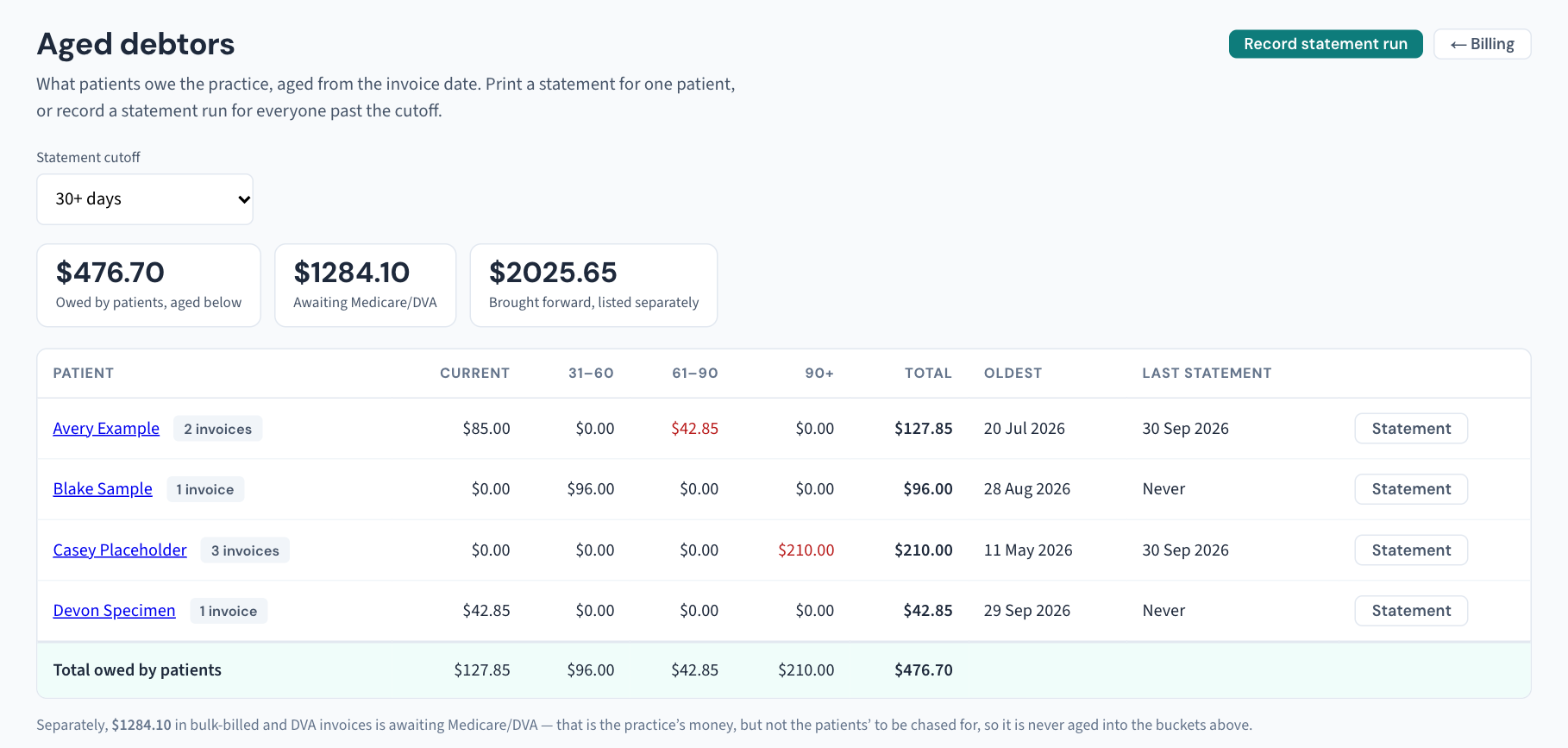
Aged debtors shows who owes the practice, bucketed by how long the money has been outstanding. What an invoice owes is its total, less any credit note raised against it (KB-148 — Take a payment, give a receipt, void or correct an invoice), less what has been paid. A statement that includes a credited invoice has a Credited column. Credit held on a patient's account is shown on their statement but is not taken off what they owe, and does not reduce Aged debtors, until someone uses it against an invoice. Billing → Account credit lists every patient who holds credit, with what each also owes. Bulk-billed and DVA balances are Medicare's to settle and never appear as patient debt. An unpaid WorkCover invoice is aged here too, because the practice chases it, but it is the insurer's: the row says how much of the total is WorkCover and names the insurer, such as $78.35 of it WorkCover — Allianz, or says the insurer's where no invoice names one, and the total reads "Owed by patients and WorkCover insurers". It is never on the patient's statement or in a statement run, and a debt that is all WorkCover has no Statement button (KB-179 — Bill a WorkCover consultation: the state's rates and its own codes). Statements prints one patient's account.
Three figures head the page, side by side and never added together: Owed by patients, aged below (the total of the aged table), Awaiting Medicare/DVA, and, only where your practice imported balances from its previous system, Brought forward, listed separately.
A fourth figure, On payment plans, appears when any patient is paying an invoice by instalments (KB-181 — Payment plans: let a patient pay an invoice in instalments, and remind them): how much of the aged total is under a plan, and how much of that is behind. It is part of the total above it, not beside it — the balance is still aged like any other — and each such patient's row says On a payment plan, on track or behind by $…, so the ones to chase are the ones behind.
Balances brought forward
Brought forward is what patients owed the practice you converted from, where those balances were imported (KB-070 — Import patients, documents, appointments and balances from your previous system, and read the reconciliation report). It has its own list on Aged debtors, under the aged table and never inside it, because an old practice's balance has no issue date here to age from. Selecting the Brought forward figure at the top of the page takes you to the list. A practice that imported no balances sees neither the figure nor the list.
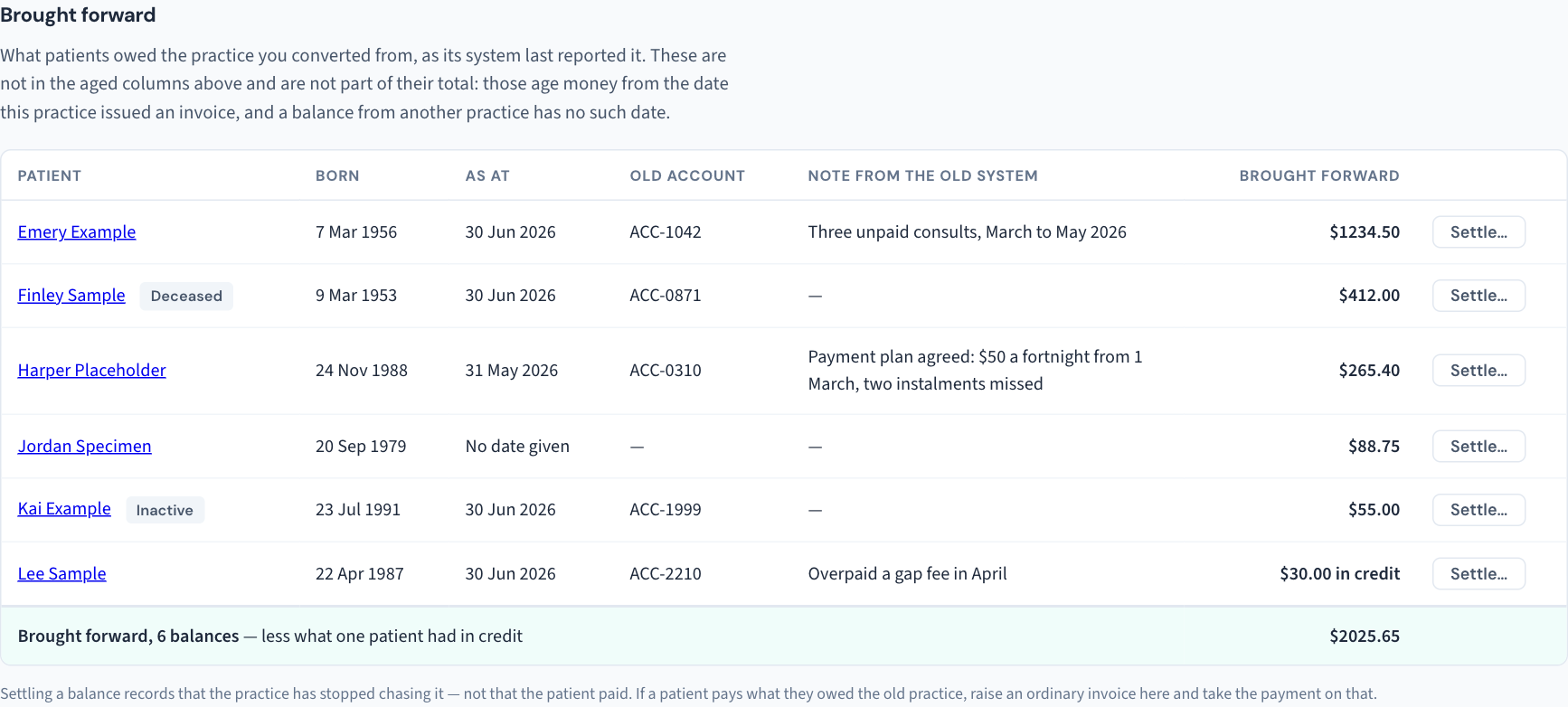
Each row is one balance as the old system reported it, largest first: the patient, their date of birth, the date the balance was struck (No date given where the file had none), the old account, any note that came with it, and the amount. A patient who has died or is no longer active is marked Deceased or Inactive beside their name. A balance the old practice held for a patient reads in credit, and the total at the foot is what was owed less those credits.
Settle… on a row records that the practice has stopped chasing it, not that the patient paid. It asks for a reason, keeps your name, the time and the reason, and cannot be undone. It needs the billing.adjust permission, which the Admin and Clinician roles hold by default and Reception does not (KB-121 — Change what each role may do in Settings → Permissions); everyone else sees the list without the button. When the patient does pay, raise an ordinary invoice here, with its own receipt and GST treatment, then settle the old balance. KB-108 — Bank lines that won't match, statement reprints and brought-forward balances: the ledger FAQ answers the questions this raises.
Run the month-end statements
- On Aged debtors, pick a cutoff — every debtor, or only accounts with an invoice 30, 60 or 90 days old.
- Choose Record statement run. Every qualifying patient is recorded with their balance as it stood, and one print opens with a statement per patient, one per sheet, ready for the post. Each statement says Statement as at and the day it was printed. An invoice the patient is paying by instalments says so under it, with where the plan stands (KB-181 — Payment plans: let a patient pay an invoice in instalments, and remind them).
- The debtors list then shows when each patient was last statemented — "Never" is a fact, not a blank.
A run with nobody in it is refused rather than recorded. The run history lets you reprint; a reprint shows the account as it stands today, so an account settled since the run prints "do not post this page" instead of a demand for money already paid.
Reconcile the bank statement
- Export the statement from the bank: a CSV (CBA, ANZ, NAB and Westpac exports are all recognised), an OFX or QFX file (often labelled "Quicken", "Money" or "OFX" in internet banking), or a QIF file.
- Open Billing, choose Bank reconciliation in the toolbar, then choose Import bank statement. You do not say which format it is; the screen says how it read the file.
- Read the preview. Overlapping statements are fine: a line an earlier import already holds is skipped, and only the new lines are added. If the statement is for a different account and its lines only look the same (the monthly fee on the same day, say), tick Import them anyway.
- Check the proposed matches. Every deposit is matched with the reason in words: the line names a Tyro reference or invoice number; it equals one day's EFTPOS takings (a Tyro settlement); or exactly one direct deposit of that amount arrived within three days. A day's EFTPOS takings are every EFTPOS payment on invoices and every EFTPOS deposit onto a patient's account that day, less what was refunded or paid back on the terminal. A transfer onto a patient's account is matched as a direct deposit. When more than one answer fits, nothing is guessed — the line waits for you.
- Import. Nothing is written until you do.
- Work the leftovers. Each line can be matched by hand, unmatched, or set aside with a reason (a bank fee, rent, a transfer between the practice's own accounts). Payments the ledger holds that no bank line explains are listed under Ledger payments no line explains, with deposits onto patients' accounts among them.
If that didn't work
A bank file the screen cannot read, or a match whose stated reason does not fit, is worth a ticket — attach nothing from the statement; describe the bank, the file type and the date.
Still stuck? Raise a ticket at support.curaeon.com.au or call 1300 XXX XXX. If your clinic can't see patients right now, call and choose option 1. Support is staffed Monday to Friday, 8:00–18:00 Sydney time; outside those hours a call or text to the same number is answered on a best-effort basis.
Related articles
- KB-052 — Raise, correct and claim an invoice, including when "Send to Medicare…" is blocked — Raise, correct and claim an invoice, including when "Send to Medicare…" is blocked
- KB-070 — Import patients, documents, appointments and balances from your previous system, and read the reconciliation report — Import patients, documents, appointments and balances from your previous system, and read the reconciliation report
- KB-023 — Requesting a data export or report — Requesting a data export or report
- KB-108 — Bank lines that won't match, statement reprints and brought-forward balances: the ledger FAQ — Bank lines that won't match, statement reprints and brought-forward balances: the ledger FAQ
- KB-181 — Payment plans: let a patient pay an invoice in instalments, and remind them — Payment plans: let a patient pay an invoice in instalments