Find consults that were never billed: the Consults to bill list
Find completed consults that have nothing billed, or billing that does not match the visit, and know what each flag is telling you.
Before you start
- You need the
practice.adminpermission, which only the Admin role holds by default. Other roles do not see the panel, and the list refuses them (KB-121 — Change what each role may do in Settings → Permissions). - Changing a consult's time, voiding and Void & correct need
billing.adjust, which Admin and Clinician hold by default. So do Set aside… and Put back on a No incentive row. - Curaeon does not suggest an item number. This list says a consult has no item, or no bulk billing incentive. It never says which item it should be. The clinician who saw the patient chooses (KB-056 — Why the scribe never writes the Assessment or suggests item numbers).
- The No incentive flag appears only once an administrator has recorded the practice's Modified Monash area in Settings → Practice (KB-177 — Why an item is warned about or refused on an invoice: MBS co-claiming rules and the bulk billing incentive). It is counted from the day the area was recorded or last changed, not for earlier consults.
Open the list
- Open Billing.
- In the panel on the right, find Consults to bill. It shows how many completed consults need attention.
- Choose Reconcile consults.
The panel appears only when at least one consult is flagged. If it is not there and you are an administrator, nothing is flagged.
Read the list
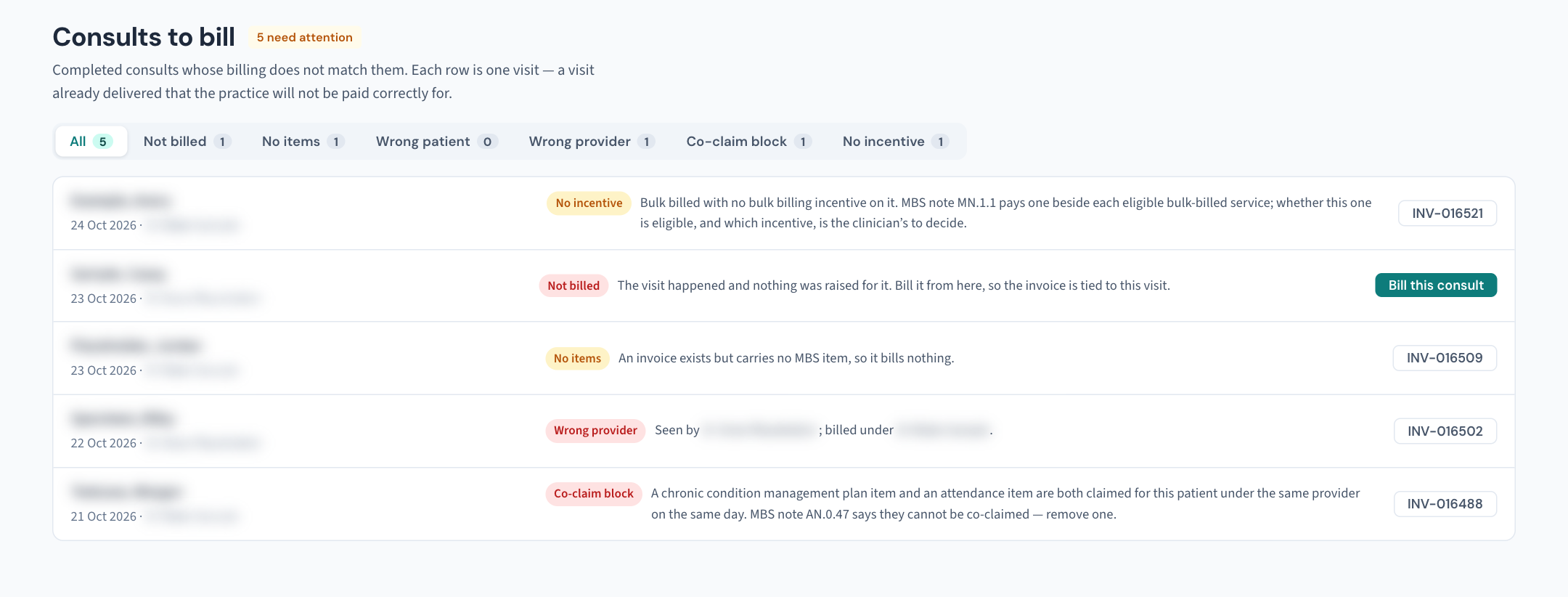
Each row is one completed consult: the patient, the date, the clinician, one or more flags with a sentence each, and a button that opens the invoice where there is one. It shows the invoice number, or Open invoice for a draft, which has no number yet. The newest are first, 50 at a time. The list reaches back over every completed consult, not only this month. No incentive is the one flag that does not: see "The day No incentive is counted from" below.
The tabs narrow the list to one flag. A zero on a tab is the good answer. One consult can carry two flags, so the tab counts can add up to more than the total.
| Flag | What it means |
|---|---|
| Not billed | The visit happened and has no invoice. An invoice that was voided does not count |
| No items | An invoice exists for the visit and carries no MBS item, so it bills nothing. It looks handled and is not |
| Wrong patient | The invoice names a different patient from the one seen. The row says who was seen and who was billed |
| Wrong provider | The invoice is billed under a different provider from the clinician who saw the patient. The row names both |
| Co-claim block | A chronic condition management plan item and an attendance item are both claimed for the same patient, under the same provider, on the same day. MBS note AN.0.47 says they cannot be claimed together |
| No incentive | The consult was bulk billed, has an item, and carries no bulk billing incentive on any of its invoices. The row names no item: MBS note MN.1.1 pays one beside each eligible bulk-billed service, and whether this one is eligible, and which incentive, is the clinician's to decide (KB-177 — Why an item is warned about or refused on an invoice: MBS co-claiming rules and the bulk billing incentive) |
The day No incentive is counted from
No incentive is counted only for consults on or after the day the practice recorded its Modified Monash area, or last changed it. Recording the area for the first time does not list the bulk-billed consults the practice had before that day.
Open the No incentive tab and a line above the rows gives the day: "No incentive is counted for consults from" the date, "the day the practice recorded or last changed its Modified Monash area. Earlier consults are not listed for it."
- Changing the area starts the list again from that day, for a correction as much as a first recording. Consults before it are no longer listed for No incentive, and rows set aside for consults before it are no longer shown under Set aside. Nothing asks you to confirm the change; the message after the save in Settings → Practice says what happened (KB-116 — Set up your practice's details, opening hours and closures in Settings → Practice).
- While no area is recorded, the check is not run. The No incentive tab then says No incentive is not checked yet: "This check is not run until the practice records its Modified Monash area, under Settings, Practice." That is not the same as no consult failing the check.
- If your practice recorded its area before the list began keeping the day, the day shown is the day the area was last saved. Where Curaeon held no record of that save, it is the day your server was updated.
The list does not check whether the item suits the appointment. A standard booking that ran long is correctly billed as a longer item, and that is the clinician's call.
Why a consult ends up here
When a clinician finishes a consult, Curaeon opens a draft invoice for that visit in the same step. The draft is a Bulk Bill invoice. While it is still a draft, its Claim type can be changed on the invoice to Private, DVA or WorkCover, and its lines are priced again for it (KB-179 — Bill a WorkCover consultation: the state's rates and its own codes); once issued, the type is fixed. If the appointment type has a default item, the draft starts with it. So a consult normally has an invoice from the moment it ends.
A consult is flagged when that draft was never given an item (No items), when its only invoice was later voided (Not billed), or when the invoice linked to the visit names someone else.
Clear each flag
Choose the invoice button on the row to open the invoice. When you issue it, Curaeon brings you back to this list.
| Flag | What to do |
|---|---|
| No items | Ask the clinician which item applies. Open the draft, search under MBS item numbers, add the item, and choose Issue invoice. The row leaves the list once the invoice has an item |
| Co-claim block | Open the invoice and remove one of the two items. The other item may be on a second invoice for the same day. If the invoice is locked, use Void & correct where it is offered and remove the item on the new draft (KB-148 — Take a payment, give a receipt, void or correct an invoice) |
| No incentive | Ask the clinician whether the service is eligible and which incentive applies. To add one, open the invoice and add it while its items can still be changed, or use Void & correct if it is offered (KB-148 — Take a payment, give a receipt, void or correct an invoice). Once the claim has been sent, the incentive cannot be added to it in Curaeon. If the clinician's answer is that no incentive applies, choose Set aside… on the row and give the reason. See "Set aside a No incentive row" below |
| Wrong patient, Wrong provider | An invoice's patient and provider cannot be changed, and Void & correct copies them unchanged. Open the invoice and void it with the reason. The row then reads Not billed. Choose Bill this consult on it |
| Not billed | Choose Bill this consult on the row. It opens New Medicare claim on that consult. See the next section |
Set aside a No incentive row
No incentive is the one flag on this list that is a question, not an error: whether an incentive applies is the clinician's to decide. Where the answer is that none does, set the flag aside so the row stops waiting beside the ones that need work. No other flag can be set aside. The rest stay until the billing is fixed.
You need the billing.adjust permission as well as the one that opens the list. Without it the buttons are not shown, and the line above the rows on the No incentive tab and on the Set aside list adds "Setting a row aside, or putting one back, needs permission to adjust billing."
- On a row flagged No incentive, choose Set aside…. A window opens headed Set aside No incentive for and the patient's name.
- Type why under Reason. The box reads "Why no incentive applies" until you type. A reason is required: until there is one the window says "Enter a reason to continue."
- Keep the reason to 500 characters. The window counts as you type, for example "42 of 500 characters". Past the limit the count says how many too many, for example "512 of 500 characters: 12 too many", Set aside cannot be chosen, and the window says "Shorten the reason to 500 characters to continue."
- Choose Set aside, or Cancel to leave the row as it is.
Curaeon answers "No incentive set aside for the consult with" the patient's name. The consult is no longer listed or counted under No incentive. Your name, the time and the reason are kept. Nothing on the invoice changes, and Curaeon does not say which incentive to claim.
Things to know:
- A row with another flag stays on the list for that. A consult billed to the wrong patient as well keeps its Wrong patient flag and still counts under All until the billing is fixed. The window says so before you confirm, and the answer adds "It stays on the list for its other problem.", or "problems" where it has more than one.
- If someone else set the same consult aside first, theirs stands. The message says who set it aside and when, then "That one stands, and the reason typed here was not kept." and quotes their reason. A long reason is quoted from its start, about 200 characters of it, followed by "The whole reason is on the Set aside list." This message stays on screen until you close it.
- If Curaeon refuses, the window stays open and says why, beginning "Not set aside." What you typed is kept, so you can put it right and choose Set aside again.
- If the consult is no longer listed for a missing incentive, the window closes and a message reads "Not set aside. This consult is not listed for a missing incentive, so there is nothing to set aside. The list may have changed since it was drawn." Someone has added an incentive, or the billing has changed, since you opened the list.
- The set-aside belongs to the consult, not the invoice. If the invoice is later voided and the consult billed again, it is still set aside.
- Both are recorded. The Audit log shows No incentive on a consult set aside and No incentive on a consult put back on the list (KB-101 — Find who did what in the Audit log: kinds, Sign-ins, Exactly, Who and a bookmarkable view).
See what has been set aside, and put a row back
Once at least one consult is set aside, a second pair of buttons appears beside the tabs: To do, with the count still needing attention, and Set aside, with the count set aside.
- Choose Set aside. The tabs give way to the list of consults set aside. Each row shows No incentive, set aside, then who set it aside, when, and the reason in their words.
- To list a consult's No incentive again, choose Put back on its row. It asks for no reason.
- Choose To do to return to the worklist and its tabs.
Curaeon answers "Put back. No incentive for the consult with" the patient's name "is listed again if it still applies; the record that it was set aside is kept." A consult that has gained an incentive since is not listed again, because the flag no longer applies to it.
As the line above the list says, a consult's No incentive that has been set aside "is not counted above; one that fails another check as well is still on To do for that". When the No incentive tab is empty because its rows were set aside, it says how many, for example "3 set aside."
Bill a consult from its row
Bill this consult opens New Medicare claim already set to that consult. A line at the top says which: the date, and the clinician.
- The patient is the one who was seen. There is no Change.
- The Provider is the clinician who saw them, and cannot be changed there.
- Date of service is the day of the consult, not today.
-
Medicare number reads "Shown on the invoice". Open the invoice after saving to see it.
-
Choose the billing type and add the items, as on any claim (KB-052 — Raise, correct and claim an invoice, including when "Send to Medicare…" is blocked).
- Choose Save draft, or Issue & queue claim (Issue invoice for a private invoice). If the clinician who saw the patient has no provider number recorded, Issue & queue claim says so and raises nothing; an administrator adds the number under Settings → Users first (KB-052 — Raise, correct and claim an invoice, including when "Send to Medicare…" is blocked, KB-162 — Register each provider with Tyro before the first claim).
- Curaeon opens the invoice. Its back link returns you to Consults to bill.
The invoice is tied to the consult. The row leaves the list once the invoice has an item, and a Medicare or DVA claim on it carries the consult's date as the date of service.
Important: Bill a consult on this list from its row, not with New claim on the Billing screen. An invoice raised with New claim is not tied to any consult: the row stays on the list, and its claim is dated the day the invoice was made, not the day the patient was seen. An invoice already raised that way cannot be tied to the consult afterwards.
| The screen says | What it means | What to do |
|---|---|---|
| Billing the consult on a date with a clinician | The consult is waiting and can be billed | Add the items and save |
| "This consult is no longer waiting to be billed." | It has been billed since the list was opened. Save draft and the issue button are greyed out | Go back to the list |
| "This consult already has an invoice." | It is on the list for another reason. Nothing new is raised | Choose the link to open that invoice |
| "The consult could not be loaded", with the reason | The screen could not check the consult. Nothing can be saved | Choose Try again (KB-170 — When part of a screen says it could not be loaded: Try again, and what Loading… means) |
Correct a wrong invoice with Void & correct where you can. It keeps the tie to the visit. A plain Void invoice does not replace the invoice, so the row comes back as Not billed, ready to be billed from its row.
Check the consult time
The time is not one of the flags, but it is the other thing to check before an item is chosen.
Every invoice shows Time with patient above the items, with where the figure came from:
- from the consult clock: the time between the consult being started and finished on screen. A consult left open over lunch reads as hours.
- stated by the clinician: someone has corrected it.
- no consult times recorded: the invoice did not come from a consult, or the consult is still open.
To correct it, choose Correct (or Change), type the Minutes and choose Save. Use the clock removes a correction. The time can be changed while the invoice is a draft, or issued with no payment and no claim. After that it is locked with the items.
Curaeon shows the time. It does not turn minutes into an item number or an attendance level. The same figure prints on the receipt, marked "from the consult clock" when nobody has stated it.
What each message means
| Message | What it means | What to do |
|---|---|---|
| Nothing under a tab's name | No consult fails that one check. Others may | Read the line beneath, then look at All |
| No incentive is not checked yet | The practice has no Modified Monash area recorded, so the check has not been run. It does not mean every bulk bill carries an incentive | An administrator records the area in Settings → Practice (KB-116 — Set up your practice's details, opening hours and closures in Settings → Practice) |
| Nothing is set aside | No consult's No incentive is set aside at the moment. "A row set aside from No incentive is listed here until it is put back." | Choose To do to go back to the worklist |
| "Not set aside." and a reason, inside the window | Curaeon refused the set-aside. The reason follows, and what you typed is kept | Put right what it names and choose Set aside again |
| "Not put back." and a reason | The row was not put back. The list is read again | Try once more; if it repeats, raise a ticket |
| your role does not permit this action | Your role lacks practice.admin |
Ask an administrator |
| A red message where the rows should be, beginning "Consults to bill could not be read" or "The Set aside list could not be read", with Try again | The list could not be read. The reason follows where there is one; otherwise it ends "The server did not say why." This is not the same as nothing to bill, or nothing set aside | Choose Try again (KB-170 — When part of a screen says it could not be loaded: Try again, and what Loading… means) |
If that didn't work
If a row will not clear and none of the above explains it, raise a ticket with the invoice number, or the consult's date and clinician. Do not include the patient's name.
Still stuck? Raise a ticket at support.curaeon.com.au or call 1300 XXX XXX. If your clinic can't see patients right now, call and choose option 1. Support is staffed Monday to Friday, 8:00–18:00 Sydney time; outside those hours a call or text to the same number is answered on a best-effort basis.
Related articles
- KB-052 — Raise, correct and claim an invoice, including when "Send to Medicare…" is blocked — Raise, correct and claim an invoice, including when "Send to Medicare…" is blocked
- KB-148 — Take a payment, give a receipt, void or correct an invoice — Take a payment, give a receipt, void or correct an invoice
- KB-056 — Why the scribe never writes the Assessment or suggests item numbers — Why the scribe never writes the Assessment or suggests item numbers
- KB-121 — Change what each role may do in Settings → Permissions — Change what each role may do in Settings → Permissions
- KB-116 — Set up your practice's details, opening hours and closures in Settings → Practice — Set up your practice's details, opening hours and closures in Settings → Practice
- KB-177 — Why an item is warned about or refused on an invoice: MBS co-claiming rules and the bulk billing incentive — Why an item is warned about or refused on an invoice: MBS co-claiming rules and the bulk billing incentive