Register each provider with Tyro before the first claim
Make sure every doctor's provider number is registered and active in Tyro Health Online, and recorded in Curaeon, so the first claim under that doctor is not refused.
Note: This applies once your practice's Tyro connection is switched on. Until then, Send to Medicare… shows what would be sent and files nothing.
Before you start
- You need your practice's sign-in to Tyro Health Online. Registration is done there, not in Curaeon.
- To record provider numbers in Curaeon you need to be an administrator, with the
practice.adminpermission (KB-121 — Change what each role may do in Settings → Permissions). - Have each doctor's Medicare provider number for your location to hand.
Why this comes first
Tyro accepts a claim only for a provider number that is registered and active in Tyro Health Online, under your practice's own Tyro account. A number Tyro does not know is refused. This applies to bulk bills and DVA claims alike.
Three things follow from how Tyro works:
- Tyro offers no way for Curaeon to register a provider for you. Someone at your practice does it in Tyro Health Online.
- Curaeon cannot check that it has been done. It refuses to queue a claim for a doctor with no provider number recorded in Curaeon, and says so on New Medicare claim and in the queue window (KB-052 — Raise, correct and claim an invoice, including when "Send to Medicare…" is blocked). It cannot tell you whether Tyro has that number registered.
- The first sign of a missed registration is a rejected claim, after the consult has been billed.
So do it for every doctor before anyone bills.
Register each provider number in Tyro Health Online
- List every doctor who will bill at your practice, with the provider number each uses at your location.
- Sign in to Tyro Health Online and register each provider number. Tyro's own instructions are in its help article Activating Medicare and DVA claiming. The steps on Tyro's screens are Tyro's, so this article does not repeat them.
- Confirm each provider number is active with Tyro, not only entered. The number must be active for the funder you are claiming from. If you treat veterans, check DVA as well as Medicare.
- Repeat for every number. Tyro registers provider numbers one at a time, and a doctor who works at more than one location has a different number for each. Three doctors across two sites is six registrations.
Note: Registration belongs to your practice's Tyro account. If that account is ever replaced, or your practice is moved to a different one, check with Tyro that each provider is registered against the new account before you bill.
Record the same number in Curaeon
- Open Settings → Users and choose Edit on the doctor's row.
- Check Provider number matches, character for character, the number you registered with Tyro.
- Choose Save changes.
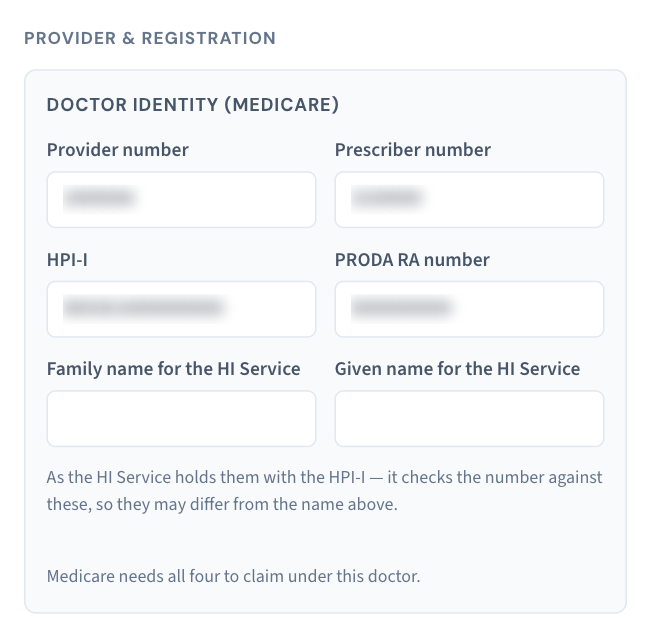
Curaeon holds one provider number per doctor (KB-120 — Manage staff accounts in Settings → Users: add, change a role, seats, provider numbers, deactivate). It sends that same Medicare provider number on a DVA claim. There is no separate DVA provider number to record.
Important: A claim keeps the provider number that was on the doctor's account at the moment the claim was queued. Adding or correcting the number afterwards does not change claims already queued.
What a missing provider looks like in Curaeon
| What you see | What it means | What to do |
|---|---|---|
| A banner at the top of Billing: These claims can't be submitted yet, then a doctor's name with has no provider number and a count of claims waiting | The doctor has no provider number in Curaeon and has queued claims. | An administrator chooses Add it on their staff account in the banner, or opens Settings → Users. Anyone else sees An administrator adds it on their staff account in its place. |
| In Settings → Users, on the doctor's account: Incomplete — Medicare claims under this doctor will be refused until all four are set. | One of the provider number, prescriber number, HPI-I or PRODA RA number is missing. | Fill in what is missing (KB-120 — Manage staff accounts in Settings → Users: add, change a role, seats, provider numbers, deactivate). |
| A claim rejected with provider number is required … | The claim was queued when the doctor had no provider number in Curaeon. Nothing was sent. | Record the number, then use Void & correct on the invoice and queue the claim on the corrected one. Send again would send the claim without the number again (KB-156 — Follow a Medicare or DVA claim: its status, Check now and the claims list). |
| A claim rejected shortly after it was queued, with a sentence from Tyro about the provider | Curaeon sent the claim and Tyro refused it. The likeliest cause is a provider number that is not registered, or not active, in Tyro Health Online. | Register or activate the number with Tyro, then send the claim again (KB-156 — Follow a Medicare or DVA claim: its status, Check now and the claims list). |
Curaeon shows Tyro's refusal in Tyro's own words, exactly as it arrived. This article cannot quote that sentence, because it is Tyro's to change.
The same banner also says when the practice has no Medicare Minor ID, with a link to Settings → Practice (KB-116 — Set up your practice's details, opening hours and closures in Settings → Practice).
When a new doctor starts
Add these to your starter checklist (KB-084 — New staff onboarding and offboarding checklist):
- Register the doctor's provider number for your location in Tyro Health Online, and confirm it is active.
- Record the number on their account in Settings → Users.
- Only then let them bill.
A locum or registrar is no different. The number they use at your practice is registered before their first day.
If that didn't work
If Tyro confirms the provider is active and claims under that doctor are still refused, compare the number in Settings → Users with the one in Tyro Health Online. A single wrong character is enough. If they match, raise a ticket with the invoice number and the reason shown on the claim. Do not include the patient's name or Medicare number (KB-007 — Why we never need patient details in a support ticket).
Still stuck? Raise a ticket at support.curaeon.com.au or call 1300 XXX XXX. If your clinic can't see patients right now, call and choose option 1. Support is staffed Monday to Friday, 8:00–18:00 Sydney time; outside those hours a call or text to the same number is answered on a best-effort basis.
Related articles
- KB-120 — Manage staff accounts in Settings → Users: add, change a role, seats, provider numbers, deactivate — Manage staff accounts in Settings → Users: add, change a role, seats, provider numbers, deactivate
- KB-156 — Follow a Medicare or DVA claim: its status, Check now and the claims list — Follow a Medicare or DVA claim: its status, Check now and the claims list
- KB-017 — Medicare claim rejections — common causes and fixes — Medicare claim rejections — common causes and fixes
- KB-058 — What Curaeon connects to Services Australia today (AIR, IHI, PBS authorities, Medicare, MyMedicare), and the manual workaround for each — What Curaeon connects to Services Australia today (AIR, IHI, PBS authorities, Medicare, MyMedicare), and the manual workaround for each
- KB-084 — New staff onboarding and offboarding checklist — New staff onboarding and offboarding checklist
- KB-116 — Set up your practice's details, opening hours and closures in Settings → Practice — Set up your practice's details, opening hours and closures in Settings → Practice