Refer a patient: find a provider in HealthLink/HealthShare, or record a referral without a letter
Address a referral to the right specialist first time — even one your practice has never written to — and make sure a referral made by phone is still on the record.
Before you start
Referrals are written from the consult (or the chart's New from template) and are filed to the patient's record whether or not they are sent electronically. Who it is to comes first, on two tabs: Address book is everyone this practice has written to before; Find a provider searches the published provider directory for everybody else. Adding someone from the directory needs no administrator; an administrator can correct the entry later in Settings → Address book, which is an administrators' page.
A referral needs a clinical reason; it won't send without one.
Find a provider
- On the recipient step, choose Find a provider.
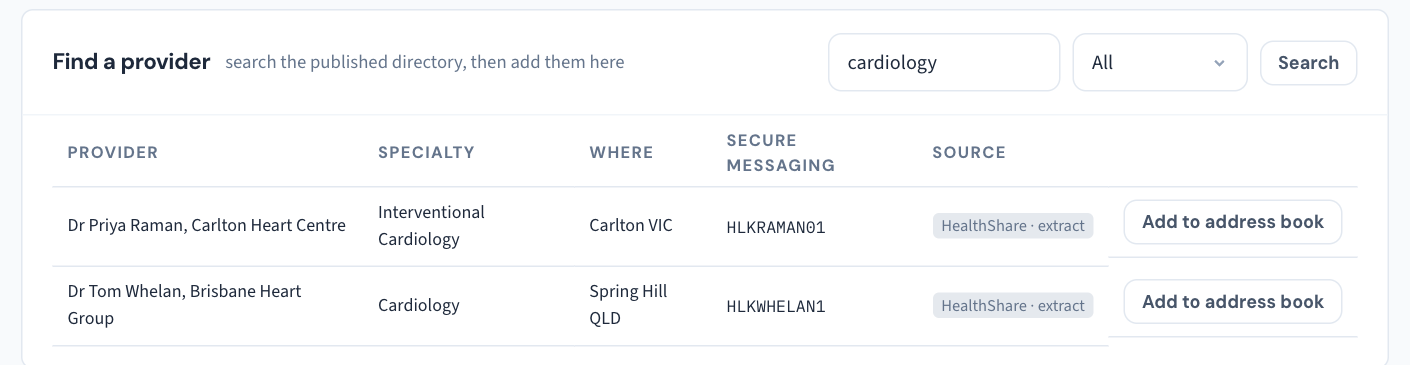
- Type it the way you'd say it — "cardiologist Carlton" — or a name, a practice, a postcode or a special interest.
- Read the badge on each result. The directory is really two, HealthLink and HealthShare, and every row says whose it is and how fresh: live is the service's answer just now; extract with a date is a file loaded on that date. The list beside the search box narrows results to one directory.
- If the same provider is in both directories under the same provider number, you'll see them once, with both rows beneath a line saying so — each exactly as its directory publishes it, because the two can disagree (a different secure-messaging address; a practice they've since left). Choose the row to use. Curaeon never mixes the two.
- Select the provider to see what the directory holds — specialty, provider number, address, whether they have a secure-messaging address — then add them.
If one directory can't be reached, the results say which, and the other's are still listed.
Record a referral without a letter
A referral by phone, or one whose letter you'll write tomorrow, still needs recording: where a patient was sent and for how long the referral is valid is what the practice tracks and what Medicare cares about.
- Tick Record only — no letter on the recipient step, or use Record without a letter on the Referrals list under "Issued this visit".
- The referral appears in that list. From there, Print produces a paper referral on your letterhead, Write letter opens the composer for it later, and Mark sent records that it has gone. Once the referral holds a letter the button reads Write another letter; the new letter takes the earlier one's place on the referral, and the earlier one stays in the patient's documents.
You won't create a duplicate: a letter written this visit for a recipient already referred to attaches to that referral instead of starting a second one.
Every referral has a number
A referral is given a number when it is recorded, with or without a letter, and the number never changes. It reads Referral no. 1042, and you will find it:
- on the referral's row in the Referrals list under "Issued this visit" in the consult;
- on Referrals waiting for a letter, on the Reports tab of the patient's record, where a referral recorded without a letter waits for one;
- on the paper referral that Print on the row produces, after its date and urgency;
- under the date on the letter you file for the referral. You do not type it and it is not a field to insert: Curaeon puts it there, on the filed letter, its PDF and its .rtf.
So the practice the referral goes to reads the number from the letter. A referral sent over HealthLink also carries it in the message itself.
When their rooms ring about "referral 1042":
- If the letter was sent by secure messaging, an administrator types the number into Find by referral number on Settings → Referrals sent (KB-059 — Secure-messaging referral "Not delivered" or stuck on "Sent — awaiting confirmation").
- A referral that was printed and handed over, posted, or not sent yet is not in that list. Its number is on the referral in the patient's consult.
A letter filed before Curaeon began printing the number does not carry it, and is not changed. The referral itself still has its number.
If the number could not be read when the letter was opened, a notice above the letter says so, and the letter is held back rather than filed without it. What the notice offers is in KB-106 — Write a letter in the editor: Insert from the record, { } Field, and the formatting that survives print and email.
Good to know
- Curaeon connects to one messaging network at a time. A recipient on a different network is refused at the point of sending, naming both networks — never marked sent and quietly lost. Post it, or ask them for an address on your network. Send-status badges and "Not delivered" are covered in KB-059 — Secure-messaging referral "Not delivered" or stuck on "Sent — awaiting confirmation".
- On Medical-Objects, the address is the recipient's Medicare provider number or, for somebody who has none, the routing id Medical-Objects gave them (two letters, four digits, then five more characters). The placeholder
0000000Yis nobody's address. Curaeon checks the address when you press send, not when it is typed, and refuses one Medical-Objects does not know or has deactivated. One it lists as inactive but still delivers to is a warning, with Send anyway or Keep it unsent (KB-059 — Secure-messaging referral "Not delivered" or stuck on "Sent — awaiting confirmation"). - A second letter for the same referral replaces the first. Once the referral's earlier letter has been sent, the button reads Send corrected letter and names the date of the letter it replaces (KB-088 — Letters and referrals FAQ).
If that didn't work
| What you see | What it means | What to do |
|---|---|---|
| On the Address book tab: "The address book could not be loaded (…), so nobody can be chosen from it. Find a provider searches the published directory instead." | The practice's address book was not read. It is not an empty address book | Choose Try again beside the message, or use Find a provider |
| "The address book is empty — nobody has been written to from here yet." | The address book was read and holds nobody | Use Find a provider, or ask an administrator to add the contact (KB-124 — Keep the practice address book in Settings → Address book: add, edit and retire a contact) |
| "Loading the address book…" | The list is on its way | Wait |
| In the New referral window that Record without a letter opens: "The address book could not be loaded, so nobody can be chosen from it. Type who the referral is to below." | The picker is empty because the address book was not read | Choose Try again, or type the name in Referred to |
| Under Copies: "The address book could not be loaded, so copies cannot be chosen." | Copies cannot be ticked. The letter can still be filed and sent to its recipient | Choose Try again |
The Address book tab lists the whole address book once it has loaded. A notice above the letter that begins "Could not be loaded when this letter was composed" is covered in KB-106 — Write a letter in the editor: Insert from the record, { } Field, and the formatting that survives print and email, and what a part that could not be loaded means in general is in KB-170 — When part of a screen says it could not be loaded: Try again, and what Loading… means.
If a provider you know exists isn't in either directory, ask an administrator to add them to the address book by hand (KB-124 — Keep the practice address book in Settings → Address book: add, edit and retire a contact), and let us know. The directories are HealthLink's and HealthShare's, not ours — we can't correct their entries, but we can check your extract is current.
Still stuck? Raise a ticket at support.curaeon.com.au or call 1300 XXX XXX. If your clinic can't see patients right now, call and choose option 1. Support is staffed Monday to Friday, 8:00–18:00 Sydney time; outside those hours a call or text to the same number is answered on a best-effort basis.
Related articles
- KB-059 — Secure-messaging referral "Not delivered" or stuck on "Sent — awaiting confirmation" — Secure-messaging referral "Not delivered" or stuck on "Sent — awaiting confirmation"
- KB-088 — Letters and referrals FAQ — Letters and referrals FAQ
- KB-049 — Build and import letter templates: Word upload, merge fields, pronoun fields, snippets — Build and import letter templates: Word upload, merge fields, pronoun fields, snippets
- KB-007 — Why we never need patient details in a support ticket — Why we never need patient details in a support ticket
- KB-103 — Check Directory sources when Find a provider says "extract", looks stale, or cannot reach a directory — Check Directory sources when Find a provider says "extract", looks stale, or cannot reach a directory
- KB-124 — Keep the practice address book in Settings → Address book: add, edit and retire a contact — Keep the practice address book in Settings → Address book: add, edit and retire a contact