Record a patient's MyMedicare registration, and what reads it
Put on the patient's record the day they registered in MyMedicare with your practice, and the day it ended, so the billing checks for telehealth, the MyMedicare incentives and GP chronic condition management plans give the right answer.
Before you start
- Curaeon has no connection to MyMedicare. It does not ask Services Australia whether a patient is registered, and it does not register anyone. You check the registration in the Services Australia portal, as before, and record here what it says (KB-058 — What Curaeon connects to Services Australia today (AIR, IHI, PBS authorities, Medicare, MyMedicare), and the manual workaround for each).
- What you record is what Curaeon believes. Nothing checks it afterwards. A patient registered with the practice but not recorded here is treated as not registered.
- Any signed-in member of staff who can open the patient's record can record a registration or its end. It is the same front-desk work as keeping the Medicare card up to date.
- It cannot be done with an API key. The record keeps who said it.
Find the MyMedicare row
- Open the patient's record. Stay on the Overview tab.
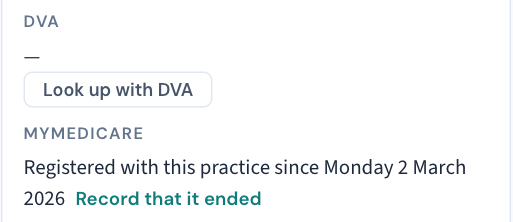
- Find the Identifiers & Funding card. MyMedicare is its last row.
The row says one of two things:
- Not recorded as registered with this practice, with Record registration beside it;
- Registered with this practice since and the date, with Record that it ended beside it.
Record a registration
- Check the registration in the Services Australia portal, and note the day it started.
- On the MyMedicare row, choose Record registration.
- In Registered on, enter the day the registration started. It starts on today. A day after today cannot be chosen.
- Choose Save.
The row now reads Registered with this practice since and the date. Cancel closes the form without saving.
Record that a registration ended
When the patient moves their MyMedicare registration to another practice, or withdraws:
- On the MyMedicare row, choose Record that it ended.
- In Ended on, enter the day it ended. It cannot be after today or before the day it started.
- Choose Save.
The row goes back to Not recorded as registered with this practice. Nothing is deleted: the registration is kept with both dates, and the billing checks still read it for services in that period. On the day given as Ended on, the patient counts as no longer registered.
A patient has at most one open registration. To record a new one after an end, choose Record registration again.
What reads it
Three Medicare Benefits Schedule rules turn on whether the patient was registered on the day of the service. Curaeon checks them when an item is added to an invoice, and says what it finds as a message. All three are warnings: none stops the item being billed, and none names a different item (KB-177 — Why an item is warned about or refused on an invoice: MBS co-claiming rules and the bulk billing incentive).
| Rule | Items | What Curaeon does |
|---|---|---|
| Telehealth needs a face-to-face service at the practice in the last 12 months (MBS note AN.1.1) | Telehealth attendance items | Warns when none is on the practice's accounts. No warning for a patient recorded as registered on the day of the service, because the schedule exempts them |
| MyMedicare incentives are for registered patients only (MBS note MN.1.1, Category 3) | 75880 to 75885 | Warns when the patient is not recorded as registered on the day of the service, and ends: "If they are registered, record it on their record (MyMedicare)." |
| A patient registered in MyMedicare has GP chronic condition management plans from the practice they are registered with (MBS note AN.0.47), for services from 1 July 2025 | 965, 967, 92029, 92030, 392, 393, 92060 and 92061 (prepare and review; GP and prescribed medical practitioner; face to face and video) | Warns when the patient is not recorded as registered with your practice on the day of the service. The warning quotes the note and its exception, that a patient not registered through MyMedicare can have the service from their usual medical practitioner, and ends: "If they are registered with this practice, record it on their record (MyMedicare); if they are registered with another, item … is that practice's to provide." |
Curaeon records registration with your practice only. A patient not recorded here may be registered nowhere, or with another practice, and Curaeon cannot tell which; that is why the care plan warning names both.
So a registration you have not recorded shows up as a warning on an incentive or care plan item, not as a silent mistake. If the patient is registered, record it here.
Important: Record the registration with the day it really started. A telehealth service before that day is checked as if the patient were not registered.
If the row could not be read
If Curaeon could not read the registration, the row says so in red, with the reason and Try again. It does not say "not registered" in its place, because that is the answer the billing checks would act on. Choose Try again (KB-170 — When part of a screen says it could not be loaded: Try again, and what Loading… means).
What is recorded
Each change is on the patient's history and in the Audit log, with who made it:
| You did | It reads |
|---|---|
| Recorded a registration | MyMedicare registration recorded |
| Recorded that it ended | MyMedicare registration ended |
If that didn't work
- "this patient is already recorded as registered in MyMedicare with the practice." A registration is already open. Record that it ended before recording a new one.
- "this patient is not recorded as registered in MyMedicare with the practice." There is no open registration to end. Read the record again: someone else may have changed it.
- "invalid MyMedicare date" and a reason. The day is after today, or the end is before the start.
- An earlier registration is not on the screen. The row shows only the open one. Earlier registrations are kept and still count for their dates.
- A warning about MyMedicare on an invoice for a patient you know is registered. Record the registration, with the day it started. The warning was a message only: the item stays on the invoice either way.
Still stuck? Raise a ticket at support.curaeon.com.au or call 1300 XXX XXX. If your clinic can't see patients right now, call and choose option 1. Support is staffed Monday to Friday, 8:00–18:00 Sydney time; outside those hours a call or text to the same number is answered on a best-effort basis.
Related articles
- KB-058 — What Curaeon connects to Services Australia today (AIR, IHI, PBS authorities, Medicare, MyMedicare), and the manual workaround for each — What Curaeon connects to Services Australia today (AIR, IHI, PBS authorities, Medicare, MyMedicare), and the manual workaround for each
- KB-175 — Book and hold a phone or video consult — Book and hold a phone or video consult
- KB-177 — Why an item is warned about or refused on an invoice: MBS co-claiming rules and the bulk billing incentive — Why an item is warned about or refused on an invoice: MBS co-claiming rules and the bulk billing incentive
- KB-157 — Verify a patient's Medicare card with Medicare — Verify a patient's Medicare card with Medicare
- KB-142 — Register a new patient — Register a new patient