Import patients, documents, appointments and balances from your previous system, and read the reconciliation report
Bring your previous system's data into Curaeon through Settings → Import patients, one kind at a time, with a preview before anything is written and a printable reconciliation report at the end — the record your old system is retired on.
Before you start
- KB-024 — Migrating from your legacy PMS — what to expect explains the shape of a migration; this article is about the tool. For a full Best Practice or Medical Director conversion, raise a Data migration request or talk to your Curaeon contact rather than starting with the import screen alone.
- You'll need your previous system's exports in the formats below, and a practice administrator to approve each import. Only a practice administrator can run an import.
- Read "How the importer reads coded words" near the end of this article before the file is prepared. A status the importer does not recognise is refused, not guessed.
What Settings → Import patients brings across
The screen has three cards, one for each kind of file.
| Card | Format | What to know |
|---|---|---|
| Import patients (steps 1 to 3 on the screen) | CSV / spreadsheet, or Curaeon export XML | A spreadsheet carries demographics only. Clinical history comes with a patient record in Curaeon's export XML, one patient per file: allergies, diagnoses, medications, immunisations, results, recalls, contacts, family links, alerts, observations, social and family history, care plans, past prescriptions and consultation notes. An outstanding balance travels in the same record. |
| Import documents | A zip with a manifest.csv or manifest.xml |
Each row must match exactly one patient here, so import the patients first. A file's own date is kept. A file already on that patient's chart from an earlier import is listed as not taken, and not filed again. |
| Import appointments | CSV or XML | Every practitioner named in the old system is confirmed against a person here before anything is booked. |
An outstanding account balance lands as one figure per patient, not re-created invoices, so the old practice's revenue never enters this practice's books. See "Balances from the previous practice" below for where that figure is shown.
Steps
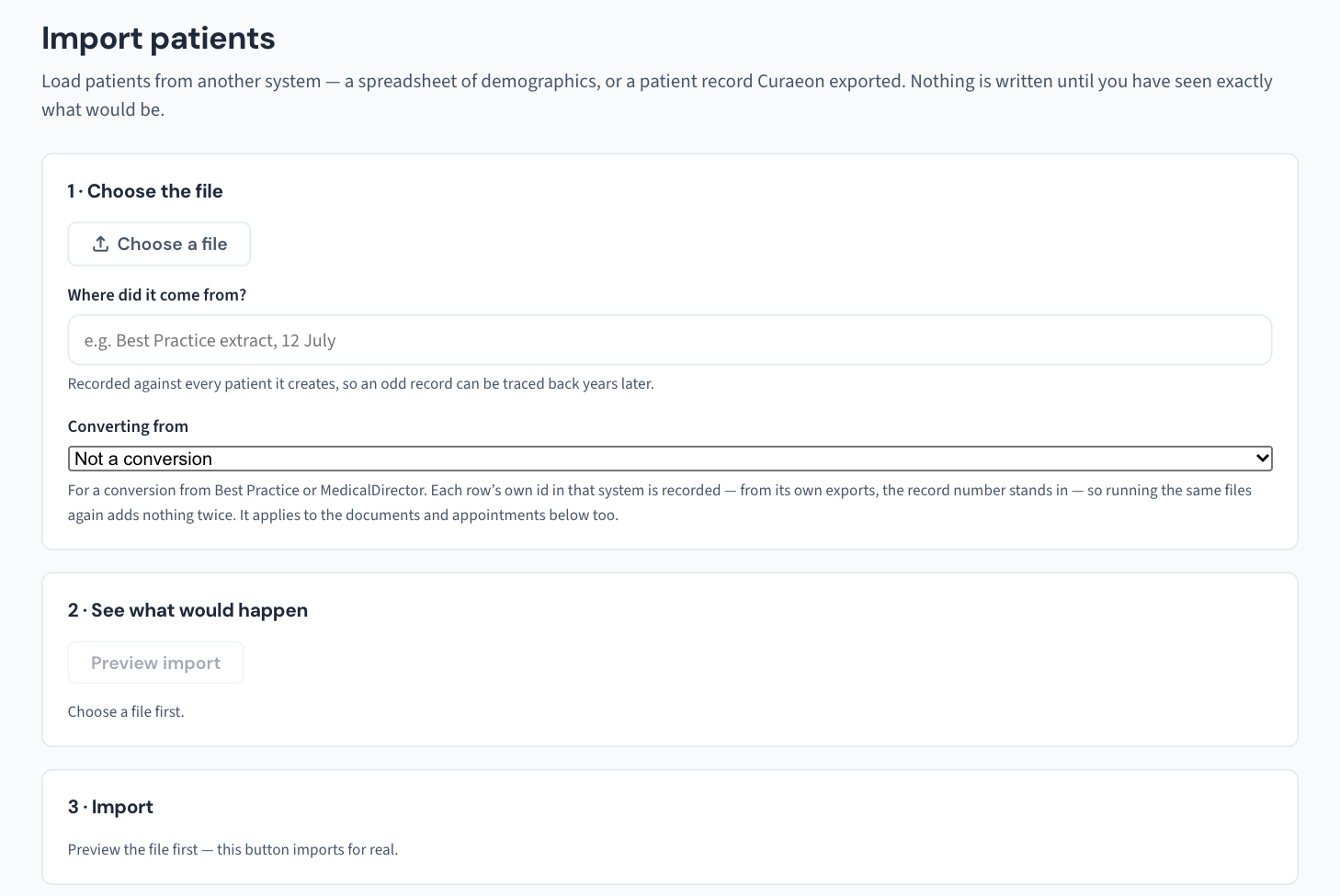
- Open Settings → Import patients.
- Under 1 · Choose the file, choose the file. Check the format shown beside its name (CSV / spreadsheet or Curaeon export XML) and fill in Where did it come from?.
- For a conversion from Best Practice or MedicalDirector, choose the system under Converting from. The screen explains why: each row's own id in that system is recorded, "so running the same files again adds nothing twice". The choice applies to the documents and appointments cards too.
- Under 2 · See what would happen, choose Preview import. Curaeon previews first and writes nothing. Read the preview: how many patients would be created, how many are already on file and how many rows are unusable, each with its reason; the clinical history that would come across, section by section; and any section in the file that is not imported.
- Under 3 · Import, choose Import N patients. The result line says how many patients were created, how many clinical records came with them, how many were already on file and how many rows could not be imported.
- Choose Print the reconciliation report.
- For the scanned archive, use the Import documents card: choose the zip, then Preview, then Import N documents. Read Not taken, and why in the preview first. A document already on that patient's chart from an earlier import is listed there with "this patient's chart already holds this exact file from an earlier import — not filed again", so running the archive a second time does not file a second copy. Two rows of one archive holding the same file for the same patient file once; the second reads "the same document as row N — filed once". This match is by the file's bytes, and only where the row has no
source_id: a row with one is kept apart from every other, as the old system kept them, whatever its bytes. A page scanned in by hand on the chart is not found by it, because only an import records what it compares. - For the appointment book, use the Import appointments card: choose the file, then Preview. Under Who is who — confirm each before booking, match each old-system practitioner to the right person here. Read Not taken, and why. Then choose Book N appointments.
- Print each report, check the counts against what your previous system said it held, and have the practice decision-maker sign the sign-off line. File it. It is the record the old system is retired on.
Important: The preview of a patient file cannot show every refusal. It counts the clinical rows that are missing a required detail (shown as "· N skipped" beside the section). A clinical row with a coded word the importer does not recognise is only found when the row is written, so it appears after the import, in the result line ("N could not be imported.") and in the reconciliation report. The appointment preview is different: it lists every row it would refuse, with the reason, before anything is booked.
Each on-screen list shows the first 100 rows. The printed report has all of them.
Tip: Print the reconciliation report is offered in the result of the import you have just run. Print or save the report before you leave or reload the screen.
Reading the reconciliation report
Three things are on it: the counts (under What came across), every skip with its reason (under What did not come across, and why), and the sign-off line. A skip is not a silent failure. It names the row and why it was left out, so you can decide whether it matters.
Skips are grouped by section and by reason, largest group first, with the number of rows beside each. Every row in a group is listed by its row in the source file, its record number and how it was matched, never by a patient's name, because the page sits on a desk. A coded word is its own line: every allergy whose status is a word the importer cannot read is one line with one count, so you can see at once how many rows a single word cost.
Fix what's mechanical in the source and re-import, or accept the skip and note why on the printed report. "A word the importer does not recognise", below, says what can be re-imported and what cannot.
Imported allergies raise alerts
An allergy or adverse reaction that comes across as active raises an allergy alert, the same alert a reaction recorded on the chart raises (KB-145 — Record allergies, history and observations). It shows in the alerts above the patient's record (KB-104 — Add or lift a DNR, interaction or red-flag alert above a patient's chart), in the consult, on Today and under the Allergy alert filter on Patients. Resolving the reaction on the chart lifts its alert.
- The alert is graded by the severity the reaction landed with. See the severity table below: a severity the importer cannot read lands as moderate.
- A reaction that comes across as resolved, including one the old system marked "Inactive", is on the record, marked resolved, and raises no alert. If a clinician disagrees, they record the reaction again on the chart, which raises the alert.
- The preview raises nothing. Alerts are made when the import runs.
- The alerts are not counted in the report's rows. The report counts the reactions the file held; each alert is made from its reaction.
- If the file carries its own alerts as well as the reactions, an allergy alert that says exactly what the reaction's alert would say is used for that reaction, and no second one is raised. A differently worded alert from the old system is kept as it is, and the reaction raises its own. Two lines about the same allergy can then show; a person lifts the spare one.
Allergies imported by an earlier version of Curaeon, which raised no alert, were given their alerts when the server was updated.
A code from a terminology Curaeon does not hold
Curaeon holds diagnosis codes in two terminologies: ICPC-2 and SNOMED CT-AU. A diagnosis or a family history entry coded in either keeps its code.
A row coded in anything else is kept as text. That includes DOCLE (MedicalDirector), Pyefinch (Best Practice), "ICPC-2 PLUS" and "SNOMED CT" without the AU. Everything else in the row comes across. The code and the name of its terminology are both left out, because a code only means something in the terminology that issued it.
- The old code is not kept anywhere in Curaeon, and the report does not list it: the row landed, so it is not a skip. If you need the old codes, they are in the system you came from.
- The diagnoses that landed without a code are listed, grouped by wording, in Settings → Diagnosis coding, where a clinician can code them in bulk (KB-126 — Code a backlog of free-text diagnoses in Settings → Diagnosis coding). They do not appear in Utilities → Data quality, which checks patient details only (KB-081 — Fix data-quality gaps before they become rejected claims or lost letters).
Balances from the previous practice
An imported balance is stored as one figure for the patient, with the date it was struck, the old account reference and any notes the file gave. It is never turned into an invoice or a payment here. The reconciliation report counts these rows as Imported balances under What came across.
Imported balances appear on Billing → Aged debtors as Brought forward: a figure at the head of the page, and their own list under the aged table. They are never inside the aged buckets or their total. The buckets age money from the date this practice issued the invoice, and a balance struck by another practice has no such date. The list is there so a conversion doesn't quietly understate what the practice is owed.
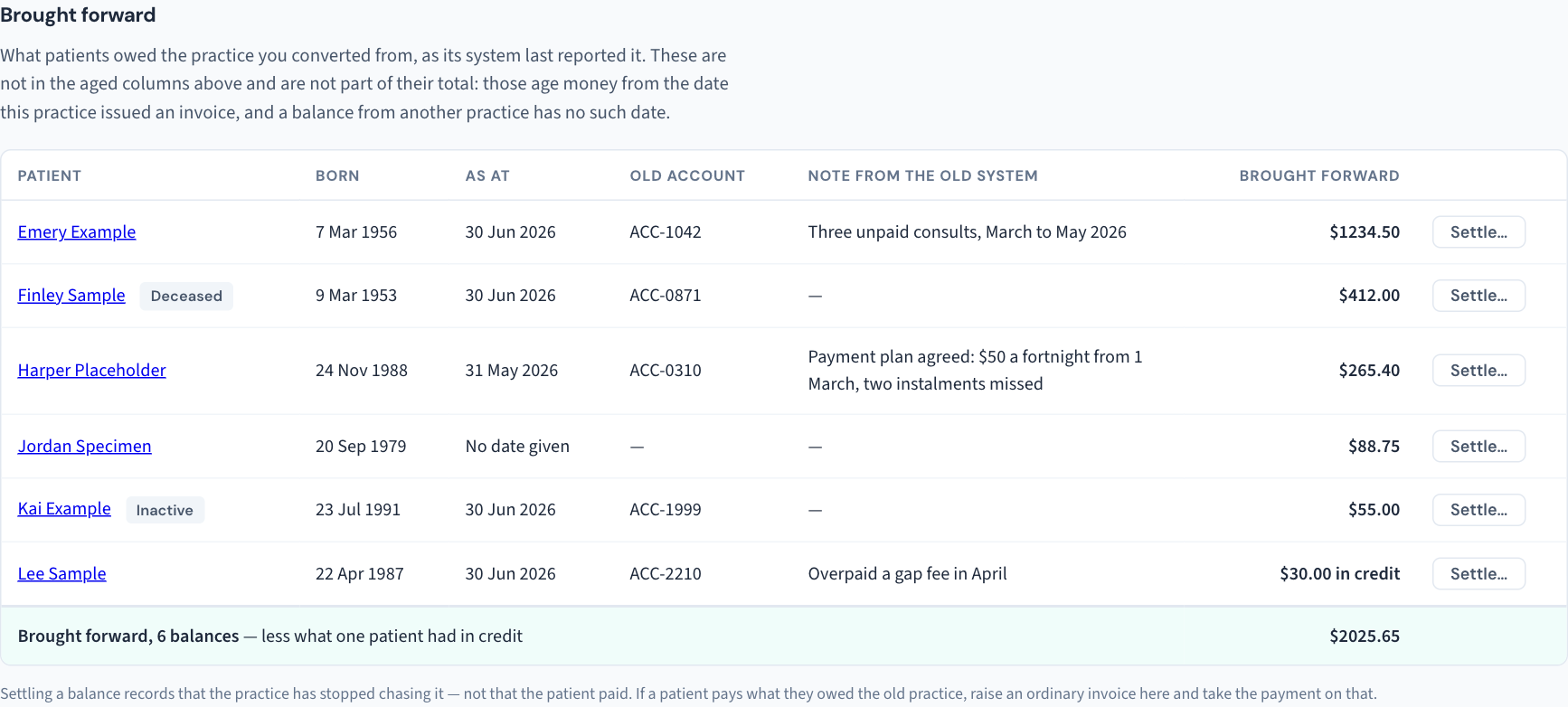
What the file gave is what the list shows:
- The date the balance was struck is in the As at column. A row with no date reads No date given.
- The old account reference and the notes are in their own columns, so a query can be answered from the system that still holds the detail.
- A credit in the file is shown as in credit, and the total at the foot is what was owed less those credits.
-
Where you chose a system under Converting from, Curaeon keeps one opening balance per patient. A balance row left out for that reason is on the report, with its row and one of two reasons:
- A patient who already has a balance from an earlier import is not given another: "this patient already has an opening balance from an earlier import — not written again".
- Where one import lists two balances for the same patient, the first is brought forward and the second is not: "this patient already has an opening balance from another row of this import — one is kept per patient, so this amount was not brought forward". The same reason is given in a conversion (KB-136 — Run a rehearsal and a cutover from Utilities → Conversion, and how it differs from Import) when two records in the archive share a record number and each carries a balance.
The amount on a row left out is not in the Brought forward list or its total. Give each patient their old balances as one figure in the file. A rehearsal's report shows which patients that is.
When a patient pays an old balance, they pay this practice. Raise an ordinary invoice here, with its own receipt and GST treatment. Then Settle… the old balance, which records that the practice has stopped chasing it, not that it was paid (KB-108 — Bank lines that won't match, statement reprints and brought-forward balances: the ledger FAQ).
A balance row needs an amount. 1,250.00, $1250 and (45.50) or -45.50 for a credit are read. An amount that cannot be read, or a zero, refuses the row with "amount is not an amount:" and the value.
After the import
- Utilities → Duplicate patients lists records that look like one person (same Medicare number, or same family name and date of birth). Nothing merges automatically; each pair opens Settings → Merge patients (KB-042 — Find and merge duplicate patient records).
- Utilities → Data quality lists active patients missing a Medicare number, date of birth, mobile or a usable address.
- Settings → Diagnosis coding lists the diagnoses that came across without a code (KB-126 — Code a backlog of free-text diagnoses in Settings → Diagnosis coding).
- On a patient's record, imported entries carry a stamp: "Imported from" and the name you gave the file, "Dated before" and the date of the signed cutover (or "Not yet cut over."), and "Not screened."
What a spreadsheet or an appointment file needs
A patient spreadsheet (CSV) needs a header row. Capitals do not matter, and a space or an underscore between words is read the same. These headings are recognised:
| Detail | Headings read |
|---|---|
| Family name (the file must have this column) | family name, surname, last name |
| Given name | given name, first name, firstname |
| Date of birth | date of birth, dob, birth date |
| Sex | sex, gender |
| Medicare number | medicare number, medicare, medicare no |
| Record number | mrn, patient id, record no, urn |
| Mobile | mobile phone, mobile, cell |
| Home phone | home phone, phone |
| email, email address | |
| Address | address line1, address, address line 1, street |
| Suburb, state, postcode | suburb, town, city; state; postcode, post code, zip |
Every row needs a family name, a given name and a date of birth. A row without one is listed under Cannot be imported with the reason, for example "no date of birth". A patient already on file is listed under Already on file — skipped, never overwritten and is never changed: the reasons are "a patient already has this MRN", "a patient already has this Medicare number", "a patient with this name and date of birth is already on file" and "listed more than once in this file".
An appointment file (CSV or XML) needs practitioner and start for each booking, and the patient: mrn, or family_name, given_name and date_of_birth. It may also carry duration_minutes, type, status, reason and source_id.
startis a date and time on the practice's clock, written for example as2026-10-12 09:30,2026-10-12T09:30or12/10/2026 09:30. One that cannot be read refuses the row with "unreadable start".duration_minutesis 15 when the file gives none. It must be a whole number from 5 to 480.typeis matched by name to one of this practice's appointment types. With no match the booking lands with no type.statusis read from the list under "Appointments" below.- The patient must match exactly one patient here, so import the patients first.
How the importer reads coded words
Many fields in a patient record hold one word from a short list: a status, a severity, a route. Other systems spell those words their own way. This section lists every word the importer reads and what each becomes. The same rules apply to Settings → Import patients and to Utilities → Conversion (KB-136 — Run a rehearsal and a cutover from Utilities → Conversion, and how it differs from Import).
Three rules hold for every list:
- Capitals never matter, and spaces before or after a word are ignored. "ACTIVE", "Active" and "active" are the same word.
- Only whole words are read. "Inactive" is read; "No longer active" is not.
- Write a word as it is listed, unless the table says another spelling is read. Statuses, certainty, category and reaction type also accept a hyphen or an underscore where the list has a space: "Entered in error", "entered-in-error" and "entered_in_error" are one status. The relationship, recall and report type lists do not: there the word must be written as shown.
The field names in the tables (status, severity) are the names the file uses, and the names a refusal quotes.
Allergies and adverse reactions
| Field | In the file | Becomes |
|---|---|---|
severity |
severe, life threatening (or life-threatening), fatal, anaphylaxis, anaphylactic | Severe |
| moderate | Moderate | |
| mild, minor | Mild | |
| any other word ("Unknown", "High", "Low"), or nothing | Moderate. The row is kept. A severity is never a reason to refuse an allergy | |
status |
active, or nothing | Active, and an alert is raised |
| resolved, inactive | Resolved. No alert | |
| entered in error | Entered in error. No alert | |
| any other word ("Deleted", "Stopped") | The row is refused | |
certainty |
confirmed, or nothing | Confirmed |
| suspected | Suspected | |
| any other word ("Unlikely") | The row is refused | |
category |
medication, food, environment, biologic, other | As written. Nothing given lands as medication |
| any other word | The row is refused | |
reaction_type |
allergy, intolerance, adverse reaction | As written. Nothing given lands as allergy |
| any other word ("Side effect") | The row is refused |
A refused row here is a whole allergy that did not come across. Read these lines of the report first.
Diagnoses
| Field | In the file | Becomes |
|---|---|---|
status |
active, or nothing | Active |
| resolved, inactive | Resolved | |
| entered in error | Entered in error | |
| any other word ("Deleted", "Stopped") | The row is refused | |
category |
condition, procedure, obstetric | As written. Nothing given lands as condition |
| any other word | The row is refused | |
code_system |
ICPC-2, SNOMED CT-AU | The code is kept |
| any other terminology | The diagnosis is kept without its code. See "A code from a terminology Curaeon does not hold" |
Medications
| Field | In the file | Becomes |
|---|---|---|
status |
active, current, or nothing | Active: on the current medication list |
| ceased, stopped, past, inactive | Ceased: off the current medication list, and kept on the record | |
| entered in error | Entered in error | |
| any other word ("Previously", "No longer taking", "Current - under review") | The row is refused |
Note: "Stopped" lands as ceased even where the old system meant the medicine was only paused. A clinician who restarts it adds it again.
Family history
| Field | In the file | Becomes |
|---|---|---|
relation |
mother, mum, mom | Mother |
| father, dad | Father | |
| sibling, brother, sister | Sibling | |
| child, son, daughter | Child | |
| aunt; uncle; cousin | Aunt; uncle; cousin | |
| maternal grandmother, grandmother (maternal) | Maternal grandmother | |
| paternal grandmother, grandmother (paternal) | Paternal grandmother | |
| maternal grandfather, grandfather (maternal) | Maternal grandfather | |
| paternal grandfather, grandfather (paternal) | Paternal grandfather | |
| any other word ("Grandmother" with no side, "Half-brother") | Other. The row is kept, but the word itself is not. Put it in the entry's notes in the file if it matters |
|
status |
active, or nothing | Active |
| entered in error | Entered in error | |
| any other word ("Inactive", "Deceased") | The row is refused. An entry has only these two statuses; "Deceased" is about the relative, not the entry | |
code_system |
ICPC-2, SNOMED CT-AU | The code is kept |
| any other terminology | The entry is kept without its code |
Results (diagnostic reports)
A report's status may be a word or one of HL7's result status letters.
| In the file | Becomes |
|---|---|
| registered, or the letters O, I or S | Registered |
| preliminary, or the letter P | Preliminary |
| partial, or the letters R or A | Partial |
| final, or the letter F, or nothing | Final |
| corrected, or the letter C | Corrected |
| amended | Amended |
| cancelled, or the letter X | Cancelled |
| any other word or letter ("Interim", M, N, Y, Z) | The row is refused. An unreadable status is never filed as final |
The letters are read as the status of the whole report. An extract that fills this field from the status of one result line inside the report is wrong before it reaches Curaeon.
report_type is read as pathology (also path, lab, laboratory), imaging (radiology, xray, x-ray) or cardiology (cardiac, ecg). Anything else, or nothing, lands as other. It never refuses a row.
Immunisations
route in the file |
Becomes |
|---|---|
| IM, I.M., intramuscular | Intramuscular |
| SC, S/C, subcut, subcutaneous | Subcutaneous |
| oral, PO, by mouth | Oral |
| intranasal, nasal | Intranasal |
| intradermal, ID | Intradermal |
| any other word ("Left deltoid", "Intravenous"), or nothing | No route recorded. The immunisation is kept |
An immunisation with no date given is refused: the vaccine and the day are the record.
Contacts and family links
Neither of these ever refuses a row over the relationship word.
| What | In the file | Becomes |
|---|---|---|
A contact's relationship |
next of kin, next_of_kin, nextofkin, NOK, spouse, partner, husband, wife, parent, mother, father, son, daughter, sibling | Next of kin |
| emergency, emergency contact, ICE, in case of emergency | Emergency contact | |
| carer, care giver, caregiver, support person | Carer | |
| guardian, legal guardian, power of attorney, POA | Guardian | |
| any other word, or nothing | Other | |
A family link's relationship (the other person, from this patient's side) |
mother, father, parent, mum, mom, dad, step-parent, stepparent | Parent |
| son, daughter, child, stepson, stepdaughter, stepchild | Child | |
| spouse, husband, wife, partner, de facto, de-facto | Spouse | |
| sibling, brother, sister, stepbrother, stepsister | Sibling | |
| guardian, legal guardian | Guardian | |
| dependant, dependent | Dependant | |
| any other word, or nothing | Other |
When a contact's or a family link's word lands as other because Curaeon has no name for it, the word is kept in the notes as a sentence, in front of any notes the file gave. For example, a contact described as "Neighbour" carries the note:
Recorded as "Neighbour" in the imported record.
The chart prints a contact's notes beside the contact. A family link's notes show on both patients' records. On the other person's record they are printed after "On", the first patient's name and "’s record:", so the word is read the right way round.
A word that does map keeps nothing extra: "Wife" lands as next of kin, and the chart no longer says she is the wife.
A family link is written only when the other person matches exactly one patient on file. The report names the rows that did not.
Recalls and alerts
A recall's status never refuses a row, and a word the importer cannot read lands as pending, never as completed, so an outstanding recall is not closed by mistake.
A recall's status in the file |
Becomes |
|---|---|
| pending, due, outstanding, open, active, any unrecognised word, or nothing | Pending |
| contacted, notified, letter sent, sms sent, reminded | Contacted |
| booked, scheduled, appointment made, appt booked | Booked |
| completed, complete, done, attended, finished | Completed |
| cancelled, canceled, declined, inactive, deleted, no longer required | Cancelled |
An alert's type is read as allergy, DNR (also "do not resuscitate") or interaction. Anything else lands as a red flag, with the old system's text as the alert's sentence.
Appointments
The appointment book's status decides whether a booking lands as attended, missed, cancelled or still to come. In this list a hyphen or an underscore counts as a space, so "No-show", "no_show" and "No Show" are the same.
| In the file | Lands as | On the Calendar |
|---|---|---|
| cancelled, canceled, rescheduled, re-scheduled, moved, deleted, unavailable, error, and the "in error" phrases listed below | Cancelled, whatever the date | Cancelled |
| no show, DNA, did not attend | No show, whatever the date | No show |
| completed, attended | Completed, whatever the date | Done |
| tentative, provisional, on hold, hold, held, unknown | A pending booking, whatever the date | Booked |
| nothing, pending, booked, scheduled, confirmed, arrived, at reception, in progress, invoiced, paid, with doctor, at billing, seen | Completed if the appointment's time had passed when the import ran. Otherwise a pending booking | Done or Booked |
| waiting | No show if the appointment's time had passed when the import ran. Otherwise a pending booking | No show or Booked |
| any other word | The row is refused |
The "in error" phrases that become cancelled. These are matched as whole phrases from a fixed list. There is no rule that reads any phrase ending in "in error".
- entered in error; in error; made in error; booked in error; created in error
- rebooked in error (also written re-booked in error)
- overbooked in error (also written over-booked in error)
- a count word followed by "booked in error", with the count word written apart or joined to "booked": "double booked in error" or "doublebooked in error". The count words read are exactly these twenty: double, triple, quadruple, quintuple, sextuple, septuple, octuple, nonuple, decuple, undecuple, duodecuple, tredecuple, quattuordecuple, quindecuple, sexdecuple, septendecuple, octodecuple, novemdecuple, vigintuple, unvigintuple.
Refused, on purpose:
- "Cancelled in error", "Deleted in error", "Completed in error" and "Rescheduled in error". There the mistake was something done to the booking afterwards, so the booking may stand.
- "Double booked" and "Overbooked" without "in error". Nobody has called them a mistake; they are real bookings.
- Any count past twenty-one ("Duovigintuple booked in error"), a number in place of the count word, or "in error" run together with the words before it.
- A phrase with anything added, such as "Entered in error - duplicate".
Things to know before the book is exported:
- Nothing is imported as arrived or in a consult. "Arrived", "At reception", "In progress" and "With doctor" are settled by the appointment's time, so no patient appears in today's waiting room who is not there.
- "Paid" or "Invoiced" on a future booking is a prepaid booking. It stays on the book as a pending booking.
- "Rescheduled" and "Moved" must be on the old slot. If your system writes the word on the slot the booking was moved to, those bookings land cancelled. Have the word changed to "Booked" on those rows first.
- "Tentative", "On hold" and the like lose the word. Curaeon has no softer status than a pending booking. One in the past stays a pending booking; it is not counted as attended, and nothing closes it later. If you know such a past booking was never kept, have the word changed to "Cancelled" in the file. KB-076 — Appointment statuses from pending to completed, and what "At reception" means says what the desk can do with one afterwards.
- "Unknown" is not the same as nothing. A past booking with no status lands as completed. One marked "Unknown" stays a pending booking.
- "Deleted", "Error" and the "in error" phrases land as a cancelled booking on that patient's appointment history. If the booking was deleted because it was made for the wrong patient, leave the row out of the file. A future booking marked this way comes off the book.
- "Unavailable" is usually a blocked-out slot with no patient. A row that names no patient is refused for that reason, whatever its status.
- "Waiting" on a past booking is read as a patient who was never seen. Take the export after the day's book is closed, or a patient sitting in the waiting room at that minute lands as a no show.
A word the importer does not recognise
The row is refused, and the refusal names the field and the word exactly as the file wrote them:
status "Deleted" is not one the importer recognises
The field is the file's own field name with spaces for underscores (reaction type "Side effect" is not one the importer recognises). A value longer than 60 characters is not quoted in a clinical row; that row reads "the practice database refused this row:" followed by the database's reason. A long appointment status is quoted cut short.
| What was imported | Where the refusal is shown | What to do |
|---|---|---|
| The appointment book, from Settings → Import patients | In the preview, under Not taken, and why, one line per row, before anything is booked. After booking, in the reconciliation report | Change the word in the file to one in the table above, or clear it if the old system recorded nothing, and choose Preview again |
| A patient's clinical history, from Settings → Import patients | Not in the preview. After the import, the result line counts it ("N could not be imported.") and the reconciliation report lists it | The patient is now on file, and importing the same file again skips a patient already on file together with their history. Add the entry by hand on the patient's record (KB-145 — Record allergies, history and observations), or raise a ticket |
| Anything, from Utilities → Conversion | On the run, under Skipped rows · grouped by reason · first three of each, with the section and the number of rows. Every row is in the printed report | Have the word corrected in the extract and run a rehearsal again (KB-136 — Run a rehearsal and a cutover from Utilities → Conversion, and how it differs from Import) |
If a refused word is one your previous system uses often and its meaning is not in doubt, raise a ticket. Give the section, the field and the word exactly as the report prints them, and the number of rows. Do not include any patient's details (KB-007 — Why we never need patient details in a support ticket). Which status another system's word stands for is a clinical decision, so Curaeon adds a word only when someone who knows the source has said what it means.
Other things the importer leaves out without refusing the row
- A date it cannot read in a clinical row is left blank and the row is kept. Dates are read day first:
2026-04-03,03/04/2026,3/4/2026,03-04-2026and20260403all mean 3 April 2026. A patient's date of birth is the exception: one that cannot be read refuses the patient. - A patient's sex it cannot read is left blank. These are read: F, female or 1; M, male or 2; X, other, intersex, indeterminate, non-binary or 3; U, unknown or not stated.
- An immunisation's route, a social history answer or an observation's interpretation it cannot read is left blank. An observation whose
typeit cannot read is refused, because a reading means nothing without knowing what it measures. - A field it does not know is named in the preview after "ignored fields:".
- A whole section it does not write is named in the preview after Not imported from this file:. In a conversion each of its rows is on the skip list with "Curaeon does not bring this section across from a conversion — it stays in the source system".
If that didn't work
| What you see | What it means | What to do |
|---|---|---|
status "…" is not one the importer recognises (or another field in place of status) |
The file used a word that is not in the lists above | See "A word the importer does not recognise" |
| "the practice database refused this row:" and a reason | The row broke a rule other than a coded word, for example a value that is too long or a missing date | Read the reason, correct the row in the file, or add the entry by hand |
| "no" followed by a field, such as "no substance" or "no drug name" | The row is missing the one detail it cannot do without | Fill it in the file, or accept the skip |
| An allergy is on the record but there is no alert above the chart | The reaction came across as resolved or entered in error, or the old system marked it "Inactive" | If it is a current allergy, record it on the chart (KB-145 — Record allergies, history and observations) |
| A diagnosis came across with no code | Its code was in a terminology Curaeon does not hold | Code it in Settings → Diagnosis coding (KB-126 — Code a backlog of free-text diagnoses in Settings → Diagnosis coding) |
| Many past appointments show as Done that you did not expect | They had no status, or a word that says only that the booking existed | That is how a past booking with no outcome lands. See the appointments table |
Still stuck? Raise a ticket at support.curaeon.com.au or call 1300 XXX XXX. If your clinic can't see patients right now, call and choose option 1. Support is staffed Monday to Friday, 8:00–18:00 Sydney time; outside those hours a call or text to the same number is answered on a best-effort basis.
Related articles
- KB-024 — Migrating from your legacy PMS — what to expect — Migrating from your legacy PMS — what to expect
- KB-023 — Requesting a data export or report — Requesting a data export or report
- KB-053 — Month-end and end of day: aged debtors, statement runs and bank reconciliation — Month-end and end of day: aged debtors, statement runs and bank reconciliation
- KB-136 — Run a rehearsal and a cutover from Utilities → Conversion, and how it differs from Import — Run a rehearsal and a cutover from Utilities → Conversion, and how it differs from Import
- KB-135 — Export the patient list, billing history or the whole database from Utilities → Import & export — Export the patient list, billing history or the whole database from Utilities → Import & export
- KB-126 — Code a backlog of free-text diagnoses in Settings → Diagnosis coding — Code a backlog of free-text diagnoses in Settings → Diagnosis coding
- KB-104 — Add or lift a DNR, interaction or red-flag alert above a patient's chart — Add or lift a DNR, interaction or red-flag alert above a patient's chart
- KB-076 — Appointment statuses from pending to completed, and what "At reception" means — Appointment statuses from pending to completed, and what "At reception" means