Migrating from your legacy PMS — what to expect
The honest version of how a migration goes — including the parts other vendors gloss over.
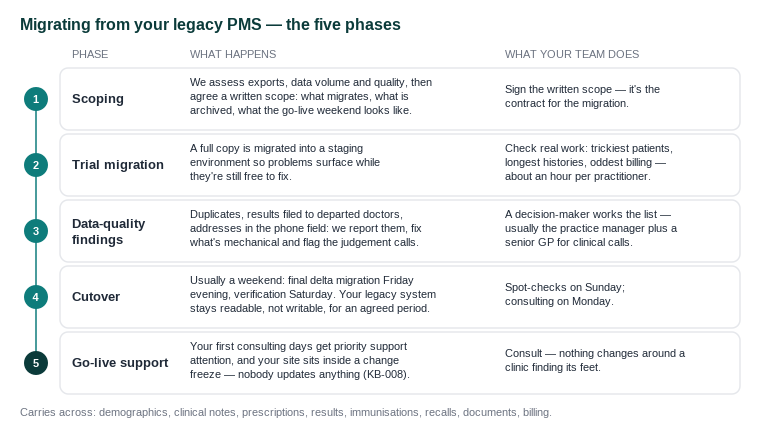
The shape of it
- Scoping (before anything moves). We assess your current system's export capabilities, data volume and quality, and agree a written scope: what migrates, what gets archived, what the go-live weekend looks like. You sign this — it's the contract for the migration, and nothing in it is a surprise later.
- Trial migration. We migrate a full copy into a staging environment and your team checks real work against it — look up your trickiest patients, longest histories, oddest billing arrangements. This is the step that catches problems while they're free to fix; the practices that test hardest have the smoothest go-lives.
- Data-quality findings. Every legacy system has them: duplicate patient records, results filed to departed doctors, addresses in the phone field. We report what we find, fix what's mechanical, and flag what needs a human decision from you. Expect this list to exist — its absence would mean we hadn't looked.
- Cutover. Typically over a weekend: final delta migration Friday evening, verification Saturday, your team's spot-checks Sunday, consulting Monday. Your legacy system stays readable (not writable) as a safety net for an agreed period.
- Go-live support. Your first consulting days get priority support attention, and your site sits inside a change freeze — nobody updates anything around a clinic finding its feet (KB-008 — Planned maintenance — how you'll be notified).
What genuinely carries across, and what doesn't
Patient demographics, allergies and adverse reactions, diagnoses, medications, immunisations, results, recalls, contacts and family links, alerts, observations, social and family history, scanned documents and the appointment book migrate.
Three kinds of record come across as history, kept apart from this practice's own work and marked as imported: consultation notes, past prescriptions and care plans prepared at the old practice. Past prescriptions show on the chart under Prescribed at a previous practice. None of them can be printed or reissued; Prescribe again starts a new script from a search for the medicine's name.
Billing history does not come across as invoices. The old practice's invoices and payments are not re-created here. What a patient still owed comes across as one figure per patient (KB-070 — Import patients, documents, appointments and balances from your previous system, and read the reconciliation report).
Two honest caveats: formatting fidelity of very old notes depends on how the legacy system stored them (content always survives; cosmetics sometimes don't), and third-party add-on data (a separate recall tool, a bolt-on dictation product) depends on that vendor's export — we'll tell you at scoping, not after.
Four things about how the records are read, each worth knowing before the trial migration:
- Status words are read from a list, not guessed. For allergies, diagnoses and medications the usual words are read: "Active" and "Inactive", and for medications "Current", "Past" and "Stopped". A word that is not on the list refuses that row, and the report names the word and counts the rows, so it can be mapped and the trial run again.
- An imported allergy raises its alert. An active allergy shows in the alerts above the patient's record from the day it is imported. One the old system marked inactive comes across as resolved and raises none.
- Codes from DOCLE, Pyefinch and other terminologies Curaeon does not hold are left behind. The diagnosis comes across as text and can be coded again here.
- An appointment's status decides how it lands. A past booking with no outcome lands as attended; one marked cancelled, rescheduled or made in error lands as cancelled; a status the importer cannot read leaves the booking out and names the word.
KB-070 — Import patients, documents, appointments and balances from your previous system, and read the reconciliation report has the full lists.
What we need from your team
- A decision-maker for the data-quality list (usually the practice manager plus a senior GP for clinical calls)
- Real testing effort at step 2 — an hour per practitioner, honestly spent
- Your legacy vendor's cooperation on the export; where a vendor charges for exports or drags their feet (it happens), we've seen most of the tricks and will help push
The commitment underneath
From cutover onward your data lives on your appliance with continuous backups — and everything in KB-023 — Requesting a data export or report applies from day one: it's your data, exportable on request, including away from us. We'd rather earn the renewal than build the lock-in.
Start the conversation: raise a Data migration ticket at support.curaeon.com.au, or talk to your Curaeon contact. Scoping costs nothing and commits you to nothing.
Related articles
- KB-023 — Requesting a data export or report — Requesting a data export or report
- KB-025 — Booking training for new clinic staff — Booking training for new clinic staff
- KB-136 — Run a rehearsal and a cutover from Utilities → Conversion, and how it differs from Import — Run a rehearsal and a cutover from Utilities → Conversion, and how it differs from Import
- KB-070 — Import patients, documents, appointments and balances from your previous system, and read the reconciliation report — Import patients, documents, appointments and balances from your previous system, and read the reconciliation report