Print a patient health summary
Print a one-page summary of a patient's record, and know when to write a health-summary letter instead.
Two different things
| Print summary | Clinical handover / health summary letter | |
|---|---|---|
| What it is | A fixed page printed straight from the record, titled Patient Summary | A letter template you fill in and edit |
| Where it starts | Print summary at the top of the patient's record | New from template, under Correspondence Out (KB-154 — Write a medical certificate, and the other built-in letter templates) |
| Who it is to | Nobody. It has no addressee | A recipient you choose |
| What goes in | Four sections, taken from the record as it is now | What you put in |
| Can you edit it | No | Yes |
| Is it filed | No. It is printed, and the print is recorded | Yes, as outgoing correspondence |
| Who can make one | Anyone who can open the record | A role that can write letters |
Print the summary
- Open the patient's record.
- Choose Print summary at the top of the record, beside Export. The summary opens in a new browser tab.
- Read it on screen.
- Choose Print.

There is nothing to set up for one patient and nothing to save. The summary is built again from the record every time you open it. The footer gives the date and says it reflects the record at the time of printing.
What is on it
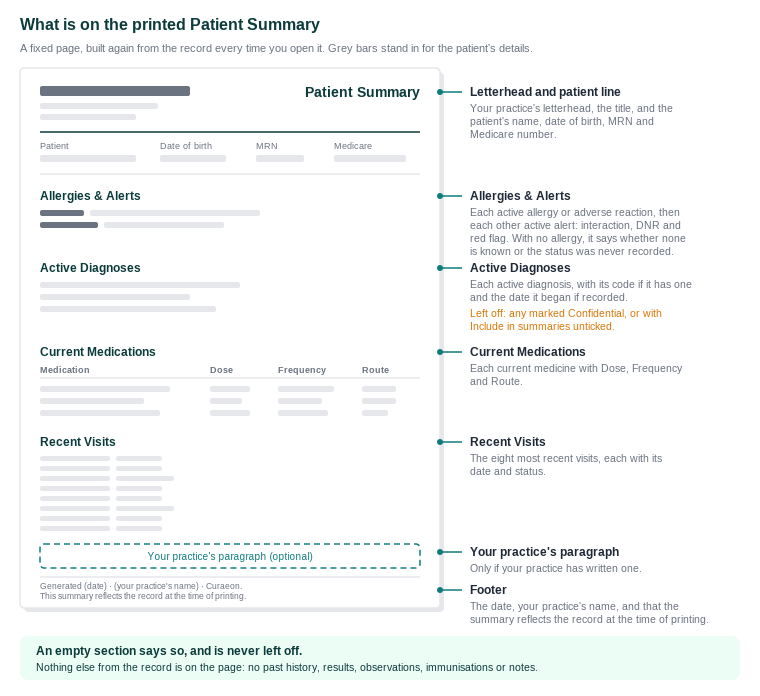
| Part | What it shows |
|---|---|
| Letterhead and patient line | Your practice's letterhead, the title Patient Summary, and the patient's name, date of birth, MRN and Medicare number |
| Allergies & Alerts | Each active allergy or adverse reaction on the record, with its reaction and severity, including one brought across from your previous system. Then each other active alert: interaction, DNR and red flag. A resolved reaction or a lifted alert is not printed |
| Active Diagnoses | Each active diagnosis, with its code if it has one and the date it began if recorded |
| Current Medications | Each current medicine with Dose, Frequency and Route |
| Recent Visits | The eight most recent visits, each with its date and status |
| Your practice's paragraph | Only if your practice has written one |
| Footer | The date, your practice's name, and that the summary reflects the record at the time of printing |
Nothing else from the record is on the page. It has no past history, results, observations, immunisations or notes.
An empty section says so. The section is never left off, so a missing heading cannot be read as "none". With no allergy listed, the page says which kind of nothing it is:
- No known allergies — recorded and the date, when someone has recorded that the patient has no known allergies (KB-145 — Record allergies, history and observations).
- Allergy status not recorded. Check with the patient or their record. when nobody has recorded either.
With no other alert, it prints No other alerts on the record.
The summary prints whole, or not at all. If any part of it cannot be loaded, the page shows a message naming the part and no Print button. It does not print a summary with a section missing, because a missing section would read as "none recorded".
What is left off on purpose
A diagnosis marked Confidential, or with Include in summaries unticked, is not printed. The summary does not say that anything was withheld. On the record, those diagnoses carry a Confidential or Not in summaries label, so check the diagnosis list if you need to know what the page will leave out.
Important: A summary may be read by people outside your practice. Read it on screen before you print it and hand it over.
Restricted records
If a record is restricted and you are not named on it, you see the restriction notice in place of the record, so there is no Print summary button to choose (KB-061 — Restrict a patient's record, and open one in an emergency). The summary's own page refuses too: it says the record is restricted and prints nothing. Someone named on the record, or someone who has opened it with Emergency access, prints the summary in the usual way.
What is recorded
Each print is recorded in the Audit log against the patient as Printed, with the document shown as Health summary (KB-063 — Answer "who has seen my record?": print a patient access report).
Add your practice's own paragraph
An administrator can add a paragraph that prints at the end of every summary, above the footer, for example who to call with questions.
- Open Settings → Templates and choose Text on printouts.
- Type the paragraph in the Patient summary box. It can be up to 1,000 characters.
- Choose Save.
Write a health-summary letter instead
Use the letter when the summary is going to a named person, or needs words of your own.
- Start a letter from New from template and choose Correspondence Out, then Letters, then Clinical handover / health summary (KB-154 — Write a medical certificate, and the other built-in letter templates).
- Choose who it is to.
- The letter opens with the recipient, two places to fill from the record (Current medications and Allergies), a consent line, and your details and the date. Choose each place to fill it from the record, and use Insert from the record for anything else, such as active diagnoses (KB-106 — Write a letter in the editor: Insert from the record, { } Field, and the formatting that survives print and email). A place left unfilled prints as nothing.
- File it. It is kept on the record's Reports tab under Outgoing correspondence.
If that didn't work
| What you see | What it means | What to do |
|---|---|---|
| Loading summary… and nothing more | The page is still waiting for your server | Close the tab and choose Print summary again |
| This summary cannot be printed: and the part that could not be loaded | Your server did not answer for that part. Nothing is printed rather than a summary with a section missing | Reload the page. If it keeps happening, raise a ticket |
| Allergy status not recorded. on a patient you know has an allergy | The allergy is not on the record as an active reaction | Record it on the Clinical History tab (KB-145 — Record allergies, history and observations), then print again |
| A diagnosis you expected is missing | It is not active, or it is marked Confidential or Not in summaries | Check the diagnosis on the record |
Still stuck? Raise a ticket at support.curaeon.com.au or call 1300 XXX XXX. If your clinic can't see patients right now, call and choose option 1. Support is staffed Monday to Friday, 8:00–18:00 Sydney time; outside those hours a call or text to the same number is answered on a best-effort basis.
Related articles
- KB-154 — Write a medical certificate, and the other built-in letter templates — Write a medical certificate, and the other built-in letter templates
- KB-061 — Restrict a patient's record, and open one in an emergency — Restrict a patient's record, and open one in an emergency
- KB-104 — Add or lift a DNR, interaction or red-flag alert above a patient's chart — Add or lift a DNR, interaction or red-flag alert above a patient's chart
- KB-078 — Print a medication summary chart, or a whole aged-care round — Print a medication summary chart, or a whole aged-care round
- KB-063 — Answer "who has seen my record?": print a patient access report — Answer "who has seen my record?": print a patient access report