Follow up scripts that were never filled: the Unfilled scripts list
Find the scripts the eRx Script Exchange says were not dispensed, ask the exchange for an up-to-date answer, and know what the list can and cannot tell you.
Note: This list depends on eRx. eRx is not yet connected at Curaeon practices (KB-128 — Is eRx working? Read Settings → eRx Script Exchange: the outbox, the certificate and who is not yet on it), so today the list is empty at every practice. That is the expected state, not a sign that every script was filled.
Before you start
- You need the
prescribepermission. Clinicians and administrators hold it by default (KB-121 — Change what each role may do in Settings → Permissions). - Open More in the menu bar, then Scripts. It opens Owing scripts. Choose the Unfilled scripts tab beside it.
- The list holds only scripts whose copy the exchange has stored. A script by a prescriber who is not on eRx never appears here (KB-128 — Is eRx working? Read Settings → eRx Script Exchange: the outbox, the certificate and who is not yet on it).
What puts a script on the list
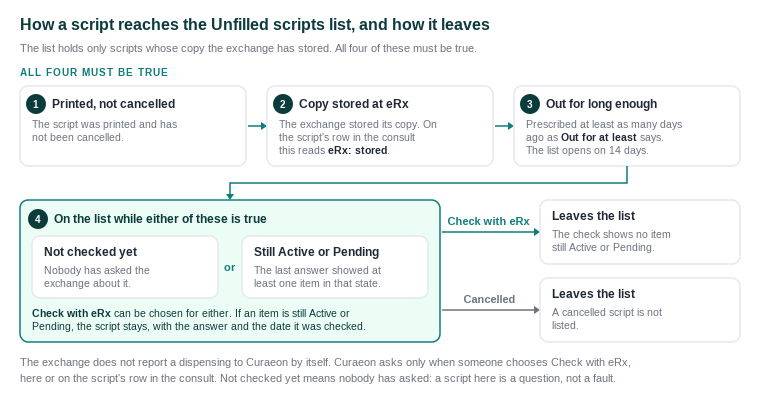
All four must be true:
- The script was printed and has not been cancelled.
- The exchange stored its copy. On the script's row in the consult this reads eRx: stored.
- It was prescribed at least as many days ago as Out for at least says. The list opens on 14 days.
- Either nobody has asked the exchange about it, or the last answer showed at least one item still Active or Pending.
A script leaves the list when a check shows no item still Active or Pending, or when it is cancelled.
How Curaeon knows
It knows only what it has been told. The exchange does not report a dispensing to Curaeon by itself. Curaeon asks when someone chooses Check with eRx, here or on the script's row in the consult, and it records each answer on the script.
So read the two kinds of row differently:
- Not checked yet means nobody has asked. The script may well have been dispensed.
- A row with states, such as "1 Active · 2 Dispensed", is as current as its checked date and no more.
The screen puts it this way: a script here is a question, not a fault.
Read the list
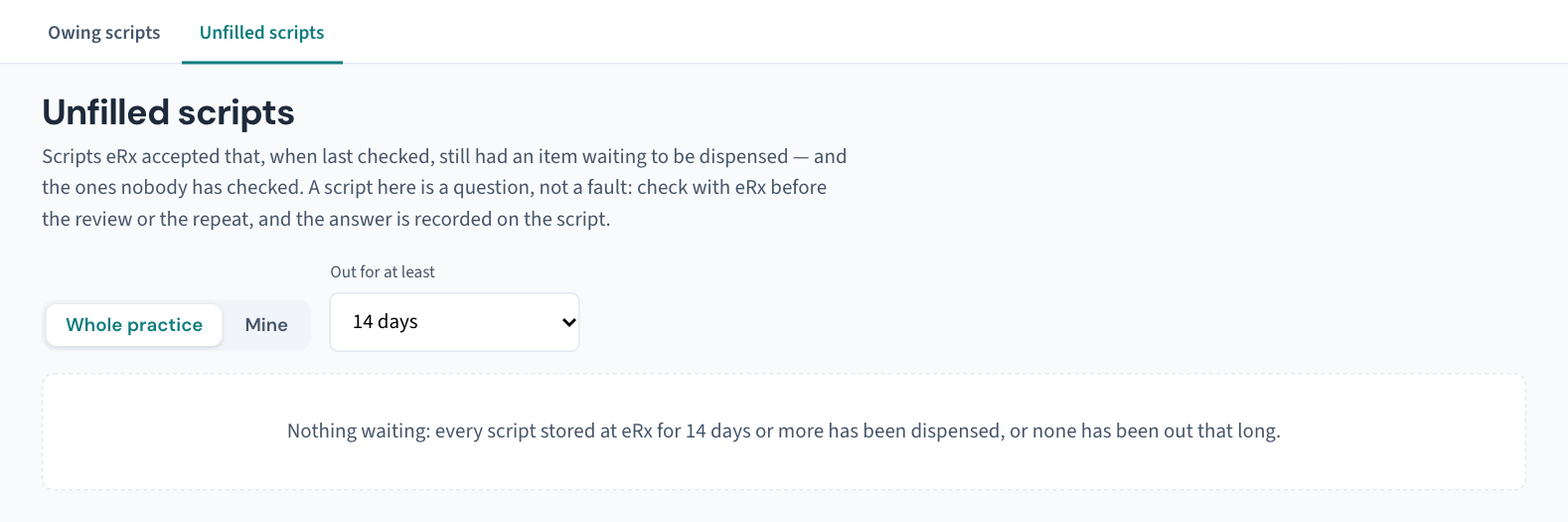
Choose Whole practice or Mine, and set Out for at least to 7, 14, 30, 60 or 90 days. The oldest script is first. The line above the table counts the scripts and how many were never checked.
| Column | What it shows |
|---|---|
| Prescribed | The date the script was written |
| Patient | The patient, linked to their record |
| Medication | The items still standing on the script. A cancelled item is left out |
| Prescriber | Who wrote it |
| eRx says | Not checked yet, or the exchange's last answer for each item and the date it was checked |
The number before each state is the item's place on the script: "1 Active · 2 Dispensed" means the first item has not been dispensed and the second has.
Ask the exchange
- On the script's row, choose Check with eRx.
- Read the message. It starts "eRx holds:" and gives each item's state.
- The list reloads. A script with nothing left to dispense drops off.
Each check is recorded on the script, and the answer also shows on the script's row in the consult. Once an item is reported dispensed, the medicine on the patient's Medications list shows dispensed and the date, where that script is what put the medicine on the list.
Note: View opens the script in a new tab to read. It does not record a print, and the script stays as it was: printed stays printed. That page does not print. It has no Print button, and if you print it from the browser the script is left off the paper. To print another copy, choose Print this script at the top of the page. That print is recorded, and a script printed before becomes reprinted (KB-144 — Write a prescription: repeats, authority, Schedule 8, brands, reprint and cancel).
What to do about an unfilled script
That is the prescriber's call, and the list offers no action beyond the check. Useful moments to look are before a review and when a repeat is requested. To follow up with the patient, use the tools made for it: a task for a colleague (KB-147 — Work the Tasks screen: follow-ups about a patient, due by a date), a recall (KB-051 — Run recalls: book from a recall, and why a recall stays open or comes back), or a message asking the patient to call (KB-141 — Send a patient a one-off message from their record). Do not name the medicine in a message.
What each message means
| Message | What it means | What to do |
|---|---|---|
| Nothing waiting: every script stored at eRx for 14 days or more has been dispensed, or none has been out that long. | No script meets the four conditions. With eRx switched off, none can | Nothing. Shorten Out for at least to see newer scripts |
| Nothing open to you is waiting. | The only scripts on the list belong to restricted records you are not named on | See KB-061 — Restrict a patient's record, and open one in an emergency |
| A line saying scripts for restricted records are not shown | The list left those rows out and says how many | Someone named on the record can check them (KB-061 — Restrict a patient's record, and open one in an emergency) |
| eRx is not enabled on this server | The practice's connection to the exchange is off | See KB-128 — Is eRx working? Read Settings → eRx Script Exchange: the outbox, the certificate and who is not yet on it |
| eRx holds: no items. | The exchange answered without listing any item for this script | Check again later. If it repeats, raise a ticket with the prescribing date and prescriber |
What is recorded
Opening the list is recorded as a worklist being viewed, because it names patients. Each Check with eRx is recorded with who asked and what the exchange answered.
View is recorded as that patient's record being opened, as any look at a patient's record is. It is not recorded as a print.
If that didn't work
- There is no Scripts entry under More. Your role does not have
prescribe. - A script you expect is missing. Check each of the four conditions. The usual reasons are that the prescriber has no eRx Entity Id, the copy has not been stored yet, or the script is newer than Out for at least. Settings → eRx Script Exchange shows what is waiting to send (KB-128 — Is eRx working? Read Settings → eRx Script Exchange: the outbox, the certificate and who is not yet on it).
- The pharmacy cannot find a script. That is a different problem: start at KB-018 — eRx not reaching the pharmacy — checklist.
Still stuck? Raise a ticket at support.curaeon.com.au or call 1300 XXX XXX. If your clinic can't see patients right now, call and choose option 1. Support is staffed Monday to Friday, 8:00–18:00 Sydney time; outside those hours a call or text to the same number is answered on a best-effort basis.
Related articles
- KB-128 — Is eRx working? Read Settings → eRx Script Exchange: the outbox, the certificate and who is not yet on it — Is eRx working? Read Settings → eRx Script Exchange: the outbox, the certificate and who is not yet on it
- KB-018 — eRx not reaching the pharmacy — checklist — eRx not reaching the pharmacy — checklist
- KB-144 — Write a prescription: repeats, authority, Schedule 8, brands, reprint and cancel — Write a prescription: repeats, authority, Schedule 8, brands, reprint and cancel
- KB-044 — Record and settle an owing script — Record and settle an owing script
- KB-061 — Restrict a patient's record, and open one in an emergency — Restrict a patient's record, and open one in an emergency
- KB-147 — Work the Tasks screen: follow-ups about a patient, due by a date — Work the Tasks screen: follow-ups about a patient, due by a date