eRx not reaching the pharmacy — checklist
What to check when a pharmacy says it cannot find a script, starting with the fact that covers every case: the printed script is the prescription.
First, where things stand today
eRx is not yet connected at Curaeon practices. Curaeon's accreditation with eRx Script Exchange is still in progress, so nothing is uploaded yet and Settings → eRx Script Exchange shows a grey Off badge (KB-128 — Is eRx working? Read Settings → eRx Script Exchange: the outbox, the certificate and who is not yet on it). Until that changes, every prescription is a printed paper script and a pharmacy dispenses from the paper. If a pharmacy says "we can't find it in eRx", that is expected: there is nothing there to find.
The rest of this checklist applies once eRx is switched on at your practice.
How a script reaches the pharmacy
Curaeon prints a paper prescription, and the signed paper is the legal document. The patient takes it to any pharmacy.
When eRx is on and the prescriber has an eRx Entity Id on their staff account, the printed script also carries a barcode, and a copy is uploaded to eRx. The upload is a convenience for the pharmacy: they scan the barcode and the script fills in, where otherwise they type it in from the paper.
Curaeon does not send electronic prescription tokens. Nothing goes to the patient by SMS or email, and there is no token to resend. If a patient asks for "the token", they need the paper script.
The uploaded copy also carries the patient's choice about the Active Script List. In step 3 of the prescriber, Patient consents to the Active Script List is ticked on every new script. Left ticked, the copy says nothing about the list, which the exchange reads as consent. If the prescriber unticks it because the patient declined, the copy tells the exchange that the patient declined for that script (KB-144 — Write a prescription: repeats, authority, Schedule 8, brands, reprint and cancel).
1. Does the patient have the paper script?
A script that "didn't arrive" is most often a script that was never handed over or has been lost. Reprint it from the script's row, in the consult it was written in or under Prescriptions on the patient's Medications tab (KB-144 — Write a prescription: repeats, authority, Schedule 8, brands, reprint and cancel). Reprinting and re-issuing keep earlier versions visible, so what was actually given to the patient is recoverable. Do not write a new prescription to replace a lost printout unless the prescriber decides to: a second script is a second legal prescription.
2. The pharmacy's scanner finds nothing
The pharmacy can always dispense from the paper by entering it by hand. Tell them so, then find the cause when there is time:
- eRx is off at your practice (today's state): no script is uploaded.
- The prescriber has no Entity Id. Their scripts print as paper only, with no barcode. Settings → eRx Script Exchange lists prescribers who wrote scripts in the last 90 days without one (KB-128 — Is eRx working? Read Settings → eRx Script Exchange: the outbox, the certificate and who is not yet on it).
- The copy is still waiting to send, or eRx refused it: see the next step.
3. Is the copy stuck in the outbox?
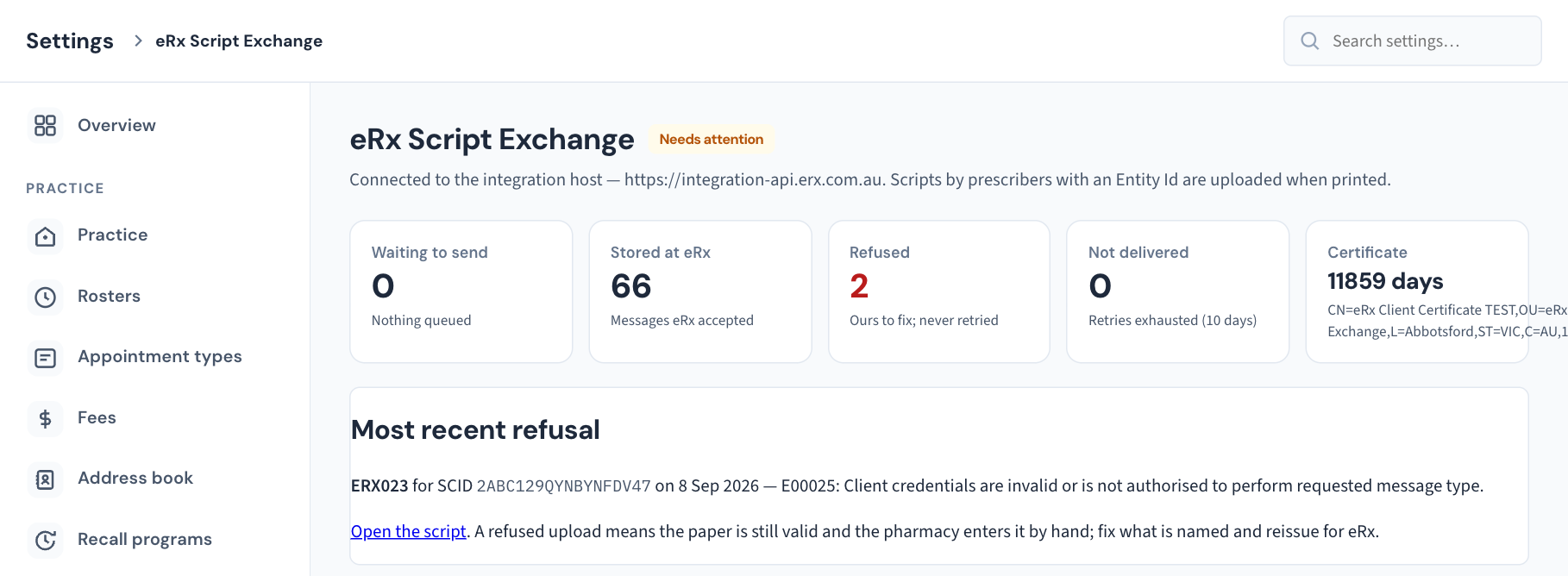
Settings → eRx Script Exchange shows the outbox: how many messages are waiting to send, how many eRx has stored, any it refused, and any not delivered.
- Waiting to send has not left your server. Messages queue during any connection problem and send themselves when it clears. Curaeon keeps trying for ten days. Don't ask the doctor to prescribe again because a message is waiting.
- Refused is different: eRx rejected the message and Curaeon will not send it again. The page names the most recent refusal with its error code. The paper script is still valid. Fix what the code names and have the prescriber reissue the script so a correct copy goes up.
- Not delivered means Curaeon gave up after ten days. An administrator can Retry it from the same screen.
4. Is it the eRx service itself?
If several prescribers are affected at once and the outbox is filling, the cause is likely the connection or the eRx service, not one script. Check our status page (status.curaeon.com.au), which lists Electronic prescribing as its own line (KB-009 — Subscribe to status updates for your clinic). Paper prescriptions are unaffected and remain valid throughout.
The Active Script List case
If a patient says a script is missing from their Active Script List, the script first has to have reached eRx, so work through steps 2 to 4. Then check how it was written: a script written with Patient consents to the Active Script List unticked was sent to the exchange as declined for that script. The choice is made for each script when it is written. Curaeon has no screen to change it afterwards, does not register patients for the list, and cannot show what is on it.
The certificate case
eRx signs in with the practice's NASH certificate. If it has expired, every upload stops until it is renewed; the Certificate tile on the same screen shows the days left. With 30 days left the days turn red, and on the same day Curaeon raises a security alert, A certificate is about to expire, which every administrator sees on Security alerts in the menu bar; it clears by itself once the API has been restarted with the renewed certificate (KB-064 — Sign off the weekly Security review, and act on alerts and audit-log check warnings). Printing is not affected, so patients still leave with a valid script. A certificate issued by the NASH authority that expired on 19 October 2026 has to be renewed whatever its own expiry date says, and Curaeon refuses one before eRx is switched on. See KB-020 — NASH certificates — why they matter and how renewal works for the background and KB-021 — NASH certificate renewal — step-by-step to renew.
None of these? Raise a ticket at support.curaeon.com.au. Include the approximate prescribing time and the prescriber — not the patient's name or details; we can locate the script from those.
Related articles
- KB-128 — Is eRx working? Read Settings → eRx Script Exchange: the outbox, the certificate and who is not yet on it — Is eRx working? Read Settings → eRx Script Exchange: the outbox, the certificate and who is not yet on it
- KB-144 — Write a prescription: repeats, authority, Schedule 8, brands, reprint and cancel — Write a prescription: repeats, authority, Schedule 8, brands, reprint and cancel
- KB-153 — Follow up scripts that were never filled: the Unfilled scripts list — Follow up scripts that were never filled: the Unfilled scripts list
- KB-020 — NASH certificates — why they matter and how renewal works — NASH certificates — why they matter and how renewal works
- KB-021 — NASH certificate renewal — step-by-step — NASH certificate renewal — step-by-step
- KB-009 — Subscribe to status updates for your clinic — Subscribe to status updates for your clinic