Check appliance health and link security in Settings → AI Appliance, and revoke a certificate
Read the appliance's own health page, see how the scanning tray is keeping up, check the certificates that secure the link — and know when, and how, to revoke one.
Before you start
Settings → AI Appliance is an administrator's page: open More in the menu bar, then Settings. The page itself is headed Edge AI Appliance. Your server and appliance run in your own practice, so for them this page is the status page. Curaeon's public status page at status.curaeon.com.au covers the services we run and national services such as Medicare and eRx, not your practice's own equipment (KB-009 — Subscribe to status updates for your clinic).
Check health
- Open Settings → AI Appliance. The top of the page shows the scribe appliance's status and health.
- If the scribe is misbehaving, read this before anything else — the symptoms and their meanings are in KB-054 — Scribe option missing, "appliance is busy", or the draft never arrives.
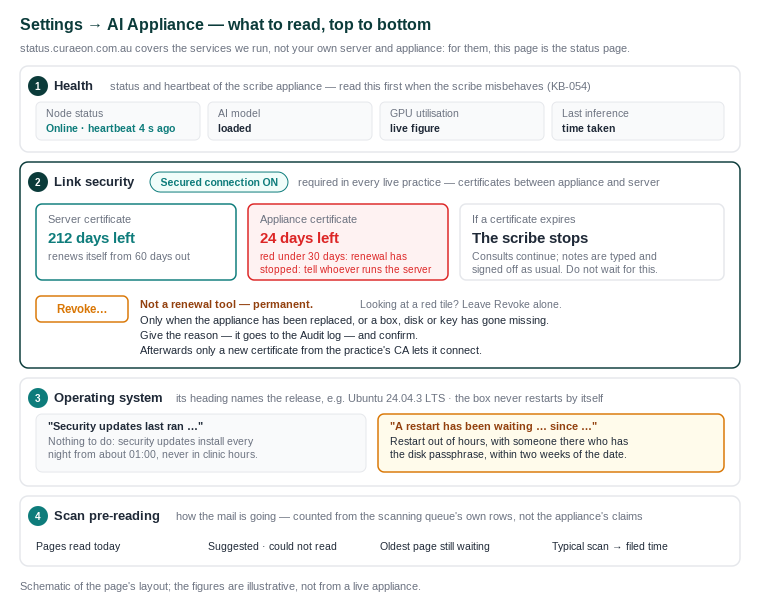
Check the operating system and a waiting restart
The appliance installs Ubuntu's security updates by itself every night, from about 01:00 — never in clinic hours, and only security updates. It never restarts by itself: its disk is encrypted and asks for a passphrase when it starts, so a box that restarted alone overnight would wait at that prompt and the morning would have no scribe. The restart some updates need is a person's job, and the Operating system card, under Link security, is where you see that one is waiting. Its heading line names the release the box runs, for example "Ubuntu 24.04.3 LTS".
| The card says | What to do |
|---|---|
| "Security updates last ran …" | Nothing. They run every night. |
| "A restart has been waiting to finish installing updates since …. Restart the box out of hours — it asks for its disk passphrase when it starts." | Restart the appliance out of hours, with somebody there who has the disk passphrase. Do it within two weeks of the date shown. |
| "Security updates last ran … days ago (…) — they should run every night." | Updates have stopped for more than three days. Raise a ticket. |
| "Automatic security updates are switched off on this box." or "The box has no record of security updates having run." | Raise a ticket. |
| "… has security support until …" | Nothing. |
| "…'s security support ends on …, in … days — move the box to the next LTS release before then." | Shown from 180 days before the end. Raise a ticket so a move can be planned; the box is reinstalled, not upgraded in place. |
| "…'s security support ended on …. The box gets no more security fixes: move it to a supported release." | Raise a ticket now. |
| "The box has not said what it runs — its worker is older than this report, or it is not running Ubuntu." | The appliance does not report this yet. Raise a ticket if you expected it to. |
| "Awaiting heartbeat." | The appliance has not reported in. See KB-011 — Appliance appears offline — five checks before you call. |
Nightly security updates are set up when the appliance is installed from Curaeon's current install files. They have not yet been run on a practice's appliance, so an appliance installed earlier may say it has no record of updates, or that they are switched off. Either raises the security alert below: raise a ticket.
Keep the disk passphrase, or its recovery key, in the practice's safe. An appliance that needs it after a restart or a power cut, with nobody there who knows it, is a practice without its scribe or its documents.

When it becomes a security alert
Nobody opens this page unprompted, so Curaeon also checks the appliance's report every hour. When the report shows something past waiting, it raises a security alert, The scribe appliance is not being patched. Every administrator sees it on Security alerts in the menu bar and on Settings → Security review, waiting to be acknowledged (KB-064 — Sign off the weekly Security review, and act on alerts and audit-log check warnings). It is raised when:
- a restart to finish installing updates has waited more than 14 days;
- security updates have not run for more than 7 days, or have no record of having run;
- automatic security updates are switched off;
- the release's security support has ended.
The card above warns sooner. The alert is for what is past waiting. An appliance that sends no report, or one that is offline, raises no alert.
The alert names the appliance and what it reported, for example "a restart to finish installing updates has waited 16 days". It ends: "A waiting restart is done out of hours by someone with the disk passphrase; anything else, contact support."
- For a waiting restart, restart the appliance out of hours, with somebody there who has the disk passphrase.
- For anything else, raise a ticket.
- Acknowledge the alert with what you did. There is one open alert at a time. Once acknowledged, it is not raised again for a week; if the appliance still reports the same a week later, a new alert is raised, before the next weekly review.
Check the scanning tray
Because the appliance also pre-reads the scanning tray (KB-047 — Scan and file paper letters, including the appliance's pre-filled suggestions), the same page shows how the mail is going:
- pages read today;
- what it suggested, and what it could not read;
- the oldest page still waiting;
- the typical time from scan to filed.
The counts come from the queue's own rows, not from the appliance's claims.
Check link security
Link security shows the certificates between the appliance and the server. A secured connection is required in every live practice.
- Confirm the secured connection is on.
- Read each certificate's days left: the Server certificate and Appliance CA tiles, and the Expires column beside each appliance. A count turns red with 30 days left; the card's last line begins "Certificates turn red with 30 days left." On a certificate's last day the count reads Expires today until its end has passed, then Expired. An expired certificate stops the scribe.
- Note each appliance's own certificate — the one that lets the server tell the appliance apart from a person. That matters for restricted records: the appliance reads a restricted record's consult only when it connects with its certificate (KB-061 — Restrict a patient's record, and open one in an emergency).
Certificate renewal on the server is automatic — a daily task, from 60 days out — so red means renewal has stopped working and the person who runs your server needs to know (KB-036 — A certificate is red in Settings → Certificates: what it means and who to tell). Do not wait for it to expire.
The alert before a certificate expires
You are told without opening this page. Curaeon reads each appliance's own certificate every hour, and with 30 days left, the day that appliance's count turns red here, it raises a security alert, A certificate is about to expire. Every administrator sees it on Security alerts in the menu bar and on Settings → Security review (KB-064 — Sign off the weekly Security review, and act on alerts and audit-log check warnings).
The alert names the certificate as "Appliance" and the appliance's name, and says the day it ends. It goes on: "If it lapses, that appliance cannot connect to the server, and the scribe stops. A new one is issued on the server and copied to the appliance: contact support." It ends "Settings › AI Appliance shows it."
- Raise a ticket so a new certificate can be issued for the appliance.
- Acknowledge the alert with what you did, or leave it open. If you acknowledge it with more than 7 days left and the certificate is still the old one when 7 days are left, the alert is raised once more. A certificate that expires is raised as A certificate has expired.
- Nobody has to acknowledge it once the appliance has its new certificate. The server clears the alert by itself after the old certificate has been revoked on this page (below) and the appliance has connected with its new one. It is then listed under All on Settings → Security review, marked Cleared.
The days on this page and the days in an alert are counted the same way, so a count turns red here on the day its alert is raised. Before the November 2026 update the two could differ by one. Two counts on this card still differ from their alerts in other ways:
- Server certificate is the appliance link's own certificate, the one on Settings → Certificates as Appliance link (API), and it has the same alert (KB-036 — A certificate is red in Settings → Certificates: what it means and who to tell). This card counts the certificate the server read when it last started; the alert reads the file every hour. After a renewal the alert clears within the hour, and the count here changes when the server is next restarted.
- Appliance CA has no alert under that name. In the usual install it is the practice's own certificate authority, and is warned about as Practice CA on Settings → Certificates. A server given a separate certificate authority for its appliances has this count only, and no alert for it.
Revoke a certificate
Revoke… stops an appliance's certificate for good. Use it when:
- the appliance has been replaced;
-
a box, disk or key has gone missing.
-
On Link security, choose Revoke… beside the appliance's certificate.
- Give the reason. It is recorded in the Audit log.
- Confirm.
After revocation the appliance works again only with a new certificate from the practice's CA. Revocation is not a restart or a reset: it is a permanent statement that this certificate is no longer trusted. Issuing a new one is part of the appliance's install procedure — raise a ticket if you need it. If a device has gone missing, revoke first and ask questions afterwards — the certificate is what would let it connect.
If that didn't work
A tile that stays red after the server's renewal has been looked at, or an appliance that will not reconnect after a new certificate is issued, is a ticket for our technical team — say what the page shows, and tick diagnostics consent so we can read the appliance's logs (they contain no patient information).
Still stuck? Raise a ticket at support.curaeon.com.au or call 1300 XXX XXX. If your clinic can't see patients right now, call and choose option 1. Support is staffed Monday to Friday, 8:00–18:00 Sydney time; outside those hours a call or text to the same number is answered on a best-effort basis.
Related articles
- KB-036 — A certificate is red in Settings → Certificates: what it means and who to tell — A certificate is red in Settings → Certificates: what it means and who to tell
- KB-054 — Scribe option missing, "appliance is busy", or the draft never arrives — Scribe option missing, "appliance is busy", or the draft never arrives
- KB-011 — Appliance appears offline — five checks before you call — Appliance appears offline — five checks before you call
- KB-010 — Appliance status lights and what they mean — Appliance status lights and what they mean
- KB-064 — Sign off the weekly Security review, and act on alerts and audit-log check warnings — Sign off the weekly Security review, and act on alerts and audit-log check warnings