A certificate is red in Settings → Certificates: what it means and who to tell
A red tile means automatic renewal has stopped working and there are 30 days or fewer to act — here is what each certificate does, what stops when it expires, and who needs to know today.
What the page shows
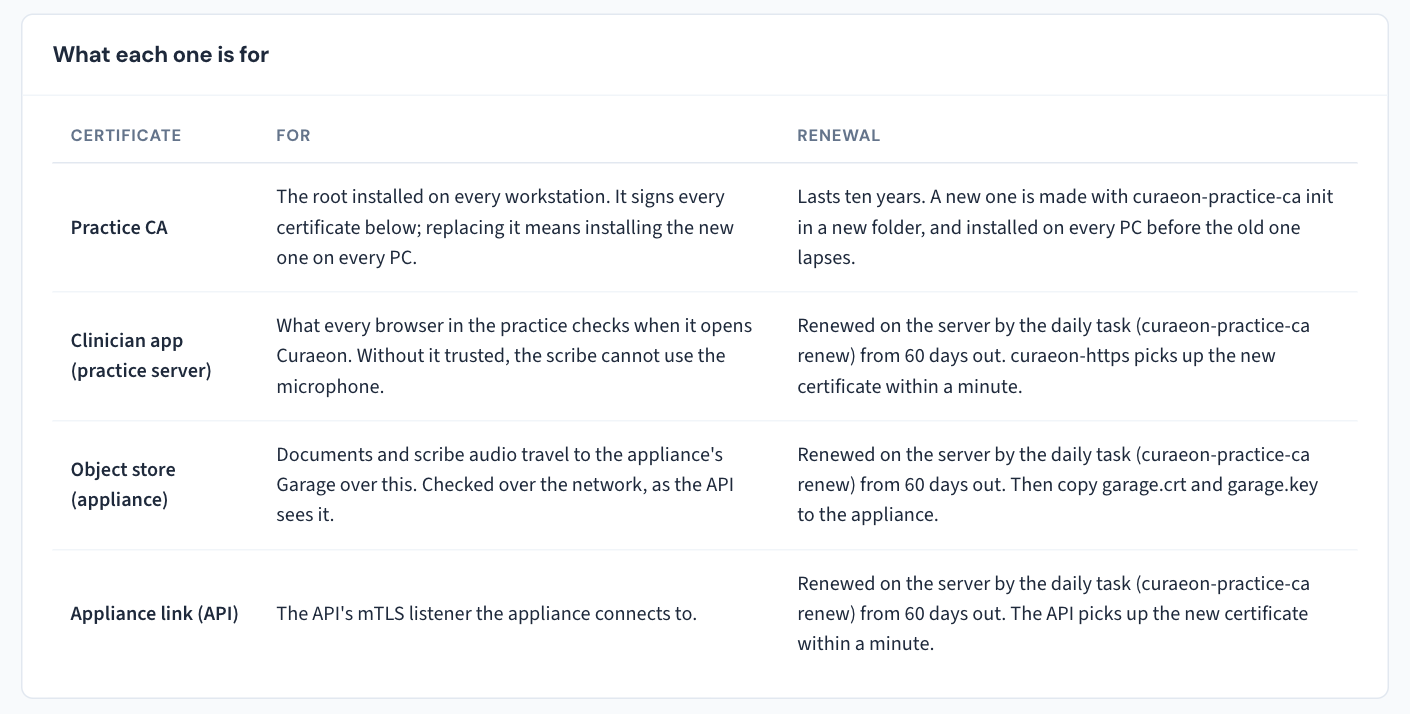
Settings → Certificates lists the certificates that make HTTPS work inside the practice, each with the days it has left:
- the practice's own certificate authority (the one every computer was made to trust — KB-035 — Make a new PC, Mac or locum laptop trust Curaeon ("Your connection is not private"));
- the certificate the server presents to every browser;
- the object store's certificate;
- the appliance link's certificate, between the scribe appliance and the server;
- on a practice set up to take card payments on the terminal through Curaeon, the Payments name (public) certificate. The tile is shown only where a payments name has been set up on the server. See "The payments certificate" below;
- on a practice that uses Medical-Objects, Medical-Objects (sending) and Medical-Objects (receiving). Each tile is shown only where the practice has that certificate. See "The Medical-Objects certificates" below.
Renewal is automatic: a daily task on the server renews the server, object store and appliance-link certificates from 60 days out. The certificate authority's own certificate lasts ten years, and the payments certificate renews in its own way (below). A tile turning red with 30 days left therefore means something specific — the renewal task has not done its job for a month. The two Medical-Objects certificates are the exception: nothing renews them automatically, so red there means it is time to replace one by hand.
Reading the days. A tile's days turn amber under 60 days and red with 30 days left. The payments name's tile keeps its own days: amber under 28 and red with 14 left (below). On the day a certificate ends, its tile reads Expires today until the end has passed, and Expired after.
You do not have to open the page to find out. As the page itself says, "Each tile turns red with 30 days left (14 for the payments name, which renews itself at 30). A security alert is raised on the same day, and waits in every administrator's menu bar until it is acknowledged or the certificate is replaced." See "The security alert" below.
What to do
- Tell whoever runs your server, today. They look at why the daily renewal is not renewing. Nothing on the Certificates page itself renews anything.
- Note which tile is red and how many days it shows — the first thing they, or we, will ask.
- If they cannot see why, raise a ticket under Networking / on-site with those details. Say if more than one tile is red, or the certificate authority itself is.
- On Settings → Security review, acknowledge the alert with what you did, or leave it open as the reminder. An open alert clears by itself once the certificate is replaced.
The security alert
Curaeon reads every certificate on this page once an hour and raises a security alert for one that is close to its end. Every administrator sees it on Security alerts in the menu bar and on Settings → Security review (KB-064 — Sign off the weekly Security review, and act on alerts and audit-log check warnings). Curaeon sends nobody a message.
| When | The alert |
|---|---|
| 30 days left. For Payments name (public), 14 days left | A certificate is about to expire |
| 7 days left, if the first alert was acknowledged when more than 7 days were left and the certificate has still not been replaced | A certificate is about to expire once more, with "An earlier warning was acknowledged; this is the reminder for its last week." An alert acknowledged inside the last 7 days is not repeated |
| The certificate has expired | A certificate has expired, whatever was acknowledged before |
The alert names the certificate as this page does, and says the day it ends, what stops if it lapses and what to do. It ends "Settings › Certificates shows it." For the server and appliance-link certificates it says the renewal has stopped working. For the object store's it says the server renews the certificate, but the new one is copied to the appliance by hand, and that has not been done or the renewal has stopped. Each says to contact support.
When the certificate is replaced, the server clears the alert by itself, at the next hourly check that reads the new certificate. The alert leaves the menu bar, and on Settings → Security review it is listed under All, marked Cleared. Nobody needs to acknowledge it. One certificate on this page is read only when the API starts: Medical-Objects (sending). Its alert clears after the API has been restarted with the new file, not when the file is replaced.
A warning left open until the certificate expires is cleared too. Its reason on Settings → Security review reads "The certificate has since expired; a new alert says so.", and A certificate has expired takes its place and waits to be acknowledged. A Cleared alert with that reason does not mean the certificate was replaced (KB-064 — Sign off the weekly Security review, and act on alerts and audit-log check warnings).
The same alert is raised for three certificates that are not on this page: the NASH certificate (KB-129 — Read Settings → HI Service: the connection, the NASH certificate, and what the HI Service returned and disclosed), the one eRx signs in with (KB-128 — Is eRx working? Read Settings → eRx Script Exchange: the outbox, the certificate and who is not yet on it), and each appliance's own (KB-057 — Check appliance health and link security in Settings → AI Appliance, and revoke a certificate).
What stops if a certificate expires
| Certificate | If it expires |
|---|---|
| Certificate authority | Every computer stops trusting the practice's other certificates. It lasts ten years and is replaced by hand, with the new one installed on every computer before the old one lapses. Raise a ticket well ahead. |
| Server (browsers) | Every computer warns "your connection is not private" at once, and the scribe's microphone is blocked on all of them. Do not click past it (KB-035 — Make a new PC, Mac or locum laptop trust Curaeon ("Your connection is not private")). |
| Appliance link | The scribe stops. The consult does not — notes are typed as in any other system and signed off the same way. |
| Object store | Documents and scribe audio cannot be saved or opened. |
| Payments name (public) | Only taking a card on the terminal from an invoice stops. Consults, records and the scribe are not affected. |
| Medical-Objects (sending) | Letters and referrals cannot be sent through Medical-Objects. |
| Medical-Objects (receiving) | Results, letters and acknowledgements cannot be delivered to the practice through Medical-Objects. |
An expired object-store certificate reads Expired. The server checks the object store's certificate over the network, and refuses to connect once it has expired. The tile then reads Expired, with Until and the day it ended under it, and the reason: "the certificate at … has expired, so the API refuses to connect to it". Before the November 2026 update this tile read Could not check. On this tile Could not check now means the certificate could not be read at all: nothing answered at the appliance's address, or what answered was not the practice's certificate.
The payments certificate
The Payments name (public) tile appears only when the practice's server has been given a public payments name. A practice that does not take card payments on the terminal through Curaeon has no such name, and the page shows no payments tile.
What it is for. Take payment on the terminal on an invoice opens Tyro's terminal page in its own window (KB-160 — Take a card payment on the Tyro terminal). That page is served on a separate public name, and this is the certificate for that name. The rest of Curaeon cannot be reached through it.
How it differs from the first four:
- It is a public certificate, not one from the practice's certificate authority. No computer has to be made to trust anything for it, and KB-035 — Make a new PC, Mac or locum laptop trust Curaeon ("Your connection is not private") does not apply.
- The server obtains and renews it by itself, 30 days before it expires, through a service Curaeon runs. Each attempt is written to
CuraeonHTTPS.logon the server. - Because renewal starts at 30 days, not 60, this tile keeps its own days: amber under 28 days and red with 14 days left, where the others are amber under 60 and red with 30. Before the November 2026 update it turned amber ahead of every ordinary renewal; it no longer does. Red still means what it means for those four: renewal has not worked.
- Its security alert comes with 14 days left, not 30, on the day the tile turns red. By then the renewal has been failing for a fortnight.
Reading the tile:
| The tile says | What it means | What to do |
|---|---|---|
| A number of days, neither amber nor red | In date, with 28 days or more left | Nothing |
| A number of days, amber | Under 28 days left. The renewal that starts at 30 days has not gone through yet | Tell whoever runs your server, so they can read CuraeonHTTPS.log for the reason before the tile turns red |
| A number of days, red | 14 days or fewer left and the renewal has not succeeded. The security alert is raised the same day | Tell whoever runs your server today, and raise a ticket. They read CuraeonHTTPS.log for the reason |
| Could not check, with a line saying the file does not exist | The first certificate has not arrived yet. It is being obtained | Wait and reload. If it does not arrive, whoever runs your server reads CuraeonHTTPS.log for the reason, and you raise a ticket |
| Expired | Card payments on the terminal cannot be started from an invoice | As for red. Meanwhile, take the card on the terminal by itself and record the payment on the invoice with Record payment (KB-148 — Take a payment, give a receipt, void or correct an invoice) |
A red or missing payments tile also turns the badge beside the page title to Needs attention.
The Medical-Objects certificates
Two tiles appear only on a practice that uses Medical-Objects (KB-059 — Secure-messaging referral "Not delivered" or stuck on "Sent — awaiting confirmation"): Medical-Objects (sending) where the practice's letters and referrals leave through Medical-Objects, and Medical-Objects (receiving) where results, letters and acknowledgements arrive through it. Neither comes from the practice's certificate authority, and neither is renewed automatically.
| Certificate | What it is | How it is replaced |
|---|---|---|
| Medical-Objects (sending) | What the server shows Medical-Objects' software at the practice (the page calls it the practice's Capricorn) when it sends letters and referrals. Medical-Objects issues it. | Medical-Objects issues a new one from a request made on the server. The new file replaces the old one and the API is restarted, because the API reads this certificate once, when it starts. Until that restart the page goes on showing the old one. |
| Medical-Objects (receiving) | What the server shows that software when the software delivers results, letters and acknowledgements from Medical-Objects. | A new certificate and its key replace the old files on the server. The API picks them up within a minute, with no restart. |
A red tile here does not mean a renewal task has failed, because there is none. Raise a ticket so a new certificate can be arranged; the alert for each says to contact support.
The appliance's own view: Link security
Settings → AI Appliance → Link security shows the appliance-link certificate from the other side: whether the secured connection is on, each certificate's days left (red with 30 days left; an expired one stops the scribe), and each appliance's own certificate. Each appliance's own certificate raises the same security alert with 30 days left, the day its count turns red (KB-057 — Check appliance health and link security in Settings → AI Appliance, and revoke a certificate).
The Revoke… button there is not a renewal tool. It stops an appliance's certificate for good — for when a box is replaced, or a box, disk or key has gone missing — with a reason recorded in the Audit log. Afterwards the appliance works again only with a new certificate from the practice's certificate authority. If you are looking at a red tile, leave Revoke alone; KB-057 — Check appliance health and link security in Settings → AI Appliance, and revoke a certificate covers when it is the right button.
If that didn't work
If the days keep falling after whoever runs your server has looked, or a certificate has already expired, raise a ticket with the tile name, days left and what was tried. If the scribe has stopped, staff keep consulting by hand — a fault to report, not an emergency unless you decide it is one.
Still stuck? Raise a ticket at support.curaeon.com.au or call 1300 XXX XXX. If your clinic can't see patients right now, call and choose option 1. Support is staffed Monday to Friday, 8:00–18:00 Sydney time; outside those hours a call or text to the same number is answered on a best-effort basis.
Related articles
- KB-035 — Make a new PC, Mac or locum laptop trust Curaeon ("Your connection is not private") — Make a new PC, Mac or locum laptop trust Curaeon ("Your connection is not private")
- KB-057 — Check appliance health and link security in Settings → AI Appliance, and revoke a certificate — Check appliance health and link security in Settings → AI Appliance, and revoke a certificate
- KB-054 — Scribe option missing, "appliance is busy", or the draft never arrives — Scribe option missing, "appliance is busy", or the draft never arrives
- KB-160 — Take a card payment on the Tyro terminal — Take a card payment on the Tyro terminal