Drug-safety alerts from MIMS: what is screened, what an alert shows, and acknowledging one
Read the drug-safety panel in the prescriber and on the patient's record, acknowledge an alert, and know what was not checked.
Note: This applies once your practice has MIMS drug-safety screening set up and switched on in Settings (KB-173 — Set up MIMS drug-safety screening in Settings: the three credentials, the switch, the test and each doctor's MIMS user). Until then the prescriber reads "Interaction & allergy screening is available with a MIMS licence — not currently configured. Review interactions manually." and nothing is checked (KB-045 — "Not checked": what the drug-safety line says when screening is not set up, is held, or did not complete).
Before you start
- The screening is advice. It never blocks a script and never changes one. The decision is the prescriber's.
- It is a live service. Each screening asks MIMS over the internet, at the moment you need it. Curaeon keeps none of MIMS's answer. The only thing kept is an acknowledgement, described below.
- It is screened under your own MIMS user. Curaeon makes one for each doctor the first time their screening runs. The first time, you are asked to accept MIMS's licence (see below).
- To acknowledge an alert you need the
prescribepermission. Clinicians and administrators hold it by default (KB-121 — Change what each role may do in Settings → Permissions).
Where the screening runs
| Where | What is screened |
|---|---|
| The four-step prescriber: Prescribe in a consult, ↻ Reissue and Prescribe again on the patient's record (KB-144 — Write a prescription: repeats, authority, Schedule 8, brands, reprint and cancel) | The medicine being written, the items already finished on this form, any reissued item still waiting, against the patient's current medications, recorded allergies and coded diagnoses. The panel sits under the step names, so it is there on every step. |
| The Repeat script window | The items in the window, against the same three lists. The panel sits under the items. |
| The patient's record: a drug-safety panel inside the Medications card, under the list, on the Clinical History and Medications tabs, and under Current Medications in a consult. It is shown only to those who may prescribe | The current medication list as it stands, against the recorded allergies and the active coded diagnoses. |
The screening runs again by itself when what it describes changes. In the prescriber, that is a medicine added or changed. On the record, it is an allergy, a diagnosis or a medication recorded. Recording a penicillin allergy today screens the patient's current medicines against it today, not at the next script.
What MIMS need in order to screen
MIMS screen by their own codes, never by a typed name. So:
- A medicine is screened when it has a code. A medicine picked from the PBS list in the prescriber has one. On the record, a medication carries one when a script written in Curaeon put it there. Most medications typed in or brought across from a previous system do not.
- An allergy is screened when its substance matches a MIMS allergen by name. Record allergies by substance (KB-145 — Record allergies, history and observations).
- A condition is screened when it is an active diagnosis with a code. A free-text diagnosis is not sent. To code a backlog, see KB-126 — Code a backlog of free-text diagnoses in Settings → Diagnosis coding.
- Interactions and duplicate therapy need at least two medicines MIMS can identify.
Whatever could not be screened is named, with the reason (see below).
Read an alert
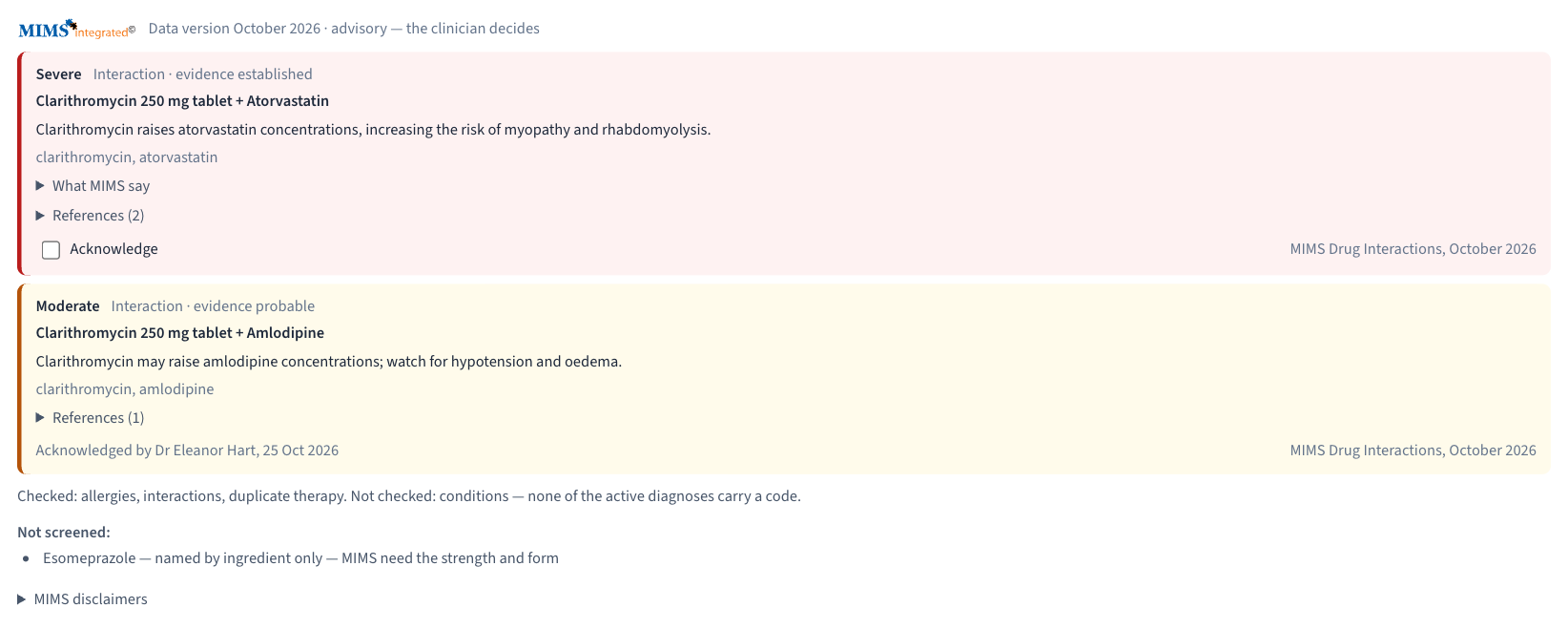
The top line carries the MIMS Integrated logo and reads Data version with MIMS's release, then advisory — the clinician decides.
Allergy and condition alerts come first, then interactions, then duplicate therapy. Each alert shows:
- The severity, in MIMS's own words for that check. It is drawn in red, amber or plain:
| Check | Red | Amber | Plain |
|---|---|---|---|
| Interaction | Severe | Moderate | Minor, Caution |
| Condition | Contraindicated | Extreme caution | Caution |
| Allergy | Same ingredient | Every other allergy type MIMS name, such as cross sensitivity | |
| Duplicate therapy | Level 1 | Level 2 | Level 3 |
- The check: Allergy, Condition, Interaction or Duplicate therapy, and for some alerts the strength of the evidence.
- The medicines, joined by +, and the recorded allergy or recorded condition it is about.
- MIMS's one-line summary, and the ingredients behind it. One combination product can raise two alerts, one for each ingredient.
- What MIMS say, folded: the precaution and the explanation.
- References, folded, with the number of references. MIMS's references are always there to open.
- The source, at the foot.
At the bottom of the panel, MIMS disclaimers opens the text MIMS require beside each check that ran.
A duplicated pair is shown once. MIMS report duplicate therapy from both sides of a pair, and Curaeon keeps the first. A medicine listed twice on the record with the same code is sent once, so it does not raise an alert against itself.
Acknowledge an alert
- Read the alert.
- Tick Acknowledge at its foot. It reads Recording… for a moment.
- The tick becomes Acknowledged by your name and the date.
What that means:
- It stands. Everyone who may prescribe sees who acknowledged it and when, on the record and in the prescriber. Nobody is asked again for the same alert.
- It reopens when something changes. A new MIMS data release reopens every alert. A new medicine reopens only the alerts it raises. A different finding on the same medicines is a new alert.
- It is optional. A script can be finished without it.
- It is recorded. The Audit log shows Drug-safety alert acknowledged, with the alert as it read at the time (KB-101 — Find who did what in the Audit log: kinds, Sign-ins, Exactly, Who and a bookmarkable view).
- Without the
prescribepermission there is no tick to see.
While Curaeon reads the earlier acknowledgements, the foot of each alert reads Checking earlier acknowledgements…. It never shows an empty tick before it knows.
What could not be screened
Under the alerts, one sentence says which checks ran and why the others did not. For example: "Checked: interactions, duplicate therapy. Not checked: allergies — none are recorded by substance; conditions — none of the active diagnoses carry a code." When no check could run it starts Nothing could be checked.
No alerts from the checks that ran. appears only when at least one check ran. It never stands for checks that did not.
Under that, Not screened: lists each medicine, allergy or condition that was left out:
| Reason shown | What it means | What to do |
|---|---|---|
| typed by hand, not picked from the schedule — no code to screen by | The medicine has no code | Pick it from the PBS list, or check it yourself |
| named by ingredient only — MIMS need the strength and form | The code names an ingredient, not a product | Check it yourself |
| not in the MIMS database | MIMS do not know the code | Check it yourself |
| does not match a MIMS allergen by name — record it by substance to screen it | The allergy's wording matches no MIMS allergen | Record the allergy by its substance (KB-145 — Record allergies, history and observations) |
| not coded | The condition has no code | Code the diagnosis (KB-126 — Code a backlog of free-text diagnoses in Settings → Diagnosis coding) |
| beyond the forty drugs MIMS screen at once | More than forty medicines | Check the rest yourself |
On the patient's record: quiet unless there is something to say
The record's panel is screened on every opening, but it only takes space when it has something to show:
- Alerts found. The panel is drawn in full, headed Current medications, screened.
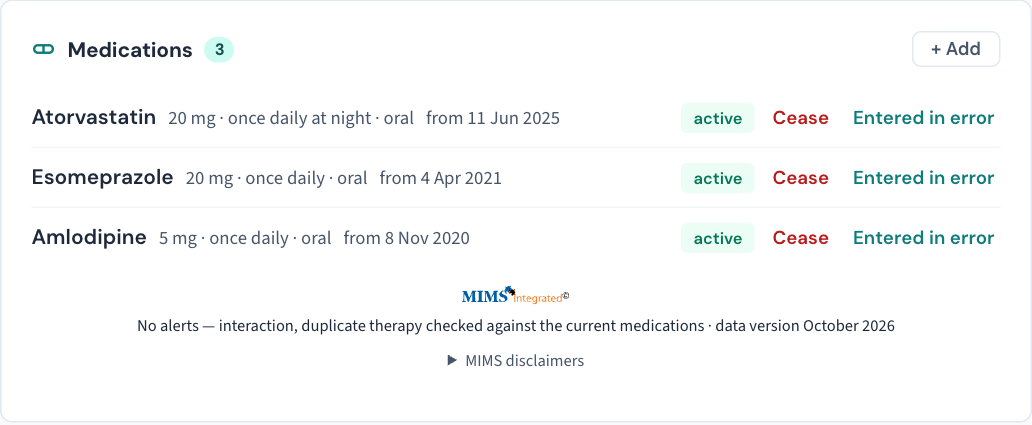
- Checks ran, nothing found. One line: the MIMS logo, No alerts — the checks that ran checked against the current medications, and the data version, with MIMS disclaimers folded beside it.
- Nothing could run. For example one coded medicine, no allergy by substance and no coded condition. Nothing is drawn.
- MIMS not set up at the practice. Nothing is drawn.
When the screening did not complete
The panel reads: "Drug-safety screening did not complete — these drugs were not checked. Review manually, or ask MIMS again." with Try again.
MIMS did not answer in time, or could not be reached: the practice's internet is down, or MIMS are slow or unavailable. Nothing was checked.
- Check the medicines yourself, as you would without screening.
- Choose Try again to ask MIMS once more. It stays busy until the answer arrives.
Prescribing carries on. An outage at MIMS never stops a script.
The MIMS licence, accepted by each person
MIMS require each person to accept their End User Licence Agreement before their content is used, and again whenever MIMS revise it. Until you do, the panel reads "Drug-safety screening is held until you accept MIMS’s licence — these drugs were not checked."
- Choose Read and accept the MIMS licence. The MIMS End User Licence Agreement window opens, with the text as MIMS publish it today.
- Read it.
- Tick I have read the licence above.
- Choose I accept. Not now closes the window and leaves the screening held.
The same screening is asked again at once. Your acceptance is kept with the revision you read, and the Audit log shows MIMS licence accepted. When MIMS publish a new revision, you are asked again.
Some installations also ask each person to accept MIMS's subscription terms, before the licence. The panel then reads "Drug-safety screening is held until you accept MIMS’s subscription terms" with Read and accept the MIMS terms, which opens MIMS Customer Subscription Terms and Conditions and works the same way. Whether they are asked is set for the installation (KB-173 — Set up MIMS drug-safety screening in Settings: the three credentials, the switch, the test and each doctor's MIMS user).
When MIMS do not license you, or have ended your subscription
If you have no MIMS user, the prescriber's panel reads: "Drug-safety screening needs a MIMS subscription for your account, and this account has none — these drugs were not checked. Ask your practice administrator." The record's panel shows nothing. MIMS users are made for doctors: every clinician, and an administrator with a provider or prescriber number recorded, as for seats (KB-114 — Your Curaeon licence: seats, renewal, and requesting more from Settings → Practice). An account with no email address cannot be given one.
If MIMS have ended your subscription, you may not write a script while the practice's MIMS screening is on. You are told before you start:
- In a consult, Prescribe is switched off and the line under Do now reads: "MIMS have ended the subscription for this account — prescribing needs a licensed MIMS user while the practice’s MIMS feed is on. Ask your practice administrator."
- On the patient's record, the same sentence is in the drug-safety panel under the Medications list, in the same card.
- A script started anyway is refused with the same reason.
This rule acts only on what MIMS have said. A doctor who has no MIMS user yet, or a MIMS outage, never stops prescribing. MIMS apply their changes overnight, and Curaeon reads their list of users each night after 00:30 Sydney time, and again when the server starts. Your administrator can see each doctor's MIMS status in Settings (KB-173 — Set up MIMS drug-safety screening in Settings: the three credentials, the switch, the test and each doctor's MIMS user).
What each message means
| Message | What it means | What to do |
|---|---|---|
| Interaction & allergy screening is available with a MIMS licence — not currently configured. Review interactions manually. | MIMS screening is not switched on at your practice | Check interactions yourself (KB-045 — "Not checked": what the drug-safety line says when screening is not set up, is held, or did not complete) |
| Drug-safety screening did not complete — these drugs were not checked. | MIMS did not answer | Check them yourself. Try again |
| Drug-safety screening is held until you accept MIMS’s licence | You have not accepted the current licence | Read and accept the MIMS licence |
| Drug-safety screening is held until you accept MIMS’s subscription terms | Your installation asks for the terms, and you have not accepted them since your account was made or reactivated, or since MIMS revised them | Read and accept the MIMS terms |
| Drug-safety screening needs a MIMS subscription for your account, and this account has none | No MIMS user is yours | Ask your practice administrator |
| MIMS have ended the subscription for this account … | MIMS have ended your MIMS user | Ask your practice administrator. Another prescriber can write the script |
| Earlier acknowledgements could not be read: and a reason | The alerts are shown, but who acknowledged them is not known yet | Try again beside it (KB-170 — When part of a screen says it could not be loaded: Try again, and what Loading… means) |
| Could not be recorded — try again. | Your acknowledgement was not saved | Tick Acknowledge again |
| The licence text could not be fetched from MIMS. Try again shortly. | The licence window could not get the text | Close it and try again shortly |
| The acceptance could not be recorded. If MIMS have revised the licence, close this and read the current one. | Your acceptance did not save, often because MIMS published a new revision while you were reading | Close the window and open it again |
If that didn't work
- A medicine you expected to be checked is under Not screened. Read its reason. A medicine typed into the record has no code; a script written from the PBS list does.
- The record never shows a panel. That is expected when there is nothing to say, when MIMS screening is not set up, or when your account cannot prescribe (nurses and reception do not see the panel).
- The screening keeps failing to complete. Check the practice's internet connection. If it keeps happening, raise a ticket with the time and the computer, and leave the patient's name out (KB-007 — Why we never need patient details in a support ticket).
Still stuck? Raise a ticket at support.curaeon.com.au or call 1300 XXX XXX. If your clinic can't see patients right now, call and choose option 1. Support is staffed Monday to Friday, 8:00–18:00 Sydney time; outside those hours a call or text to the same number is answered on a best-effort basis.
Related articles
- KB-173 — Set up MIMS drug-safety screening in Settings: the three credentials, the switch, the test and each doctor's MIMS user — Set up MIMS drug-safety screening in Settings: the three credentials, the switch, the test and each doctor's MIMS user
- KB-174 — Open MIMS's product information and the CMI leaflet from the prescriber and the patient's record — Open MIMS's product information and the CMI leaflet from the prescriber and the patient's record
- KB-045 — "Not checked": what the drug-safety line says when screening is not set up, is held, or did not complete — "Not checked": what the drug-safety line says when screening is not set up, is held, or did not complete
- KB-144 — Write a prescription: repeats, authority, Schedule 8, brands, reprint and cancel — Write a prescription: repeats, authority, Schedule 8, brands, reprint and cancel
- KB-145 — Record allergies, history and observations — Record allergies, history and observations
- KB-126 — Code a backlog of free-text diagnoses in Settings → Diagnosis coding — Code a backlog of free-text diagnoses in Settings → Diagnosis coding
- KB-101 — Find who did what in the Audit log: kinds, Sign-ins, Exactly, Who and a bookmarkable view — Find who did what in the Audit log: kinds, Sign-ins, Exactly, Who and a bookmarkable view