Pathology results not filing — what to check
"Missing" results are usually unmatched, not missing — they've arrived but haven't attached to the right patient or doctor. Three checks find nearly all of them.
1. Check the Lab feed's "Needs a patient" lane
Investigations → Lab feed → Needs a patient. (Investigations is in the menu bar; Lab feed and Requests are its two tabs.) A result lands here instead of filing when the lab's copy of the patient's details doesn't line up with yours — a maiden name, a middle name the lab has as a first name, a transposed date of birth. Matching is deliberately cautious: filing to the wrong patient is worse than waiting. The pane on the right shows exactly what the lab said the patient was; Assign to a patient files it, and it's worth tidying whichever record was wrong so the next result files itself. The neighbouring lanes catch the other cases: Disagrees (a match, but the details conflict), Demographics (the lab knew more than you do) and Unreadable (a message the server could not parse).
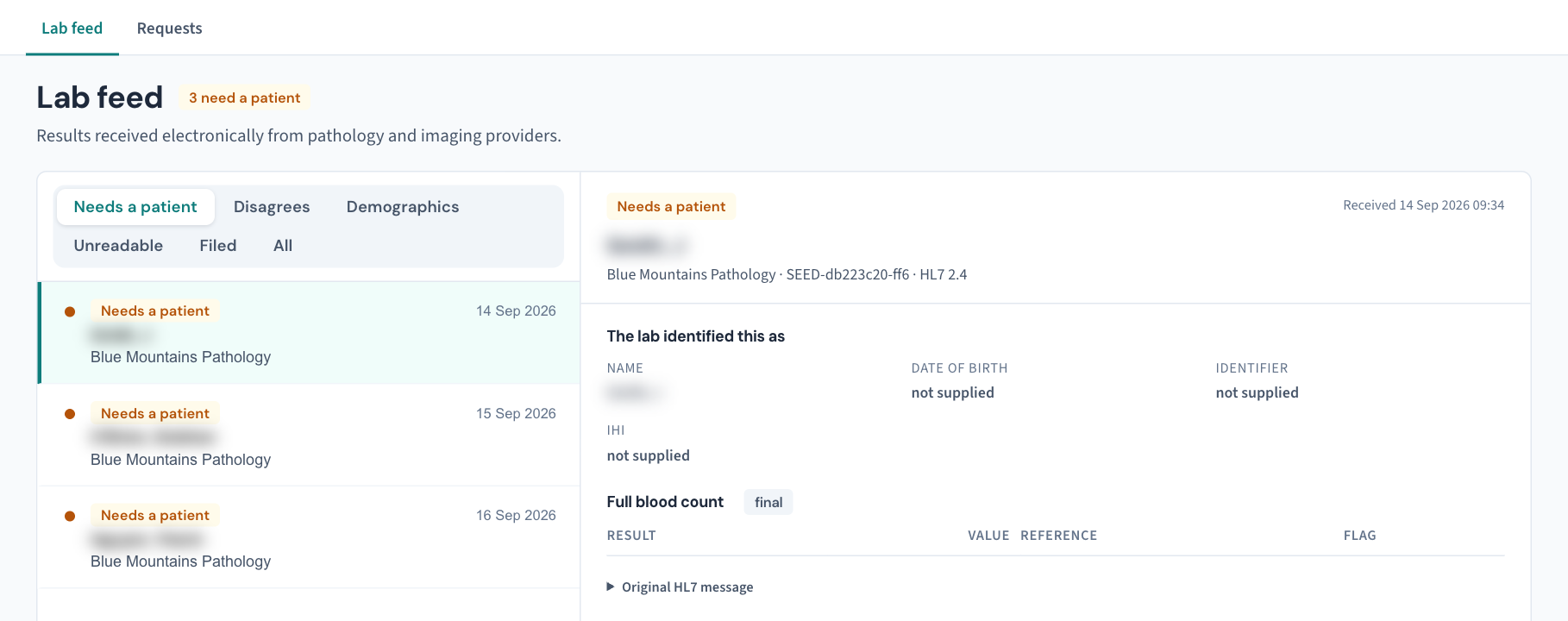
If that lane is a surprise to you, make it part of the daily results routine — it's the single most common home of a "missing" result.
Two holds in this lane look like faults and are not:
- A patient who has left. The reason reads "The only record this message matches … is inactive: the patient has left the practice." A result for a departed patient is never filed automatically, so that somebody sees it. If it is theirs, choose Assign to a patient… and pick them — the search includes patients who have left, labelled Left the practice.
- A merged record. A result that quotes the old details of a record merged into another files on the record it was merged into, by itself. If you assign a held message by hand to the merged-away record, it is refused and names the record to choose instead.
2. Check the addressing
Results file to the requesting doctor named on the request form. The usual suspects:
- A registrar or locum whose provider number isn't yet recorded here — their results may be arriving under a supervisor's name or going unmatched.
- Requests made on another practice's stationery (or an old provider number) — the lab sends the result to where the form says, not to where the doctor is today.
Check that everyone currently consulting, including part-timers and locums, has their provider number recorded under Settings → Users. Once a result is filed, the Inbox has two different filters — Practitioner (patients whose usual GP you are) and Assigned to (items routed to you) — and a result that "isn't in my inbox" is often sitting under the other one (KB-046 — Work the results Inbox: Practitioner vs Assigned to, routing, COPY and corrected results, Follow-up).
A message held because it was not addressed to this practice
Curaeon compares who an incoming message is addressed to (the receiving practice's HPI-O, and the recipient's HPI-I) with your practice's own HPI-O and your practitioners' HPI-Is. If they do not match, the message is held in Lab feed → Needs a patient, filed to nobody. Under Healthcare provider identifiers in the message, the Addressed to line carries the badge Not this practice, and the reason starts "Held:". The Audit log records Incoming message: not addressed to this practice.
This only happens once the practice has recorded its HPI-O, or a practitioner has an HPI-I. Until then the line reads Not judged and the message files as usual.
If it was sent to you by mistake, tell the sender. If it is yours, correct the HPI-O in Settings → Practice or the practitioner's HPI-I on their user record. Then a clinician or administrator chooses Assign to a patient….
At a practice connected to the HI Service, the same hold applies to a sender whose identifier the HI Service did not validate. The badge then reads Not validated. No practice is connected to the HI Service yet (KB-129 — Read Settings → HI Service: the connection, the NASH certificate, and what the HI Service returned and disclosed).
Once connected, one case to expect is a sender whose organisation is not in the HI Service's Provider Directory, which lists only organisations that chose to be listed. Each such message is held, however genuine its sender. The reason then begins "The HI Service's Provider Directory has no entry for the sender's organisation under HPI-O …" and ends "Being listed is for the sender to arrange, through its own HI Service account; it is not something this practice does." There is nothing to change at your end: check the message is genuine, tell the sender if it matters, and assign it by hand.
3. Check the feed itself
If nobody in the practice has received anything from a particular lab today:
- There is no public status page for your results feed. Results arrive on your own practice server, so its health is checked on site, not on a website: KB-082 — What to have ready before you contact support lists what to look at first. Curaeon's own status page at status.curaeon.com.au covers Curaeon's hosted services and national services such as Medicare and eRx — not your server or your lab feed.
- The All lane of the Lab feed lists every electronic message received, so you can see when the last one from that lab came in — a lab that was flowing this morning and stopped is a different question from one that has never appeared.
- One lab silent but others flowing usually means the issue is at the lab's end — raise a ticket and we'll confirm and chase it with them (you get one ticket; we handle the lab).
The urgent-result rule
For a clinically urgent result you're waiting on right now: phone the laboratory directly — every lab runs a results phone line for exactly this, and no filing question should ever sit between a doctor and an urgent result. Sort the technical side afterwards.
Raise it: support.curaeon.com.au → Raise a ticket, starting the one line with "Pathology". Include the lab name, the approximate collection date, and the requesting doctor — not the patient's name; a specimen or request number from the lab is plenty if you have it.
Related articles
- KB-046 — Work the results Inbox: Practitioner vs Assigned to, routing, COPY and corrected results, Follow-up — Work the results Inbox: Practitioner vs Assigned to, routing, COPY and corrected results, Follow-up
- KB-082 — What to have ready before you contact support — What to have ready before you contact support
- KB-090 — Results and incoming letters FAQ — Results and incoming letters FAQ
- KB-129 — Read Settings → HI Service: the connection, the NASH certificate, and what the HI Service returned and disclosed — Read Settings → HI Service: the connection, the NASH certificate, and what the HI Service returned and disclosed