Results and incoming letters FAQ
The questions doctors and the desk ask most about results and electronic letters, answered in place — what each screen is for, what the flags mean, and which situations are a call to support.
A result is in the Lab feed but not on the patient. Why?
It could not be matched confidently. Results are matched to the patient by their identifiers, name and date of birth, and the matching is deliberately cautious — filing to the wrong patient is worse than waiting. Open Investigations in the menu bar, then Lab feed, and assign the unmatched message by hand. KB-019 — Pathology results not filing — what to check has the checks to run when a result seems to be missing.
The Lab feed says the only record a message matches "is inactive"
The patient has left the practice. A result or letter for a patient who has left is never filed automatically: it waits on the Lab feed under Needs a patient so somebody sees it arrive. If it is theirs — a test collected in their last week often reports days later — choose Assign to a patient… and pick them; the search includes patients who have left, labelled Left the practice. A demographics update for them changes nothing on the record and says so.
A result quoted a record that was merged into another
It files on the record it was merged into. If you assign a held message by hand and choose the record that was merged away, it is refused: "That record was merged into another and is no longer in use. Choose the record it was merged into — the same patient's current one." The search labels both a merged-away record and a patient who has left Left the practice, so check which one you are choosing.
What is the difference between Practitioner and Assigned to?
They answer different questions. Practitioner shows items for patients whose usual GP you are. Assigned to shows items routed to you — the letter addressed to you, whoever the patient usually sees. A locum's referral coming back to the locum is exactly where the two differ (KB-046 — Work the results Inbox: Practitioner vs Assigned to, routing, COPY and corrected results, Follow-up).
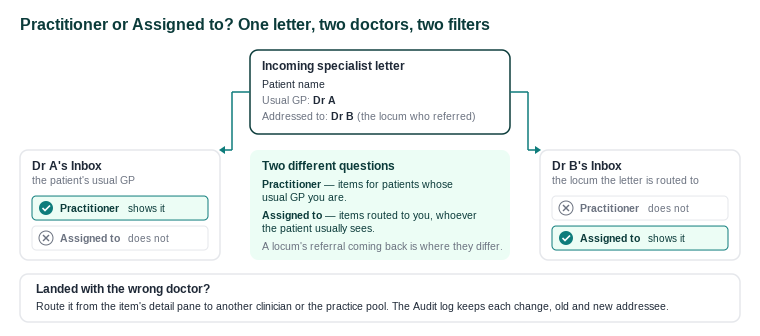
A letter has landed with the wrong doctor. How do I move it?
Open the item's detail pane and route it to another clinician, or back to the practice pool. Any item can be routed until it is actioned, and every routing change is in the Audit log with the previous and the new addressee. A scanned page filed to the wrong doctor is fixed the same way — from the Inbox, not by refiling.
What does COPY on a result mean?
It was addressed to somebody else and copied to this practice. It is for information; the addressee is responsible for actioning it.
A result says it was withdrawn or corrected. Which one do I read?
The corrected one. A correction supersedes the result it corrects, and it comes back to whoever reviewed the original. The withdrawn result is kept and marked because it is what was on file at the time — its still being there is not a fault.
Where do incoming electronic letters go?
Referrals, discharge summaries and specialist letters arriving electronically are filed to the patient record as incoming correspondence and appear in the Inbox for review. Opening the inbox item opens the letter. A discharge summary sent as a document is filed under the name of what it is, such as "Discharge summary". Paper reaches the same Inbox through the scanning tray (KB-092 — Documents and scanning FAQ).
A referral arrived already assigned to one of our doctors.
The referral named the doctor it is for, and that doctor's Medicare provider number is recorded under Settings → Users, so it was routed to them. When the doctor it names cannot be matched here, it goes to the practice pool and the inbox item says "Addressed to … — not matched to a practitioner here." Route it from the item like any other (KB-046 — Work the results Inbox: Practitioner vs Assigned to, routing, COPY and corrected results, Follow-up).
What is "Sent with this report" or "Sender's note"?
A note the laboratory or referrer wrote beside a report or letter — "on warfarin", "fasting", the clinical question. It is not part of the report and is not on its PDF. On a report it is shown at the top, above Open the PDF and the values; on a letter it is on the letter's row among the patient's documents ("Sent with it:") and in the inbox item ("Sender's note:").
A result has an "Open the PDF" button.
The sender included their own PDF of the report, and it is kept with the report. Open the PDF opens it in a new tab. A report that was sent only as a PDF — imaging often is — has no values table and says so beside the button. If the PDF will not open, a message says why under the button, with Try again.
An incoming letter has nothing to open.
The message could not be stored, but it is kept. Ask your administrator to check that object storage is running.
A letter or result is on the Lab feed as "Unreadable", and the sender says they sent it again.
When a sender sends a refused message again, Curaeon tries it again. If it can be used now — object storage has been set up since, say — it is filed. If not, it stays where it is, and the reason shown is the one from the latest attempt. Some messages are never filed and stay there with their reason: a letter that arrived only as HTML, and a message that changes or cancels a document already sent rather than delivering a new one.
Important: If results stop arriving entirely, or a result appears on the wrong patient's record, call support rather than working around it.
What is Follow-up for?
It is the safety net: results and correspondence nobody has actioned. A result that arrives, is filed and is never looked at is the commonest serious failure in general practice, and the screen exists to make it visible. Reviewing an item records who read it and when, and a recall can be raised from the review (KB-051 — Run recalls: book from a recall, and why a recall stays open or comes back).
How do I see whether a value is trending — is the HbA1c coming down?
Open the patient's Results tab. The cumulative view shows one row per analyte and one column per collection, so the question is a row read left to right rather than five reports opened one at a time. Superseded reports do not appear — the amended result is the result (KB-077 — Read a patient's results over time — the cumulative view). Only measured values are rows: the laboratory's written-out report, and a line saying a file was sent, are shown on the report itself and never as an analyte in the grid.
A Lab feed row is marked "Sender not told".
This applies only where the practice is set up to answer Medical-Objects in two steps. The sender was told at once that the message arrived, and is told what became of it in a second message. Sender not told means that second message could not be sent: the sender knows the message arrived and nothing more. The line under the message says why. If it matters, tell the sender directly, and ask your administrator to check the connection to Medical-Objects.
The Inbox, the Lab feed or Requests shows a red message where the list should be.
The list could not be loaded. That is not the same as "The inbox is clear." or "Nothing waiting — every result matched a patient.", and those sentences are shown only when the list was read and is empty. Choose Try again beside the message. While a list is on its way it says "Loading…" (KB-170 — When part of a screen says it could not be loaded: Try again, and what Loading… means).
I searched for the patient to assign a result to, and nothing came up.
Read the line under the search box. "Searching…" means the answer is not back yet. "The search could not be run (…). That is not the same as no such patient." means the search failed: choose Try again. Only "No patient matched that search. Patients who have left the practice are included." means the search ran and found nobody.
The Inbox says it has left some rows out. Why?
The patient's record is restricted and you are not named on it. The Inbox, Follow-up, the Lab feed and Requests leave a restricted record's rows out for anyone it is not open to, and say how many, so a list never looks finished when it is not (KB-061 — Restrict a patient's record, and open one in an emergency).
Still stuck? Raise a ticket at support.curaeon.com.au or call 1300 XXX XXX. If your clinic can't see patients right now, call and choose option 1. Support is staffed Monday to Friday, 8:00–18:00 Sydney time; outside those hours a call or text to the same number is answered on a best-effort basis.
Related articles
- KB-170 — When part of a screen says it could not be loaded: Try again, and what Loading… means — When part of a screen says it could not be loaded: Try again, and what Loading… means
- KB-046 — Work the results Inbox: Practitioner vs Assigned to, routing, COPY and corrected results, Follow-up — Work the results Inbox: Practitioner vs Assigned to, routing, COPY and corrected results, Follow-up
- KB-019 — Pathology results not filing — what to check — Pathology results not filing — what to check
- KB-077 — Read a patient's results over time — the cumulative view — Read a patient's results over time — the cumulative view
- KB-107 — Order a test, add copy-to recipients, and chase a result that never came back on the Requests screen — Order a test, add copy-to recipients, and chase a result that never came back on the Requests screen