Record an immunisation and work the AIR backlog
Record a vaccination with what the Register needs, from the consult or the patient's record, then clear the AIR backlog, which today means submitting through the AIR portal yourself and telling Curaeon you did.
Before you start
You need the immunise permission. Clinicians, administrators and nurses hold it by default, so a practice nurse can do all of this (KB-034 — Choose the right role and permissions for a new staff member, KB-121 — Change what each role may do in Settings → Permissions). A nurse's dashboard under Reports shows their clinics, immunisations and the AIR backlog.
Important: Curaeon does not currently send immunisations to the Australian Immunisation Register. The AIR backlog says so: "Automatic submission is waiting on PRODA setup." Until it is connected, you report through PRODA and record in Curaeon what you submitted. Nothing leaves Curaeon for AIR unless a person does it (KB-058 — What Curaeon connects to Services Australia today (AIR, IHI, PBS authorities, Medicare, MyMedicare), and the manual workaround for each).
Record an immunisation
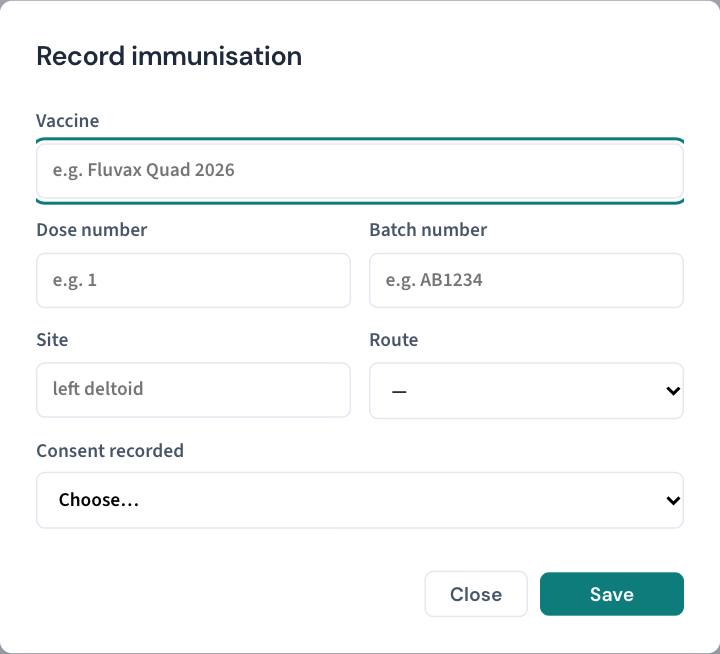
Open the Record immunisation window from either place:
| From | Do this |
|---|---|
| A consult | Choose Record immunisation under Do now. The dose is recorded against this consult. It is offered after the note is signed too: a dose that was given is always written down (KB-143 — Write and sign off a consult note) |
| The patient's record | Open the Clinical History tab and choose + Add on the Immunisations panel |
Then:
- Enter the Vaccine given.
- Enter the Dose number and the Batch number. AIR needs both, and the person holding the vial knows them.
- Enter the Site and choose the Route: IM, SC, Oral or Intranasal.
- Under Consent recorded, choose Yes or No. It starts at Choose… and Save waits until you answer: consent is never assumed.
- Choose Save. The message reads "Recorded" and the vaccine.
The dose appears on the Immunisations panel and, until it is reported, on the practice's AIR backlog. Recording an immunisation from a consult does not change the consult's note.
Read the Immunisations panel
Each dose shows the vaccine, the dose number, the site and the date given. A chip marks what needs attention:
| Chip | What it means |
|---|---|
| AIR incomplete | Something AIR needs is missing. Point at the chip to see what |
| AIR rejected | AIR refused the record. Resubmit through PRODA |
| AIR sent or AIR accepted | Recorded as submitted, or accepted |
| AEFI | An adverse event following immunisation is recorded against the dose |
AIR record, at the top of the panel, opens every dose for this patient with its reporting state.
Work the AIR backlog
- Open More in the menu bar, then AIR backlog. It lists every immunisation not yet reported, oldest first, with how many working days since it was given. A row past ten working days is marked Overdue.
- Submit each one through the AIR portal, exactly as your practice did before Curaeon.
- Back in Curaeon, choose Mark submitted on its row. It leaves the backlog.
You can also choose Mark reported on the dose itself, on the patient's Immunisations panel. The message reads "Recorded as reported to AIR".

The Status column says Ready to report, Rejected — resubmit, or Check and what looks missing, such as the dose number or the Medicare number or IHI. That check is Curaeon's own, not an AIR rule, so it never stops you marking a row submitted.
Tip: Work the backlog in one sitting rather than one patient at a time — the portal sign-in is the slow part, and the backlog is built to be cleared as a batch.
A backlog that says "N left out"
If any patient's record is restricted to named staff and you are not one of them, the AIR backlog leaves their rows out and says how many it left out, so the list never looks finished when it is not. Someone named on the restriction submits those (KB-061 — Restrict a patient's record, and open one in an emergency).
If something looks wrong
- An immunisation is missing from the backlog. Check the patient's Immunisations panel. If it reads AIR sent, someone has already recorded it as submitted; the Audit log shows who, as AIR submission status changed (KB-101 — Find who did what in the Audit log: kinds, Sign-ins, Exactly, Who and a bookmarkable view).
- A dose reads AIR incomplete. Point at the chip for what is missing. The window does not ask for the AIR vaccine code, so a dose can be incomplete for that alone.
- Save does nothing but show a message. Read it: Enter the vaccine given., Dose number: enter a whole number, e.g. 1 or 2., or Say whether consent was recorded.
What the screens do not do yet
- There is no screen for vaccine stock or the cold chain.
- A dose recorded in error has no Entered in error on the Immunisations panel. Raise a ticket under Clinical software, without the patient's name (KB-007 — Why we never need patient details in a support ticket).
Still stuck? Raise a ticket at support.curaeon.com.au or call 1300 XXX XXX. If your clinic can't see patients right now, call and choose option 1. Support is staffed Monday to Friday, 8:00–18:00 Sydney time; outside those hours a call or text to the same number is answered on a best-effort basis.
Related articles
- KB-058 — What Curaeon connects to Services Australia today (AIR, IHI, PBS authorities, Medicare, MyMedicare), and the manual workaround for each — What Curaeon connects to Services Australia today (AIR, IHI, PBS authorities, Medicare, MyMedicare), and the manual workaround for each
- KB-034 — Choose the right role and permissions for a new staff member — Choose the right role and permissions for a new staff member
- KB-061 — Restrict a patient's record, and open one in an emergency — Restrict a patient's record, and open one in an emergency
- KB-143 — Write and sign off a consult note — Write and sign off a consult note