Find a departed patient, reactivate them, or record a death or departure
Find a patient who has left the practice or died, bring one back who returns, and record a death or departure so that recalls, reminders and letters stop — reliably, and with a record of who did it.
Before you start
Anyone who works the Patients screen can search and reactivate. Recording a death or departure is done from the patient's own record; if the option isn't offered to you, ask your administrator to check your role under Settings → Permissions.
Find a patient who has left
- Open Patients. The filter chips above the list — All, Booked today, Recall due, Allergy alert, Concession, Left the practice — decide who is shown.
- Choose Left the practice. Patients who have left are hidden from every other view so they don't clutter the desk (the manual calls this "include departed"); this chip is the door back in. Search by name, date of birth, Medicare number or MRN as usual within it.
Reactivate a returning patient
- Find them under Left the practice and open the record. The chart says Left the practice at the top.
- Choose Reactivate patient there. Curaeon confirms they are searchable and bookable again. Booking offers the same door: if you try to book a departed patient an appointment, Curaeon offers to reactivate them there and then.
Record a death or a departure
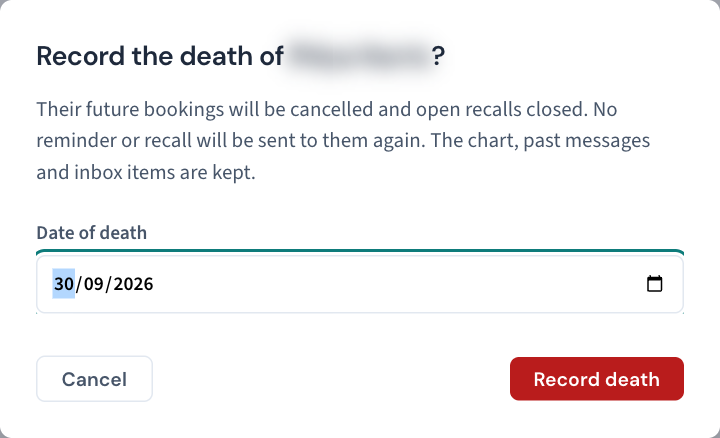
- Open the patient's record and record the death (with the date of death, if you have it) or the departure.
- Read what happens next, because most of it is automatic:
- Recalls, reminders and letters to that patient stop. This cannot be overridden by anyone — it is checked before consent and before any other override. If a colleague later sees "This patient is recorded as deceased" when trying to email a document, that is correct and deliberate; there is nothing to fix.
- Future appointments are cancelled, each with the reason, and each appointment's own history says so.
- The Audit log records who did it, the date of death if one was given, and how many bookings and recalls were closed.
- Check the calendar for appointments whose time has already passed. These are deliberately left as they were, even if nobody closed them: open each from the calendar and close it with Mark attended if the patient came, No show if they did not, or Cancel (KB-076 — Appointment statuses from pending to completed, and what "At reception" means).
Good to know
- The record is kept, not deleted. Curaeon never deletes clinical records; what changes is who the practice contacts.
- If a family member later asks who has looked at the record, the Audit log's Patient search still finds former and deceased patients (marked as such), and Print access report still works — see KB-063 — Answer "who has seen my record?": print a patient access report.
- The manual does not say whether a patient recorded as deceased appears under Left the practice or only in the Audit log's patient search; if you need to open a deceased patient's record from the Patients screen and cannot find it, check with support.
- Open recalls for the patient are closed, not left on the worklist (KB-051 — Run recalls: book from a recall, and why a recall stays open or comes back).
If that didn't work
If Patients shows a red message with Try again where the list should be, the search did not run. That is not the same as "No patients match", so do not register the person again. Choose Try again (KB-170 — When part of a screen says it could not be loaded: Try again, and what Loading… means).
If a death was recorded on the wrong patient, or in error, stop and raise a ticket rather than working around it: the manual does not describe a self-service reversal, and data on the wrong record is one of the situations where it says to call support. Give the approximate time it was recorded — not the patient's name (KB-007 — Why we never need patient details in a support ticket).
Still stuck? Raise a ticket at support.curaeon.com.au or call 1300 XXX XXX. If your clinic can't see patients right now, call and choose option 1. Support is staffed Monday to Friday, 8:00–18:00 Sydney time; outside those hours a call or text to the same number is answered on a best-effort basis.
Related articles
- KB-051 — Run recalls: book from a recall, and why a recall stays open or comes back — Run recalls: book from a recall, and why a recall stays open or comes back
- KB-063 — Answer "who has seen my record?": print a patient access report — Answer "who has seen my record?": print a patient access report
- KB-007 — Why we never need patient details in a support ticket — Why we never need patient details in a support ticket